
STARLINK Mini Kit Dish With Router User Guide

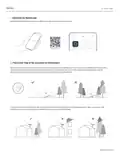


PIPE ADAPTER INSTALL
1 | Remove Kickstand
Squeeze the release tab and pull it away from its fixed location.
2 | Route Cable Through Pipe Adapter and Plug In Cable
Route the Starlink cable through the opening in the pipe adapter and out the front end.
Plug the cable into your Starlink and ensure the plug is fully inserted such that the plug face is flush with the surface.
support.starlink.com

| General | Details |
|---|---|
| Name | STARLINK Mini Kit Dish With Router User Guide |
| Make | Starlink |
| Language | English |
| Filetype | PDF (Download) |
| File size | 0.36 MB |
 (1 votes, average: 5.00 out of 5)
 Loading...
If you have any questions regarding STARLINK Mini Kit Dish With Router User Guide, please ask here and describe the problem in detail.

STARLINK Mini Kit Dish With Built In Router User Guide

STARLINK GEN 3 WIFI ROUTER Enhancing Homes Router Installation Guide

UTR-231 Starlink Router User Manual

UTR-232 WiFi 6 Starlink Router Instruction Manual

STARLINK 02633101 Gen 3 Wi-Fi Router User Guide

STARLINK LJ439RBIV3M5 Mini Router Installation Guide

STARLINK Router Installation Guide

STARLINK Standard Gen 3 Router User Guide


TP-Link Archer AX23 Wi-Fi 6 Router Installation Guide

TP-Link MR505 Wireless 4G LTE Router Installation Guide

TUBBUTEC TRS Bridge 4×4 TRS Midi Router User Guide

TP-Link Archer BE900 Wi-Fi 7 Router User Manual

Amped Wireless R10000 High Power Wireless N 600mW Router User Guide

alhua DH-AX18 Wireless Router User Manual

ALTIUS Machine 4G Wireless Router User Manual

ASUS ExpertWiFi EBM68 AX7800 Tri Band WiFi Router User Guide

Vigor 2136 Series Gigabit Broadband Router User Guide
UTR-232 WiFi 6 Starlink Router Instruction Manual