
TRUPER ROU-A3 Professional Router User Manual




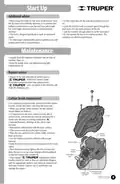







Assembly
Dust
extractor
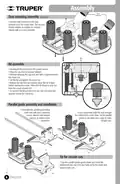
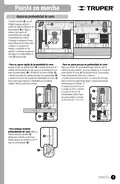
Dust extracting assembly (optional)
ꢀ Use the long screws to fit the dust
extractor onto the router base. The vacuum
cleaner adaptor is suitable for vacuum
cleaner with a 32 mm diameter.
Axis
lock
Bit assembly
ꢀ Disconnect the router from the power source.
ꢀ Press the axis lock to prevent rotation.
ꢀ Without releasing the axis lock and with a spanner loosen
the chuck nut.
ꢀ Set the bit and tighten the chuck nut.
ꢀ Release the axis lock and double check the bit is fixed
before starting the router. Allow the bit shank to stick out
from the chuck, at least 1/8”.
ꢀ To remove the bit just press the axis lock and using the
spanner loosen the chuck nut.
1/8”
Parallel guide assembly and installation
ꢀ Assemble the parallel guide fixing
both rods with their respective
screws, washers and washer
springs, as shown in the
illustration.
ꢀ Once assembled slide the rods through
the orifice in the router base. Set he parallel
guide on the work piece edge to make
straight cuts.
Tip for circular cuts
ꢀ Turn the parallel guide upside-down and insert the
attachment into one of its two holes to fix the router and
make circular cuts.
6
ENGLISH

| General | Details |
|---|---|
| Name | TRUPER ROU-A3 Professional Router User Manual |
| Make | TRUPER |
| Language | English |
| Filetype | PDF (Download) |
| File size | 1.12 MB |
 (1 votes, average: 5.00 out of 5)
 Loading...


TP-Link AC750 Wireless Dual Band Router Owner’s Manual

TechPowerUp Openwrt ONE Wi-Fi 6 Router User Manual

TP-Link VR600 Wireless DSL Modem Router Installation Guide

TP-Link MR505 Wireless 4G LTE Router Installation Guide

HONOR Router 3 WiFi Router Installation Guide

advantech ICR-3831 RAILWAY 4G LTE ROUTER & GATEWAY User Guide

ASUS XD5 AX3000 Dual Band WiFi Router User Guide

ASUS RT-BE92U BE9700 Tri Band WIFI 7 Router User Guide

COWMANAGER WIB2000 Coordinator Router User Manual

GL iNet GL-B2200 Tri-Band Wireless Gigabit Router User Manual