
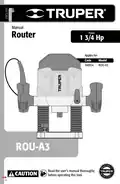
TRUPER ROU-A3 Professional Router User Manual











General power tool
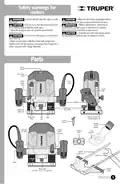
safety warnings
WARNING! Read carefully all safety warnings and instruction listed below. Failure to comply with any of
these warnings may result in electric shock, fire and / or severe damage. Save all warnings and instructions for
future references.
Work area
Keep your work area clean, and well lit.
Cluttered and dark areas may cause accidents.
Remove any wrench or vice before turning the power tool on.
Wrenches or vices left attached to rotating parts of the tool may result in personal
injury.
Never use the tool in explosive atmospheres, such as in the
presence of flammable liquids, gases or dust.
Sparks generated by power tools may ignite the flammable material.
Do not overreach. Keep proper footing and balance at all times.
This enables a better control on the tool during unexpected situations.
Dress properly. Do not wear loose clothing or jewelry. Keep
hair, clothes and gloves away from the moving parts.
Loose clothes or long hair may get caught in moving parts.
Keep children and bystanders at a safe distance while operating
the tool.
Distractions may cause losing control.
If you have dust extraction and recollection devices connected
onto the tool, inspect their connections and use them correctly.
Using these devices reduce dust-related risks.
Electrical Safety
The tool plug must match the power outlet. Never modify
the plug in any way. Do not use any adapter plugs with
grounded power tools.
Power Tools Use and Care
Modified plugs and different power outlets increase the risk of electric shock.
Do not force the tool. Use the adequate tool for your
application.
Avoid body contact with grounded surfaces, such as pipes,
radiators, electric ranges and refrigerators.
The risk of electric shock increases if your body is grounded.
The correct tool delivers a better and safer job at the rate for which it was designed.
Do not use the tool if the switch is not working properly.
Any power tool that cannot be turned ON or OFF is dangerous and should be
repaired before operating.
Do not expose the tool to rain or wet conditions.
Water entering into the tool increases the risk of electric shock.
Disconnect the tool from the power source and / or battery
before making any adjustments, changing accessories or
storing.
Do not force the cord. Never use the cord to carry, lift or unplug
the tool. Keep the cord away from heat, oil, sharp edges or
moving parts.
These measures reduce the risk of accidentally starting the tool.
Damaged or entangled cords increase the risk of electric shock.
Store tools out of the reach of children. Do not allow persons
that are not familiar with the tool or its instructions to
operate the tool.
When operating a tool outdoors, use an extension cord suitable
for outdoor use.
Using an adequate outdoor extension cord reduces the risk of electric shock.
Power tools are dangerous in the hands of untrained users.
If operating the tool in a damp location cannot be avoided, use
a ground fault circuit interrupter (GFCI) protected supply.
Using a GFCI reduces the risk of electric shock.
Service the tool. Check the mobile parts are not misaligned or
stuck. There should not be broken parts or other conditions that
may affect its operation. Repair any damage before using the
tool.
Personal safety
Most accidents are caused due to poor maintenance to the tools.
Stay alert, watch what you are doing and use common sense
when operating a tool. Do not use a power tool while you are
tired or under the influence of drugs, alcohol or medication.
A moment of distraction while operating the tool may result in personal injury.
Keep the cutting accessories sharp and clean.
Cutting accessories in good working conditions are less likely to bind and are
easier to control.
Use personal protective equipment. Always wear eye
protection.
Protective equipment such as safety glasses, anti-dust mask, non-skid shoes,
hard hats and hearing protection used in the right conditions significantly
reduce personal injury.
Use the tool, components and accessories in accordance with
these instructions and the projected way to use it for the type of
tool when in adequate working conditions.
Using the tool for applications different from those it was designed for, could
result in a hazardous situation.
Service
Repair the tool in a
Authorized Service Center
Prevent unintentional starting up. Ensure the switch is in the
“OFF” position before connecting into the power source and /
or battery as well as when carrying the tool.
Transporting power tools with the finger on the switch or connecting power
tools with the switch in the “ON” position may cause accidents.
using only identical spare parts.
This will ensure that the safety of the power tool is maintained.
This tool is in compliance with
the Official Mexican Standard
(NOM - Norma Oficial Mexicana).
4 ENGLISH

| General | Details |
|---|---|
| Name | TRUPER ROU-A3 Professional Router User Manual |
| Make | TRUPER |
| Language | English |
| Filetype | PDF (Download) |
| File size | 1.12 MB |
 (1 votes, average: 5.00 out of 5)
 Loading...
If you have any questions regarding TRUPER ROU-A3 Professional Router User Manual, please ask here and describe the problem in detail.


cradlepoint E100 Enterprise Router Endpoints User Guide

NETGEAR BE12000 Tri-Band WiFi 7 Router Owner’s Manual

LEAX ARKIVATOR TELECOM LCE4121S Mesh Router User Manual

SIERRA WIRELESS XR80 5G Cellular Router Instructions

TP-Link Qmada Gigabit VPN Router Installation Guide

ASUS RT-AX58U AX3000 Dual Band Wi-Fi Router User Guide

MikroTIK CCR2004-1G-12S+2XS Cloud Core Router User Manual

Juniper ACX7509 Cloud Metro Router User Guide

DrayTek Vigor3912 Series Security VPN Router User Guide

motorola MQ20 Wi-Fi 6E Tri Band Mesh Router User Guide