
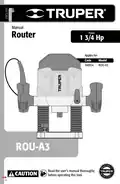
TRUPER ROU-A3 Professional Router User Manual












Start Up
Additional advice
ꢀ When using the router on free hand mode keep in mind
the bit rotates in a clockwise direction, so to prevent from
kickback is important to move the tool from left to right.
For outer edges move the tool in a counterclockwise
direction.
ꢀ Set the router base on the work piece before turning it
on.
ꢀ Guide the machine with a constant speed through the
work piece. No not apply pressure on the bit.
ꢀ Give the machine enough speed to cut the work piece.
ꢀ Do not operate the tool in an inverted position. This
condition can affect its performance
ꢀ This tool is designed specifically to work on wood and
plastic.
ꢀ To make larger cutting depths several superficial cuts with
gradual increments is recommended.
Maintenance
ꢀ Double check the machine ventilation slots are free of
sawdust, chips, etc.
ꢀ Keep the guides clean and lubricated using light
multi-purpose oil.
Repairs service
ꢀ Repairs to the tool shall only be carried out in a
Authorized Service Center.
If and when personnel other than authorized by
carry out repairs to the machine, will
make the Warranty void.
K
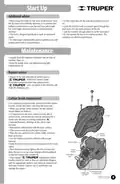
Carbon brush replacement
ꢀ It is necessary to replace worn, burned or broken carbon
brushes, or with less than 5 mm long with new ones.
ꢀ When you change carbon brushes, the two carbons
should always be replaced.
ꢀ To have access to the worn carbons and be able to
remove them, remove the top cover by removing the 4
screws with the help of a phillips screwdriver (K).
ꢀ Separate the inner cable lugs of the carbon rope
terminal.
Cover
ꢀ Remove the carbon holder with the worn carbons.
ꢀ Then remove and discard the worn carbons.
ꢀ Place the new carbons in the carbon holder and place
them in the tool.
Carbon
brushes
ꢀ Join the internal cord shoes with the carbon rope
terminal.
Carbon holder
ꢀ Verify that the carbons have made contact with the motor
switch.
ꢀ Place the top cover and tighten with the 4 screws and
allow the tool to run for a few minutes without workload
so that the carbons have a better fit.
Carbon
brushes
Inner cable
lugs
ꢀ Only original
replacement carbon
brushes should be used, as they are specifically designed
with the appropriate hardness and electrical resistance for
each type of motor. Carbons out of specification can
damage the engine.
Carbon brushes
Carbon rope
compartment
terminal
9
ENGLISH

| General | Details |
|---|---|
| Name | TRUPER ROU-A3 Professional Router User Manual |
| Make | TRUPER |
| Language | English |
| Filetype | PDF (Download) |
| File size | 1.12 MB |
 (1 votes, average: 5.00 out of 5)
 Loading...
If you have any questions regarding TRUPER ROU-A3 Professional Router User Manual, please ask here and describe the problem in detail.


NEXXT SOLUTIONS NBL301P NebulaN301 Wireless-N Router Installation Guide

peplink BR1 Mini 100 Mbps 4G LTE Router User Manual

Infinite Clouds 110 Wireless Router User Manual

TP-Link Archer BE9700 Tri-Band Wi-Fi 7 Router Owner’s Manual

dahua AX1500 Wi-Fi6 Wireless Router Instruction Manual

RV WI-FI 2024 V3 DishyDock Router User Manual

Tenda RX2LP Dual Band Gigabit Wi-Fi 6 Router Installation Guide

Tenda AC1200 WiFi 6 Router Installation Guide

TP-Link Archer BE800 BE19000 Tri Band WiFi 7 Router User Manual

LUXUL ABR-5000 Epic 5 Gigabit Router User Guide