
Westermo Merlin 4100 Series Cellular Router User Guide

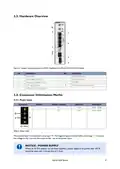
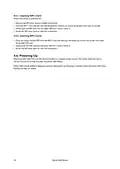

4.5.1. Inserting SIM 1 Card
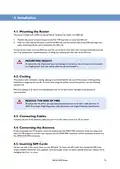
Ensure the router is powered off.
• Remove the SIM cover using a suitable screwdriver.
• Hold the SIM 1 card with the chip side facing down and the cut corner facing away from you, to the left.
• Gently push the SIM card into the upper SIM slot 1 until it clicks in.
• Screw the SIM cover back on with the screwdriver.
4.5.2. Inserting SIM 2 Card
• If you are using a second SIM, hold the SIM 2 card with the chip side facing up and the cut corner front right
facing away from you.
• Gently push the SIM card into the lower SIM slot 2 until it clicks in.
• Screw the SIM cover back on with the screwdriver.
4.6. Powering Up
Plug the power cable first into the device and then to a suitable power source. The router takes less than a
minute to boot up. During this time, the power LED flashes.
Other LEDs display different diagnostic patterns during boot up. Booting is complete when the power LED stops
flashing and stays on steady.
14
Merlin 4100 Series

5. Specifications
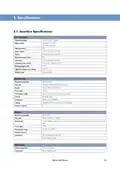
5.1. Interface Specifications
DC, Power port
Operating voltage
Rated current
9.6 to 60 VDC isolated
320 mA at 12 VDC
200 mA at 24 VDC
Rated frequency
DC
Inrush current
2.74 x 10⁻³ A2s at 12 VDC
Reverse polarity protected
No
Polarity
Redundant power input
Connector
Push-in spring connectors
0.2-2.5 mm² (AWG 24-12)
7 mm
Conductor cross section
Stripping length cable
Tightening torque, screw flange
Shielded cable
0.3 Nm
Not required
Ethernet TX
Electrical specification
Data rate
IEEE std 802.3
10 Mbit/s, 100 Mbit/s, manual or auto
Full or half, manual or auto
TNV-1
Duplex
Circuit type
Transmission range
Isolation
Up to 150 m with CAT5e cable or better
All other ports
Connection
Cabling
RJ-45, auto MDI/MDI-X
Shielded CAT5e or better is recommended
4
Number of ports
RS-232
Electrical specification
Data rate
EIA RS-232
RS-232: 50 bit/s - 1 Mbit/s
Data format
7 or 8 data bits, odd, even or none parity, 1 or 2 stop bits (2 stop bits only when no parity is
set)
Circuit type
TNV-1
Transmission range
Number of ports
Connection
RS-232: 15 m/49 ft
1
RJ-45 according to EIA-561
RJ-45 shielded cable
Digital input
Mode of operation
Connection
Dry contact only
RJ-45 shielded cable
Merlin 4100 Series
15

| General | Details |
|---|---|
| Name | Westermo Merlin 4100 Series Cellular Router User Guide |
| Make | westermo |
| Language | English |
| Filetype | PDF (Download) |
| File size | 0.78 MB |
 (1 votes, average: 5.00 out of 5)
 Loading...
If you have any questions regarding Westermo Merlin 4100 Series Cellular Router User Guide, please ask here and describe the problem in detail.

westermo Merlin 4700 Series VDSL Cellular Router User Guide

westermo MRD-405 4G LTE Router User Guide

westermo MRD-455-NA Cellular Router User Guide

westermo Merlin 4700 Series Cellular Router User Guide
westermo 4400 Cellular Router User Guide


motorola G11 Cable Modem Router User Guide

ASUS RT-AX57GO Dual Band WiFi 6 Router User Guide

DRAPER PT1202VSF 1200W 230V Variable Speed Router Instruction Manual

STARLINK GEN 3 WIFI ROUTER Enhancing Homes Router Installation Guide

NETGEAR MR6110 5G WiFi 6 Mobile Router User Guide

WEWINS M46Q 5G Mobile Router User Manual

MERCUSYS MB230-4G Wireless 4G LTE Router Installation Guide

TCL HH130VM Home Station Router User Guide
SIERRA WIRELESS AirLink LX40 Enterprise LTE Router User Guide

TP-Link Deco X20 Router Installation Guide