
ADVANTECH SL302 SmartStart LTE Router User Manual
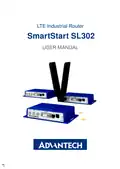

















SmartStart SL302
3. Router Description
Cellular router SmartStart SL302 is designed for wireless communication in mobile net-
works that use traditional cellular technologies. The primary purpose of this router is its use in
the newest Category 1 (Cat.1) services on the cellular LTE network of the AT&T and Verizon
carriers.
3.1 LTE Category 1 (Cat.1)
Given the uncertain future of 2G technologies (they are gradually sunsetting), it needs to
find a suitable (natural) replacement. LTE Category 1 (Cat.1) in general is the only real alter-
native to 2G. It is specifically designed to bring 4G LTE capabilities to the Internet of Things
(IoT) and machine-to-machine (M2M) applications. Like all LTE services, Cat.1 provides a low-
latency broadband connection but capped at 10 Mbps download (and 5 Mbps upload). It is an
ideal solution for smart meters for utilities, telematics for vehicle tracking and fleet manage-
ment and security use cases, such as in alarm systems.
3.2 Basic HW Information
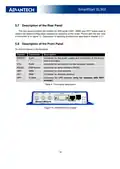
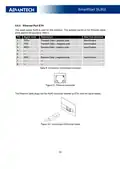
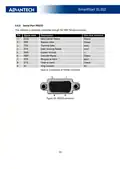
As a standard, the SmartStart router is equipped with one Ethernet 10/100 Mbps, one
serial interface RS232, one binary input and one output. SL302 also contains two readers for
3 V and 1.8 V SIM cards, which are placed on the rear panel of the device. The router can be
equipped with a WiFi module, but this must be part of the initial configuration – it cannot be
assembled to the router at some point in the future. The router is supplied in a plastic casing.
3.3 Configuration and Diagnostics
The router can be configured using a password-protected Web interface. The web interface
provides (after logging in) detailed statistics about the router activities, signal strength, detailed
system logs etc. This device supports the creation of VPN tunnels using technologies IPSec,
OpenVPN and L2TP for secure communications. There are also supported functions such as
IPv6 (the latest revision of the Internet Protocol), DHCP, NAT, NAT-T, DynDNS, NTP, VRRP,
control by SMS, primary connection backups and many other functions are also supported.
Other diagnostic functions ensuring continuous communication include automatic inspec-
tion of PPP connection offering an automatic restart feature in case of connection is lost, or
hardware watchdog which monitors the status of the router. Using a special window (start up
script window) you may insert Linux scripts for various actions. For some applications is the
key possibility to create several different configurations for one router which can be switched
as needed (e.g. using SMS or status of the binary input). Cellular routers may automatically up-
date configuration and firmware from server. This allows mass reconfiguration of many routers
in one time.
5

| General | Details |
|---|---|
| Name | ADVANTECH SL302 SmartStart LTE Router User Manual |
| Make | Advantech |
| Language | English |
| Filetype | PDF (Download) |
| File size | 0.46 MB |
 (1 votes, average: 5.00 out of 5)
 Loading...
If you have any questions regarding ADVANTECH SL302 SmartStart LTE Router User Manual, please ask here and describe the problem in detail.

ADVANTECH ICR-3200 Cellular Router Instruction Manual

ADVANTECH ICR-2701 Engineering Portal Cellular Router User Guide

ADVANTECH ICR-2531 LTE Router User Manual

advantech ICR-3831 RAILWAY 4G LTE ROUTER & GATEWAY User Guide

ADVANTECH ICR-2431 LTE Router User Manual

ADVANTECH ICR-2041 LTE Router User Manual


Spectrum MAX2V1K WiFi 6E MDU Router User Guide

DrayTek 2620 Series LTE Router User Guide

NRadio Technologies N300 4G Pocket Size LTE Modem Router User Manual

Rebel RB-0701 4G LTE Router Owner’s Manual

TP-Link Archer MR200 Wireless Dual Band 4G LTE Router User Guide

D-Link DSR-250V2 5-Gigabit Port VPN Router Installation Guide

Juniper NETWORKS ACX7024 Cloud Metro Router User Guide

eero 7 Dual Band Mesh Wi-Fi 7 Router User Guide

PRISMXR P1411 Streaming Link Air Bridge WiFi6 Router User Guide

TP-Link Archer AX53 AX3000 Gigabit Wi-Fi 6 Router User Guide