
ALTA LABS ROUTE10 High Performance 10 Gbps Router User Guide


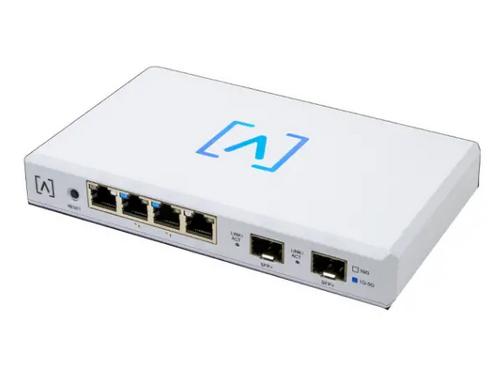
Front
Reset Button Press down for 10 seconds until
the LED begins flashing to reset the router to
factory defaults.
Ports 1-4 are standard Gigabit
Ethernet ports that support
10/100/1000/2500 Mbps
connections.
The Link LED on the left indicates
a 10/100 Mbps connection when
amber and blue indicates a
1 Gbps connection. For 2.5 Gbps
connections, the LED on the right
will illuminate white. If neither
port LED is illuminated, then the
connection is down.
Ports 2 and 3 support 802.3at
PoE+ with up to 30W per port and
a PoE budget of 40 Watts.
The PoE LEDs are located below
ports 2 & 3 with the icon next
to them. They will illuminate
amber when a device connected
to the port is being powered via
Ethernet.
4

| General | Details |
|---|---|
| Name | ALTA LABS ROUTE10 High Performance 10 Gbps Router User Guide |
| Make | ALTA LABS |
| Language | English |
| Filetype | PDF (Download) |
| File size | 1.33 MB |
 (1 votes, average: 5.00 out of 5)
 Loading...
If you have any questions regarding ALTA LABS ROUTE10 High Performance 10 Gbps Router User Guide, please ask here and describe the problem in detail.

Tenda 4G03 Pro Wi-Fi LTE Router Installation Guide

Amlogic S905W Android 7.0 TV Box y WiFi Router User Guide

Mercury Fritz Box 7360 Fibre Modem Router User Guide

BLAST u4 Wi-Fi Wireless Router User Guide

WAVLINK AC1200 Dual Band Wi-Fi Extender/AP User Guide

TP-Link AC1900 Wi-Fi Router Installation Guide

LANCOM 1793VAW VPN Router User Guide
HNK RAX1810 Smart Wi-Fi Router User Manual

TP-Link TL-MR3420 3G-4G Wireless Router Installation Guide

TRUEFIT BAC-5051A E Airflow Measurement System Router User Guide