
Anywhere AX50 Series Dual Band Gigabit Wi-Fi 6 Router User Guide





3.2
3.2.1
SETUP PROCEDURES
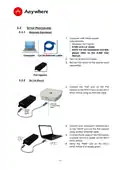
REQUIRED EQUIPMENT
1. Computer with below system
requirements:
•
•
•
Windows 10/11 64-bit
A-NM v2.0.x or newer
NOTE: For the installation of A-NM,
please refer to the A-NM User
Manual.
Computer Cat 5e Ethernet cable
2. Two Cat 5e Ethernet Cables.
3. 802.3at PoE switch or PoE injector (sold
separately).
PoE injector
3.2.2
SET UP DEVICE
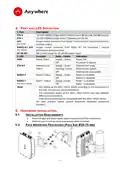
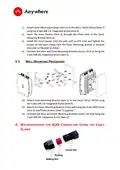
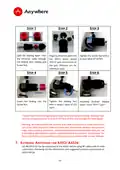
1. Connect the “PoE” port on the PoE
injector to the “ETH 0” port on the AX51/
AX52/ AX52e using an Ethernet cable.
2. Connect your computer’s Ethernet port
to the “DATA” port on the PoE injector
using another Ethernet cable.
3. Connect the AC plug on the PoE injector
to power source to power up the AX51/
AX52/ AX52e.
4. Verify the “PWR” LED on the AX51/
AX52/ AX52e is in steady green.
- 5 -

| General | Details |
|---|---|
| Name | Anywhere AX50 Series Dual Band Gigabit Wi-Fi 6 Router User Guide |
| Make | AnyWhere |
| Language | English |
| Filetype | PDF (Download) |
| File size | 0.38 MB |
 (1 votes, average: 5.00 out of 5)
 Loading...
If you have any questions regarding Anywhere AX50 Series Dual Band Gigabit Wi-Fi 6 Router User Guide, please ask here and describe the problem in detail.


TELTONIKA RUTC50 5G Router User Guide

Cudy X6 AX1800 1800mbps Dual Band Wi-Fi 6 Router Installation Guide

EnGenius ESG620 Cloud Managed VPN Router User Guide

ozito PXBLTS Trim Router Instruction Manual

LINOVISION IOT-R32W 4G LTE Cat4 Cellular Router Owner’s Manual

DrayTek Vigor2762 VDSL2 Modem Router User Guide

amber AC2600 WiFi Router User Guide

ASUS TUF-AX4200 Dual Band WiFi Router User Guide

TRUEFIT BAC-5051A E Airflow Measurement System Router User Guide

Tenda W30E AX3000 Dual Band Wi-Fi 6 Wireless Hotspot Router Installation Guide