
BOSSPAC EA000405 Border Router Instruction Manual


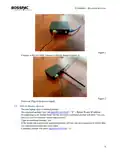


EA000405 – BOARDER ROUTER
Figure 2
-
Connect to the 915 MHz Antenna to Border Router (Figure 3)
Figure 3
-
Power on/ Plug in the power Supply
2.2 SSH to Border Router
-
-
-
On your laptop open Command prompt
On command prompt type “ssh pi@###.###.##.##” “#” = Border Router IP address
If connecting to the border router for the first time, command prompt will print “Are you
sure you want to continue connecting (yes/no)?”
-
-
Type on command prompt “yes”
If the border has a password, command prompt will ask you for a password in which then
you type password and then press enter.
-
Command prompt will print “pi@###.###.##.##:~ $”
5

| General | Details |
|---|---|
| Name | BOSSPAC EA000405 Border Router Instruction Manual |
| Make | BOSSPAC |
| Language | English |
| Filetype | PDF (Download) |
| File size | 0.22 MB |
 (1 votes, average: 5.00 out of 5)
 Loading...
If you have any questions regarding BOSSPAC EA000405 Border Router Instruction Manual, please ask here and describe the problem in detail.

SKYWORTH GN543V GPON ONT WiFi Router Installation Guide

atop Technologies AWR5805, AWR5805P Wireless Router Installation Guide

TELTONIKA QSG RUT142 RS232 Router User Manual

PROSCEND M357-5G Cellular Router Installation Guide

Amped Wireless R10000 High Power Wireless N 600mW Router User Guide

MERCUSYS MR90X Dual Band 8 Stream Wi-Fi 6 Router User Guide
NETGEAR Nighthawk 6-Stream AX5200 WiFi Router RAX48 User Guide

JUNIPER SSR1300 Session Smart Router User Guide

CP PLUS CP-GR-DE413-S Dual-Band 4G Router Installation Guide

COMFAST WR619AC V2 1200Mbps Wireless Router User Manual