
CP PLUS CP-GR-DE413-S Dual-Band 4G Router Installation Guide

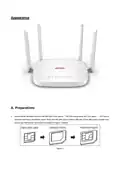


Appearance
A. Preparations
1. Insert the 4G network card into the SIM slot of the device(The SIM card grap to left, chip down). The normal
insertion will have a feedback sound. Note that the SIM card is a Micro SIM size. If the SIM card is another size,
please use the restore card cover (as shown in Figure 1 below).
Figure 1

| General | Details |
|---|---|
| Name | CP PLUS CP-GR-DE413-S Dual-Band 4G Router Installation Guide |
| Make | CP PLUS |
| Language | English |
| Filetype | PDF (Download) |
| File size | 0.26 MB |
 (1 votes, average: 5.00 out of 5)
 Loading...
If you have any questions regarding CP PLUS CP-GR-DE413-S Dual-Band 4G Router Installation Guide, please ask here and describe the problem in detail.

CP PLUS CP-GR-DE412 Dual-Band 4G Router Installation Guide

CP PLUS DN211-S Dual-Band 4G Router Installation Guide

CP PLUS CP-XR-DE21-S 4G Router Installation Guide


ASKEY EAO2522P-2 WiFi6 AP Outdoor 5G NR Router Installation Guide

acer 952483 WAVE 7 Wi-Fi Mesh Router User Guide

ONEPLUS CTD05 Hub 5G Router User Guide

TOSIBOX 175 Router User Guide
AT T MF985 Velocity 2 WiFi Hotspot Router Instruction Manual

HITRON CODA-4582 Cable Modem Router User Guide

TP-Link Aginet EX1110 AXE11000 Tri-Band 10G WiFi 6E Router Installation Guide

verizon CR100A Wireless Router User Guide

MERCUSYS 300Mbps Enhanced Wireless N Router MW325R User Manual

GEWISS GW A9707 KNX/IP Router Installation Guide