
KEENETIC KN-1310 Wireless Router User Guide





4
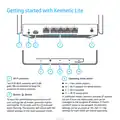
Network ports “0”, “1”, “2”, “3” , “4”
8
Indicator «FN»
By default the blue port “0” is used to
connect the cable from your ISP, and
other ports — for home devices.
The purpose of this indicator can be changed
in the settings. By default it indicates if updates
for the Keenetic firmware are available.
Flashing — An update is available.
5
DC power connectorꢀ
Off — No updates available.
Connector for the DC power adapter
from Keenetic package. The Keenetic
is designed for continuous operation and
does not need to be powered off daily.
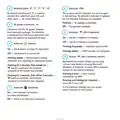
9
Indicatorꢀ ꢀ(Wi-Fi network)
On — the Wi-Fi network is enabled.
Off — the Wi-Fi network is disabled.
6
Indicatorꢀ ꢀ(Status)
Flashing frequently — indicates data transfer.
Flashing slowly — a WPS session is in progress.
On — the Keenetic is ready for operation.
Off — the Keenetic is turned off.
10 Buttonꢀ ꢀ(Wi-Fi network control)
Flashing slowly — the Keenetic is being
rebooted or is updating its operating system.
By default this button allows you to easily
connect new devices running Microsoft
Windows or Android, or other WPS compliant
devices to the wireless network.
Flashing for 2 seconds, then steady on
ꢀbutton is pressed; the function
—
assigned to the button was started.
Pressing it once — starts a quick
connection via WPS.
Flashing for 2 seconds, then off for 2 seconds
ꢀbutton is pressed; the function
assigned to the button was stopped.
—
Pressing and holding for 3 seconds
turns Wi-Fi on or off.
—
In the Keenetic settings you can assign
other functions to this button.
7
Indicatorꢀ ꢀ(Internet)
On — the Internet connection
has been established.
Off — there is no Internet connection.

| General | Details |
|---|---|
| Name | KEENETIC KN-1310 Wireless Router User Guide |
| Make | KEENETIC |
| Language | English |
| Filetype | PDF (Download) |
| File size | 0.13 MB |
 (1 votes, average: 5.00 out of 5)
 Loading...
If you have any questions regarding KEENETIC KN-1310 Wireless Router User Guide, please ask here and describe the problem in detail.

KEENETIC KN-3911 Mesh Wi-Fi 6 Multi-Gigabit Router User Guide

KEENETIC Hero KN-1012 Mesh Wi-Fi 6 Multi-Gigabit Router User Guide


ASUS TUF-AX4200 Dual Band WiFi 6 Gaming Router User Guide

ASUS ROG STRIX GS-AX3000 Dual-Band Gaming Router User Guide

Tenda TX2 Pro Dual Band Gigabit WiFi 6 Router Owner’s Manual

GL TECHNOLOGIES GL-A1300 AC1300 Gigabit Wireless Router User Manual
JUOVI J8301 AC1200 Gigabit Router User Guide

D-Link DIR-2660 AC2600 Smart Mesh Wifi Router Installation Guide

wm SYSTEM M2M Router Installation Guide

D-Link G415 AX1500 4G Router User Guide

TP-Link TD-W8951ND Wireless DSL Modem Router Installation Guide

Montersi ATE-G1CH 4G Router User Manual