
KEENETIC KN-1310 Wireless Router User Guide





Connecting to the Internet
via Ethernet cable
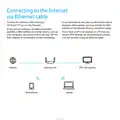
Connect the Ethernet cable from your
ISP to the “0” port on the Keenetic.
It can be found on the label on the bottom side of
Keenetic. Alternatively, you may change the MAC
address of the Keenetic during connection setup.
If the contract with your broadband provider
specifies a MAC address of another device, such as
your computer, we recommend to tell your ISP the
MAC address of the Keenetic before connecting.
If you have an IPTV set-top box or a TV that can
receive IPTV directly, we recommend to connect
it to the Keenetic using an Ethernet cable.
Internet
Keenetic Lite
IPTV Set-top-box
Smartphone
Laptop
h
t
t
p
s
:
/
/
m
a
n
u
a
l
-
h
u
b
.
c
o
m
/

| General | Details |
|---|---|
| Name | KEENETIC KN-1310 Wireless Router User Guide |
| Make | KEENETIC |
| Language | English |
| Filetype | PDF (Download) |
| File size | 0.13 MB |
 (1 votes, average: 5.00 out of 5)
 Loading...
If you have any questions regarding KEENETIC KN-1310 Wireless Router User Guide, please ask here and describe the problem in detail.

KEENETIC KN-3911 Mesh Wi-Fi 6 Multi-Gigabit Router User Guide

KEENETIC Hero KN-1012 Mesh Wi-Fi 6 Multi-Gigabit Router User Guide


Sagemcom SAX2V1S Wave 2 Wireless Router Instruction Manual

Cudy WR3600E Gigabit Wi-Fi 7 Router Installation Guide

Cudy AX3000 Wi-Fi 6 Mesh Router Installation Guide

ADDAC System ADDAC809 Chain Router User Guide

perle IRG5521+ FirstNet Ready LTE Router User Guide

GL iNet GL-XE3000NR Puli AX 5G NR Wi-Fi 6 Router User Guide

MOFI NETWORK MOFI6500 4G LTE Router User Manual

CRAFTSMAN 315.25031 Heavy Duty Router User Manual

Claro V1 GPON Router Installation Guide

NETGEAR Nighthawk Tri-Band WiFi 6 Router RAX200 User Guide