
KEENETIC KN-1310 Wireless Router User Guide

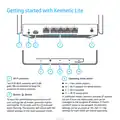




Getting started with Keenetic Lite
1
2
3
4
5
6
7
8
9
10
1
Wi-Fi antennas
3
Operating mode switch
⬛
⬛
⬛
⬛
Two PCB Wi-Fi antennas with 5 dBi
gain. We recommend to keep the
antennas in vertical position.
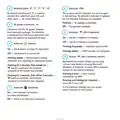
A — main mode (router)
B — Wi-Fi adapter for wired devices
C — Wi-Fi repeater
D — Wi-Fi access point
2
Buttonꢀ ꢀ(Reset)
In additional modes, Keenetic acquires IP address
via DHCP from the main router, and can be
managed by the assigned IP address. If there’s
no DHCP server in the network, the Keenetic
settings can be accessed at 192.168.1.3. The
settings for each mode are stored separately.
To reset the administrator password and all
user settings for all modes, press this button
and hold for 10 seconds until the
indicator
starts flashing. The Keenetic will reboot with the
default settings, in the main operation mode.

| General | Details |
|---|---|
| Name | KEENETIC KN-1310 Wireless Router User Guide |
| Make | KEENETIC |
| Language | English |
| Filetype | PDF (Download) |
| File size | 0.13 MB |
 (1 votes, average: 5.00 out of 5)
 Loading...
If you have any questions regarding KEENETIC KN-1310 Wireless Router User Guide, please ask here and describe the problem in detail.

KEENETIC KN-3911 Mesh Wi-Fi 6 Multi-Gigabit Router User Guide

KEENETIC Hero KN-1012 Mesh Wi-Fi 6 Multi-Gigabit Router User Guide


xiaomi CB0401 5G CPE Pro Router Instructions

QiXiang Technology QX210 Cellular Router Owner’s Manual

TP-Link Archer MR500 AC1200 Wireless Dual Band Gigabit Router User Guide

TP-Link Archer AX12 Dual Band WiFi 6 Router Installation Guide

TP-Link TL-WR802N 300Mbps Wireless N Nano Router User Manual

Micronet Union Technology WWYLT18 AC1200 Gigabit Dual Band Wi-Fi Router User Guide

Cudy WR1200 AC1200 Dual Band Wi-Fi Router Installation Guide

ASUS BT8 Tri Band WiFi Router User Guide

TP-Link TL-WR3002X Portable Router Installation Guide

acer W6M Vero Wi-Fi Router User Manual