
LINKSYS AX3200 Dual-Band Gigabit Wi-Fi 6 Router User Guide



Contents
Product Overview .........................................................................................................3
Front....................................................................................................................................................................3
Back.....................................................................................................................................................................4
Setting Up: Basics ........................................................................................................5
Where to find more help ...............................................................................................................................5
How to install your router ............................................................................................................................5
Advanced Configuration ............................................................................................7
How to open the browser-based utility...................................................................................................7
Basic Router Settings...................................................................................................................................8
Language ...............................................................................................................................................................................................9
Internet Setup...................................................................................................................................................................................10
Basic Wi-Fi Settings ...................................................................................................................................12
Wireless Security.......................................................................................................15
Security Option Settings..........................................................................................................................15
WPA2 Personal.................................................................................................................................................................................15
Disabled...............................................................................................................................................................................................15
Troubleshooting .........................................................................................................16
Your router was not successfully set up.............................................................................................16
Your Internet cable is not plugged in message ..............................................................................17
Cannot access your router message..................................................................................................18
After setup.....................................................................................................................................................19
The internet appears to be unavailable ...............................................................................................19
Specifications .............................................................................................................21
Linksys E8420 .............................................................................................................................................21
Environmental...............................................................................................................................................21
2

Product Overview
Front
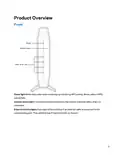
Power light-Blinks blue while router is starting up and during WPS pairing. Blinks yellow if WPS
pairing fails
Internet status light—Is solid blue when connected to the internet and solid yellow when not
connected.
Ethernet activity lights-Each light will be solid blue if an ethernet cable is connected to the
corresponding port. They will blink blue if there is activity on the port.
3

| General | Details |
|---|---|
| Name | LINKSYS AX3200 Dual-Band Gigabit Wi-Fi 6 Router User Guide |
| Make | Linksys |
| Language | English |
| Filetype | PDF (Download) |
| File size | 0.33 MB |
 (1 votes, average: 5.00 out of 5)
 Loading...
If you have any questions regarding LINKSYS AX3200 Dual-Band Gigabit Wi-Fi 6 Router User Guide, please ask here and describe the problem in detail.

LINKSYS EA7500 AC1900 Max Stream Wifi Router User Guide

Linksys WRT300N Wireless-N Broadband Router User Guide

LINKSYS MX4200 Router Installation Guide

LINKSYS N600 Dual Band Router User Guide

LINKSYS WRT54G Wireless G Router Instructions

LINKSYS E2500 Dual Band Router User Guide

LINKSYS FGW5500 5G WiFi 6 Router User Guide

LINKSYS AX1800 Dual-Band WiFi 6 Router E7350 User Guide

LINKSYS 750MR7500 Hydra Pro 6E Mesh Router User Guide

LINKSYS E900 Wi-Fi Router User Manual


TELTONIKA RUT300 Router User Guide

TP-Link OC200 4G Plus Gigabit VPN Router Installation Guide

TP-Link Archer MR200 Wireless Dual Band 4G LTE Router User Guide

hitron CHITA3.1 CHITA-RES Cable Modem Router User Guide

eero Pro 6E Mesh Router User Guide

ARISTA 7220R Series Enterprise WAN Router Instruction Manual

Milesight Routers Installation Guide

Cisco Router RV345/RV345P User Guide

CalAmp LMU-5541 Telematics Router Installation Guide

ASUS BE6500 Dual Band Wi-Fi 7 Router User Guide