
×
- 1. Ax5400 Multi-gigabit Wi-fi 6 Router (Installation → Setup → Configuration → Troubleshooting → Safety Information → Technical Support)
- 2. About This Guide (Connect The Hardware → Log In To Your Router → Set Up Internet Connection → Use Quick Setup Wizard → Manually Set Up Your Internet Connection → Specify Wireless Settings)
- 3. Maximum Wireless Signal Rates (Use Of Wi-fi 6 (802.11ax) → Saving Clients Battery Power → Use Of Wpa3 → Router Feature Support → Software Upgrades For Feature Availability → Actual Network Speed Limitations)
- 4. Get To Know About Your Router (Product Overview → Appearance → Top Panel)
- 5. Get To Know About Your Router (Back Panel → Button And Port Explanation)
- 6. Get To Know About Your Router (Wps Button → Wi-fi Button → Reset Button → Lan Port (1-3) → Gbps Wan/lan Port → 5 Gbps Wan/lan Port)
- 7. Connect The Hardware (Position Your Router → Connect Your Router)
- 8. Connect The Hardware (Position Your Router → Connect Your Router)
- 9. Connect The Hardware (Internet → Method 1: Wired → Method 2: Wirelessly)
- 10. Connect The Hardware (Wi-fi → Method 3: Use The Wps Button → Wireless Network Connection)
- 11. Log In To Your Router
- 12. Log In To Your Router (Set Up The Tcp/ip Protocol → Visit Http://tplinkwifi.net → Create A Login Password For Secure Management → Refer To The Faq Section)
- 13. Set Up Internet Connection (Use Quick Setup Wizard → Quick Setup Via Tp-link Tether App → Manually Set Up Your Internet Connection → Set Up The Router As An Access Point → Set Up An Ipv6 Internet Connection)
- 14. Set Up Internet Connection (Use Quick Setup Wizard → Set Up An Ipv6 Internet Connection → Quick Setup Via Tp-link Tether App → Tp-link Cloud Service)
- 15. Set Up Internet Connection (Manually Set Up Your Internet Connection)
- 16. Set Up Internet Connection (Dynamic Ip → Static Ip → Pppoe)
- 17. Set Up Internet Connection
- 18. Set Up Internet Connection (Set Up The Router As An Access Point)
- 19. Set Up Internet Connection (Set Up An Ipv6 Internet Connection)
- 20. Set Up Internet Connection (Dynamic Ip(slaac/dhcpv6) → Pppoe)
- 21. Set Up Internet Connection (Manually Set Up Your Internet Connection → To4 Tunnel → Pass-through (bridge))
- 22. Set Up Internet Connection (Configure Lan Ports → Check Ipv6 Connection → Visit The Faq Section)
- 23. Register A Tp-link Id (Change Your Tp-link Id Information → Manage The User Tp-link Ids → Manage The Router Via The Tp-link Tether App)
- 24. Register A Tp-link Id (Change Your Tp-link Id Information)
- 25. Tp-link Cloud Service (Manage The User Tp-link Ids)
- 26. Addtp-linkidtomanagetherouter (Removetp-linkid(s)frommanagingtherouter → Manage The Router Via The Tp-link Tether App)
- 27. Manage The Router Via The Tp-link Tether App (Launch The Apple App Store Or Google Play Store → Connect Your Device To The Routers Wireless Network → Log In With Your Tp-link Id → Register A Tp-link Id)
- 28. Network Map
- 29. Network Map (Visit Http://tplinkwifi.net, And Log In With Your Tp-link Id Or The Password You Set For The Router. → Click Each Network Device Icon To Check And Manage General Network Settings. → Click Internet To Check Internet Status. → Click The Router To Check Device Status And Network Settings. → You Can Turn On Or Off The Wireless Network Or Guest Network, Or Click Edit To Change Related Settings.)
- 30. Network Map (Mesh Devices)
- 31. Network Map (Speed Limit)
- 32. Wireless Settings (Specify Wireless Settings → Schedule Your Wireless Function → Use Wps For Wireless Connection → Advanced Wireless Settings)
- 33. Wireless Settings (Specify Wireless Settings → Enable Or Disable Ofdma → Enable Or Disable Twt → Use The Smart Connect Function)
- 34. Wireless Settings (Enable Or Disable The Wireless Function → Change The Wireless Network Name (ssid) And Wireless Password → Hide Ssid → Change The Security Option → Change The Transmit Power And Channel Settings)
- 35. Wireless Settings (To Use The Mu-mimo Function → Schedule Your Wireless Function)
- 36. Wireless Settings (Use Wps For Wireless Connection → Connect Via The Clients Pin)
- 37. Wireless Settings (Connect Via The Routers Pin → Push The Wps Button → Advanced Wireless Settings)
- 38. Wireless Settings (Configure Advanced Wireless Settings → Wmm → Ap Isolation → Airtime Fairness → Zero Wait Dfs → Beacon Interval)
- 39. Wireless Settings (Group Key Update Period)
- 40. Guest Network (Create A Network For Guests → Set Up Portal Authentication For The Guest Network → Limit The Bandwidth Of The Guest Network → Specify The Effective Time Of The Guest Network → Customize Guest Network Options)
- 41. Create A Network For Guests (Enable 2.4ghz And/or 5ghz → Customize The Ssid → Select The Security Type And Customize Your Own Password → Click Save → Share Network → View Guest Network Information)
- 42. Guest Network (Set Up Portal Authentication For The Guest Network → Visit Http://tplinkwifi.net, And Log In With Your Tp-link Id Or The Password You Set For The Router. → Go To Wireless And Locate The Guest Network Section. → Set Security To Portal. → Select The Authentication Type. → Specify The Authentication Timeout.)
- 43. Guest Network (Limit The Bandwidth Of The Guest Network → Enable Redirect → Edit The Login Page → Save)
- 44. Guest Network (Limit The Download And Upload Bandwidth For The Network → Specify The Effective Time Of The Guest Network)
- 45. Guest Network (Customize Guest Network Options)
- 46. Guest Network
- 47. Usb Settings (Access The Usb Storage Device → Media Sharing → Time Machine)
- 48. Usb Settings (Access The Usb Storage Device → Access The Usb Device Locally)
- 49. Usb Settings (To Set Up Authentication For Data Security → To Customize The Address Of The Usb Storage Device → Access The Usb Device Remotely)
- 50. Usb Settings (Configure Remote Access Settings → Access Your Usb Disk Remotely)
- 51. Usb Settings (Customize The Access Settings → Set Up Authentication For Data Security → Access With The Username And Password → Set Up A Dynamic Dns Service Account → Customize The Address Of The Usb Storage Device → Use A Third-party App For Network Files Management)
- 52. Usb Settings (To Only Share Specific Content → To Set Up Authentication For Data Security)
- 53. Usb Settings (Media Sharing → Accessing As An Administrator → Changing Authentication Settings → Customizing The Address Of The Usb Storage Device → Default Administrator Account → Default Visitor Account)
- 54. Usb Settings (Time Machine)
- 55. Usb Settings (Time Machine → Size Limit For Backups → Save)
- 56. Network Security (Parental Controls → Network Analysis & Optimization)
- 57. Network Security (Iot Protection → Intrusion Prevention System → Malicious Content Filter → Ddos Protection → Parental Controls)
- 58. Homeshield (Child Protection → Family Incentive Program → Family Time → Network Analysis & Optimization → Weekly And Monthly Reports → Quality Of Service (qos))
- 59. Homeshield
- 60. Set Up A Onemesh Network (Manage Devices In The Onemesh Network)
- 61. Onemesh With Seamless Roaming (Same Network Name & Password → Internet For Seamless Roaming → Unified Wi-fi Network → Seamless Roaming → Easy Setup And Management → Set Up A Onemesh Network)
- 62. Onemesh With Seamless Roaming (Connect A Onemesh Extender To This Router → Check Full List Of Tp-link Onemesh Devices → Set Up The Extender To Join The Onemesh Network → Find It In The Available Onemesh Devices List → Add It To The Onemesh Network → Router And Extender Successfully Form A Onemesh Network)
- 63. Onemesh With Seamless Roaming (Manage Devices In The Onemesh Network)
- 64. Onemesh With Seamless Roaming (Manage The Onemesh Device As Needed → Change Device Information → Click Manage Device To Redirect To The Web Management Page → Click Leave Onemesh To Delete This Device From The Onemesh Network)
- 65. Protect The Network From Cyber Attacks (Access Control → Ip & Mac Binding)
- 66. Protect The Network From Cyber Attacks (Access Control)
- 67. Network Security (Allow Specific Device(s) → Add Connected Devices)
- 68. Network Security (Add Unconnected Devices → Ip & Mac Binding)
- 69. Network Security (Ip & Mac Binding → Enable Ip & Mac Binding → Bind Your Device(s) → Binding List → View Connected Devices → Save)
- 70. Network Security (Bind The Unconnected Device → Alg → Sip Alg Configuration)
- 71. Share Local Resources On The Internet By Port Forwarding (Open Ports Dynamically By Port Triggering → Make Applications Free From Port Restriction By Dmz → Make Xbox Online Games Run Smoothly By Upnp)
- 72. Nat Forwarding (Share Local Resources On The Internet By Port Forwarding → Assign A Static Ip Address To Your Pc → Visit Http://tplinkwifi.net → Go To Advanced > Nat Forwarding > Port Forwarding)
- 73. Nat Forwarding (View Common Services → View Connected Devices → Save → Tips)
- 74. Nat Forwarding (Set Up A Dynamic Dns Service Account → Open Ports Dynamically By Port Triggering → Configure The Port Triggering Rules)
- 75. Nat Forwarding (Make Applications Free From Port Restriction By Dmz → Warning: Dmz Host Is Totally Exposed To The Internet, Which May Bring Some Potential Safety Hazards.)
- 76. Nat Forwarding (Assign A Static Ip Address To Your Pc → Enable Dmz → Make Xbox Online Games Run Smoothly By Upnp → Upnp Protocol Overview → Tips For Upnp Usage)
- 77. Nat Forwarding (Upnp)
- 78. Vpn Server (Openvpn → Pptp Vpn → L2tp/ipsec Vpn → Vpn Client → Use Openvpn To Access Your Home Network → Use Pptp Vpn To Access Your Home Network)
- 79. Use Openvpn To Access Your Home Network (Set Up Openvpn Server On Your Router)
- 80. Vpn Server&client (Configure Openvpn Connection On Your Remote Device → Use Pptp Vpn To Access Your Home Network → Set Up Pptp Vpn Server On Your Router)
- 81. Vpn Server & Client (Enable Pptp → Dynamic Dns Service Configuration → Client Ip Address Configuration → Pptp Connection Permission Settings → Save Configuration → Pptp Vpn Connection Account Setup)
- 82. Vpn Server&client (Configure Pptp Vpn Connection On Your Remote Device → Set Up A New Connection Or Network → Connect To A Workplace)
- 83. Vpn Server&client
- 84. Vpn Server&client
- 85. Use L2tp/ipsec Vpn To Access Your Home Network (Set Up L2tp/ipsec Vpn Server On Your Router)
- 86. Vpn Server & Client (Client Ip Address → Ipsec Encryption → Ipsec Pre-shared Key → Configure L2tp/ipsec Vpn Connection → Username And Password → Authenticate Devices)
- 87. Vpn Server&client (Set Up A New Connection Or Network → Connect To A Workplace)
- 88. Vpn Server&client (Use My Internet Connection (vpn) → Enter The Internet Ip Address Of The Router → Dont Connect Now; Just Set It Up So I Can Connect Later → Enter The User Name And Password)
- 89. Vpn Server&client (Network And Sharing Center → Change Adapter Settings → Click Close When The Vpn Connection Is Ready To Use)
- 90. Vpn Server&client
- 91. Vpn Server&client (Security → Layer 2 Tunneling Protocol With Ipsec (l2tp/ipsec) → Advanced Settings → Use Preshared Key For Authentication → Ipsec Pre-shared Key → Connect To Start Vpn Connection)
- 92. Vpn Client To Access A Remote Vpn Server (Use The Vpn Feature → Visit Http://tplinkwifi.net → Go To Advanced > Vpn Client → Enable Vpn Client → Add Vpn Servers → Specify A Description For The Vpn)
- 93. Vpn Server&client (Openvpn → Pptp)
- 94. Vpn Server&client (L2tp/ipsec Vpn → Save The Settings → Enable The One You Need)
- 95. Vpn Server&client (Add And Manage The Devices That Will Use The Vpn Function → Device List → Save The Settings)
- 96. Vpn Server&client
- 97. Customizeyournetworksettings (Change Thelansettings → Setuplinkaggregation → Configuretosupportiptvservice → Specifydhcpserversettings → Setupadynamicdnsserviceaccount → Createstaticroutes)
- 98. Change The Lan Settings (Set Up Link Aggregation)
- 99. Customizeyournetworksettings (Configuretosupportiptvservice → Staticlagorlacpmode → Igmpproxyandigmpsnooping → Advanced>network>iptv/vlan → Save → Connectyourset-topboxtoanyoftheroutersethernetport)
- 100. Customizeyournetworksettings (Specifydhcpserversettings → Enableiptv/vlan → Selecttheappropriatemode → Connecttheset-topboxtothecorrespondinglanport → Clicksave → Youriptvsetupisdonenow)
- 101. Customizeyournetworksettings (Reserveanipaddressforaspecifiedclientdevice → Setupadynamicdnsserviceaccount)
- 102. Customizeyournetworksettings (Dynamicdns → Ddnsserviceprovider → Registernow → Domainnamelist)
- 103. Customizeyournetworksettings (Createstaticroutes)
- 104. Customizeyournetworksettings (Changetherouterslanipaddresses → Visithttp://tplinkwifi.net → Gotoadvancednetworkrouting → Clickaddandfinishthesettings → Networkdestination → Subnetmask)
- 105. Customizeyournetworksettings (Interface → Description → Clicksave → Checktheroutingtable → Done → Openawebbrowseronyourpc)
- 106. Manage The Router (Update The Firmware → Backup And Restore Configuration Settings → Change The Login Password → Password Recovery → Local Management → Remote Management)
- 107. Manage The Router (Update The Firmware → Auto Update → Online Update)
- 108. Manage The Router (Online Update → Local Update → Firmware Update → Advanced → System)
- 109. Manage The Router (Backup And Restore Configuration Settings)
- 110. Manage The Router (Change The Login Password)
- 111. Manage The Router (Password Recovery → Advanced > Tp-link Id → Advanced > System > Administration → Enable Password Recovery → Smtp Server Configuration → Click Save)
- 112. Manage The Router (Local Management → Access The Router Via Https And Http → Allow All Lan Connected Devices To Manage The Router → Allow Specific Devices To Manage The Router)
- 113. Manage The Router (Remote Management)
- 114. Manage The Router (Remote Management → Set Up A Dynamic Dns Service Account)
- 115. Manage The Router (System Log)
- 116. Manage The Router (Save Log → Send System Log To Mailbox → Log In To Tp-link → Advanced > System Tools > System Log → Enter Required Information)
- 117. Manage The Router (Test The Network Connectivity)
- 118. Manage The Router (Diagnostics → Ping → Traceroute → Ip Address Or Domain Name → Ping Count → Ping Packet Size)
- 119. Manage The Router (Set System Time And Language)
- 120. Manage The Router (Ntp Server I → Ntp Server Ii → Set Time → Get From Managing Device → Manually Set The Date And Time → Enable Daylight Saving Time)
- 121. Manage The Router (Set The Router To Reboot Regularly → Select The Correct Start Date And Time → Select The Correct End Date And Time → Set System Language → Click Save → Enable Reboot Schedule)
- 122. Manage The Router (Control The Led → Reboot Time → Night Mode → Led Control)
- 123. What Should I Do If I Forget My Wireless Password? (What Should I Do If I Forget My Web Management Password? → What Should I Do If I Cant Log In To The Routers Web Management Page?)
- 124. Clicklansettingsanddeselectthefollowingthreeoptionsandclickok.go Toadvanced>restoreadvancedsettings,clickoktosavethesettings.
- 125. Reset The Router To Factory Default Settings (Reconfigure The Router To Surf The Internet → Check Internet Status → Manually Configure The Dns Server → Enter 8.8.8.8 As Primary Dns)
- 126. Restart The Modem And The Router (Reset The Router To Factory Default Settings And Reconfigure The Router → Upgrade The Firmware Of The Router → Check The Tcp/ip Settings On The Particular Device → Make Sure The Physical Connection Between The Router And The Modem Is Proper → Clone The Mac Address Of Your Computer)
- 127. Visit Http://tplinkwifi.net, And Log In With Your Tp-link Id Or The Password You Set For The Router.
- 128. Power Off Your Modem And Router (Power On Your Modem First → Confirm Your Internet Connection Type → Visit Http://tplinkwifi.net → Select Your Internet Connection Type → Please Upgrade The Firmware Of The Router → What Should I Do If I Cant Find My Wireless Network)
- 129. Make Sure The Wireless Adapter Driver Is Installed Successfully And The Wireless Adapter Is Enabled. (On Windows 7 → On Windows Xp → Check The Wlan Led Indicator On Your Wireless Router/modem. → Go To Wireless Or Advanced > Wireless > Wireless Settings. → Authenticating Problem/password Mismatch)
- 130. Fcc Compliance Information Statement (Product Name: Ax5400 Multi-gigabit Wi-fi 6 Router → Model Number: Archer Ax72 Pro → Responsible Party: Tp-link Usa Corporation → Installation Instructions → Interference Correction Measures → Compliance With Fcc Rules)
- 131. Fcc Rf Radiation Exposure Statement (Fcc Compliance Information Statement → Product Name → Model Number → Responsible Party → Address → Website)
- 132. National Restrictions (Ukca Mark → Uk Declaration Of Conformity → Canadian Compliance Statement)
- 133. Caution (Radiation Exposure Statement → Industry Canada Statement → Korea Warning Statements → Ncc Notice & Bsmi Notice)
- 134. Safety Information
- 135. Explanations Of The Symbols On The Product Label At The Bottom (Caution → Operators Manual → Recycling)
×
TP-Link AX5400 Multi Gigabit Wi-Fi Router User Guide




























Chapter 7
Wireless Settings
• Channel - Select an operating channel for the wireless network. It is recommended
to leave the channel to Auto, if you are not experiencing the intermittent wireless
connection issue.
• Mode - Select a transmission mode according to your wireless client devices. It is
recommended to just leave it as default.
•
To use the MU-MIMO function:
The MU-MIMO (Multi-User Multiple-Input Multiple-Output) feature enables the router
to simultaneously send data to multiple devices, significantly enhancing the network
efficiency.
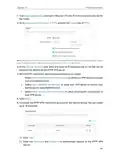
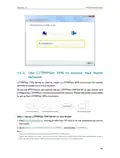
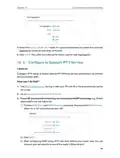
1. Go to Advanced > Wireless > Wireless Settings.
2. Make sure Smart Connect is disabled, and enable MU-MIMO for the 5 GHz band.
Note: MU-MIMO works only on the 5 GHz band and thus is not available when Smart Connect is enabled.
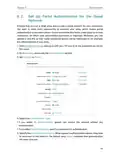
7 2 Schedule Your Wireless Function
The wireless network can be automatically off at a specific time when you do not need
the wireless connection.
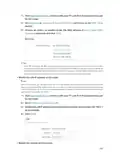
1. Visit http://tplinkwifi.net, and log in with your TP-Link ID or the password you set for
the router.
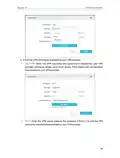
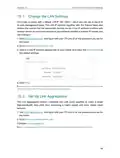
2. Go to Advanced > Wireless > Wireless Schedule.
3. Enable the Wireless Schedule feature.
4. Click Add to specify a wireless off period during which you need the wireless off
automatically, and click SAVE.
35

| General | Details |
|---|---|
| Name | TP-Link AX5400 Multi Gigabit Wi-Fi Router User Guide |
| Make | TP-Link |
| Language | English |
| Filetype | PDF (Download) |
| File size | 1.92 MB |
 (1 votes, average: 5.00 out of 5)
 Loading...
If you have any questions regarding TP-Link AX5400 Multi Gigabit Wi-Fi Router User Guide, please ask here and describe the problem in detail.

TP-Link VR300 Archer Modem Router User Guide

TP-Link T150500-2-DT WiFi Router Instruction Manual

TP-Link Archer AX55 Wi-Fi 6 Router Installation Guide

TP-Link Omada ER8411 VPN Router Instructions

TP-Link Configure VDSL Router User Guide

TP-Link Archer BE805 BE19000 Tri-Band Wi-Fi 7 Router User Manual

TP-Link VR600 Wireless DSL Modem Router Installation Guide

TP-Link AX58 Dual Band Gigabit Wi-Fi 6 Router Installation Guide

TP-Link AC750 Wireless Dual Band Router Owner’s Manual

TP-Link AX6000 8-Stream Wi-Fi 6 Router Installation Guide


Tenda W18E Wireless Enterprise Router Installation Guide

Cudy WR3000H 2.5G Mesh Wi-Fi 6 Router Installation Guide

ASUS ZenWiFi XD5 AX3000 Dual Band WIFi Router User Guide

ASUS ET12 ZenWiFi Pro AXE11000 Tri Band WiFi Router User Guide

TP-Link BE550 Tri Band WiFi 7 Router Installation Guide

HUAWEI 31500DHA_01 5G CPE Pro 2 WiFi 6 Router User Guide

D-Link AX3200 Mesh Wi-Fi 6 Router DIR-X3260 Installation Guide

NETGEAR AX6 Stream Wi-Fi Router User Manual

wm SYSTEM M2M Router Installation Guide

robustel R5020 5G WiFi Wireless Router Owner’s Manual
Table of Contents
- 1. Ax5400 Multi-gigabit Wi-fi 6 Router - Installation →
- 2. About This Guide - Connect The Hardware →
- 3. Maximum Wireless Signal Rates - Use Of Wi-fi 6 (802.11ax) →
- 4. Get To Know About Your Router - Product Overview →
- 5. Get To Know About Your Router - Back Panel →
- 6. Get To Know About Your Router - Wps Button →
- 7. Connect The Hardware - Position Your Router →
- 8. Connect The Hardware - Position Your Router →
- 9. Connect The Hardware - Internet →
- 10. Connect The Hardware - Wi-fi →
- 11. Log In To Your Router →
- 12. Log In To Your Router - Set Up The Tcp/ip Protocol →
- 13. Set Up Internet Connection - Use Quick Setup Wizard →
- 14. Set Up Internet Connection - Use Quick Setup Wizard →
- 15. Set Up Internet Connection - Manually Set Up Your Internet C... →
- 16. Set Up Internet Connection - Dynamic Ip →
- 17. Set Up Internet Connection →
- 18. Set Up Internet Connection - Set Up The Router As An Access ... →
- 19. Set Up Internet Connection - Set Up An Ipv6 Internet Connect... →
- 20. Set Up Internet Connection - Dynamic Ip(slaac/dhcpv6) →
- 21. Set Up Internet Connection - Manually Set Up Your Internet C... →
- 22. Set Up Internet Connection - Configure Lan Ports →
- 23. Register A Tp-link Id - Change Your Tp-link Id Information →
- 24. Register A Tp-link Id - Change Your Tp-link Id Information →
- 25. Tp-link Cloud Service - Manage The User Tp-link Ids →
- 26. Addtp-linkidtomanagetherouter - Removetp-linkid(s)frommanagi... →
- 27. Manage The Router Via The Tp-link Tether App - Launch The Ap... →
- 28. Network Map →
- 29. Network Map - Visit Http://tplinkwifi.net, And Log In With Y... →
- 30. Network Map - Mesh Devices →
- 31. Network Map - Speed Limit →
- 32. Wireless Settings - Specify Wireless Settings →
- 33. Wireless Settings - Specify Wireless Settings →
- 34. Wireless Settings - Enable Or Disable The Wireless Function →
- 35. Wireless Settings - To Use The Mu-mimo Function →
- 36. Wireless Settings - Use Wps For Wireless Connection →
- 37. Wireless Settings - Connect Via The Routers Pin →
- 38. Wireless Settings - Configure Advanced Wireless Settings →
- 39. Wireless Settings - Group Key Update Period →
- 40. Guest Network - Create A Network For Guests →
- 41. Create A Network For Guests - Enable 2.4ghz And/or 5ghz →
- 42. Guest Network - Set Up Portal Authentication For The Guest N... →
- 43. Guest Network - Limit The Bandwidth Of The Guest Network →
- 44. Guest Network - Limit The Download And Upload Bandwidth For ... →
- 45. Guest Network - Customize Guest Network Options →
- 46. Guest Network →
- 47. Usb Settings - Access The Usb Storage Device →
- 48. Usb Settings - Access The Usb Storage Device →
- 49. Usb Settings - To Set Up Authentication For Data Security →
- 50. Usb Settings - Configure Remote Access Settings →
- 51. Usb Settings - Customize The Access Settings →
- 52. Usb Settings - To Only Share Specific Content →
- 53. Usb Settings - Media Sharing →
- 54. Usb Settings - Time Machine →
- 55. Usb Settings - Time Machine →
- 56. Network Security - Parental Controls →
- 57. Network Security - Iot Protection →
- 58. Homeshield - Child Protection →
- 59. Homeshield →
- 60. Set Up A Onemesh Network - Manage Devices In The Onemesh Net... →
- 61. Onemesh With Seamless Roaming - Same Network Name & Password →
- 62. Onemesh With Seamless Roaming - Connect A Onemesh Extender T... →
- 63. Onemesh With Seamless Roaming - Manage Devices In The Onemes... →
- 64. Onemesh With Seamless Roaming - Manage The Onemesh Device As... →
- 65. Protect The Network From Cyber Attacks - Access Control →
- 66. Protect The Network From Cyber Attacks - Access Control →
- 67. Network Security - Allow Specific Device(s) →
- 68. Network Security - Add Unconnected Devices →
- 69. Network Security - Ip & Mac Binding →
- 70. Network Security - Bind The Unconnected Device →
- 71. Share Local Resources On The Internet By Port Forwarding - O... →
- 72. Nat Forwarding - Share Local Resources On The Internet By Po... →
- 73. Nat Forwarding - View Common Services →
- 74. Nat Forwarding - Set Up A Dynamic Dns Service Account →
- 75. Nat Forwarding - Make Applications Free From Port Restrictio... →
- 76. Nat Forwarding - Assign A Static Ip Address To Your Pc →
- 77. Nat Forwarding - Upnp →
- 78. Vpn Server - Openvpn →
- 79. Use Openvpn To Access Your Home Network - Set Up Openvpn Ser... →
- 80. Vpn Server&client - Configure Openvpn Connection On Your Rem... →
- 81. Vpn Server & Client - Enable Pptp →
- 82. Vpn Server&client - Configure Pptp Vpn Connection On Your Re... →
- 83. Vpn Server&client →
- 84. Vpn Server&client →
- 85. Use L2tp/ipsec Vpn To Access Your Home Network - Set Up L2tp... →
- 86. Vpn Server & Client - Client Ip Address →
- 87. Vpn Server&client - Set Up A New Connection Or Network →
- 88. Vpn Server&client - Use My Internet Connection (vpn) →
- 89. Vpn Server&client - Network And Sharing Center →
- 90. Vpn Server&client →
- 91. Vpn Server&client - Security →
- 92. Vpn Client To Access A Remote Vpn Server - Use The Vpn Featu... →
- 93. Vpn Server&client - Openvpn →
- 94. Vpn Server&client - L2tp/ipsec Vpn →
- 95. Vpn Server&client - Add And Manage The Devices That Will Use... →
- 96. Vpn Server&client →
- 97. Customizeyournetwork... - Change Thelansettings →
- 98. Change The Lan Settings - Set Up Link Aggregation →
- 99. Customizeyournetwork... - Configuretosupportip... →
- 100. Customizeyournetwork... - Specifydhcpserverset... →
- 101. Customizeyournetworksettings - Reserveanipaddressforaspecifi... →
- 102. Customizeyournetwork... - Dynamicdns →
- 103. Customizeyournetwork... - Createstaticroutes →
- 104. Customizeyournetworksettings - Changetherouterslanipaddresse... →
- 105. Customizeyournetwork... - Interface →
- 106. Manage The Router - Update The Firmware →
- 107. Manage The Router - Update The Firmware →
- 108. Manage The Router - Online Update →
- 109. Manage The Router - Backup And Restore Configuration Setting... →
- 110. Manage The Router - Change The Login Password →
- 111. Manage The Router - Password Recovery →
- 112. Manage The Router - Local Management →
- 113. Manage The Router - Remote Management →
- 114. Manage The Router - Remote Management →
- 115. Manage The Router - System Log →
- 116. Manage The Router - Save Log →
- 117. Manage The Router - Test The Network Connectivity →
- 118. Manage The Router - Diagnostics →
- 119. Manage The Router - Set System Time And Language →
- 120. Manage The Router - Ntp Server I →
- 121. Manage The Router - Set The Router To Reboot Regularly →
- 122. Manage The Router - Control The Led →
- 123. What Should I Do If I Forget My Wireless Password? - What Sh... →
- 124. Clicklansettingsanddeselectthefollowingthreeoptionsandclicko... →
- 125. Reset The Router To Factory Default Settings - Reconfigure T... →
- 126. Restart The Modem And The Router - Reset The Router To Facto... →
- 127. Visit Http://tplinkwifi.net, And Log In With Your Tp-link Id... →
- 128. Power Off Your Modem And Router - Power On Your Modem First →
- 129. Make Sure The Wireless Adapter Driver Is Installed Successfu... →
- 130. Fcc Compliance Information Statement - Product Name: Ax5400 ... →
- 131. Fcc Rf Radiation Exposure Statement - Fcc Compliance Informa... →
- 132. National Restrictions - Ukca Mark →
- 133. Caution - Radiation Exposure Statement →
- 134. Safety Information →
- 135. Explanations Of The Symbols On The Product Label At The Bott... →