
TUGE TR10NA IOT 4G Router User Guide




Change Administrator Password
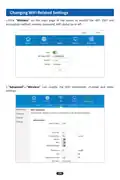
In the main page of the router, click“Advanced”, then click“System”, select
“Administrator”, and change the administrator login password in the administrator
settings.。
Change the Default Administrative IP Address and IP
Address Pool Settings
You can change the range of IP address pool by modifying the“DHCP-assigned IP start
value and DHCP-assigned IP end value”in the“Network”screen.
13

| General | Details |
|---|---|
| Name | TUGE TR10NA IOT 4G Router User Guide |
| Make | TUGE |
| Language | English |
| Filetype | PDF (Download) |
| File size | 0.1 MB |
 (1 votes, average: 5.00 out of 5)
 Loading...
If you have any questions regarding TUGE TR10NA IOT 4G Router User Guide, please ask here and describe the problem in detail.


inseego 5G Router FX2000e User Guide

SKYBOXE 5G Fixed Wireless Access Router User Guide

aparian A-CNTR ControlNet Router Module User Guide

Tenda RX2 Pro Dual Band WiFi 6 Router Installation Guide

PoEWit R-4 Preconfigured Enterprise-Class Router User Guide

HUAWEI AX3 WiFi Pro Quad-Core WiFi 6 Router User Guide

eero 7 Dual Band Mesh Wi-Fi 7 Router User Guide

airlive W6-184QAX AX1800 Router Installation Guide

TP-Link Archer C7 Dual Band Gigabit Wireless Cable Router User Guide

TP-Link 5G AX1800 Wireless Dual-Band Gigabit Router Installation Guide