
TUGE TR10NA IOT 4G Router User Guide
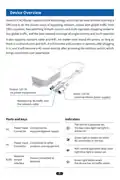




Application Scenario
Switches become 4G routers in seconds.
Wired and WiFi IoT devices become 4G connected in seconds.
Steps to use the Device
Step 1: Device Startup
1.1 Connect power to the device, the dual-color light red light is on, within one minute
the device WiFi is activated, the dual-color light blue light is on.
1.2 If the green light of the device is flashing, the device has no traffic order or the
network has not been registered successfully, if there is no traffic order, please
purchase the traffic order by scanning the upper QR code of the device, if there is
an order, please wait for the device network to be registered successfully.
1.3 When the green light of the device is on for a long time, the network registration of
the device is successful, and the power output port and network interface of the
device will be connected to other external devices or connected to the device WiFi
for use.
Step 2: Purchase a traffic package
2.1 Scan the QR code on your device to enter the mall.
2.2 Click“Device”on the bottom bar to scan the QR code again to bind the device.
2.3 Click“Subscription Packages”on the homepage or“Packages”on the bottom bar
to enter the shopping page, select the desired package, and click the“+”sign to
enter the package details page.
2.4 To check the traffic usage during use, click“Start time”or“End time”on the
package details page to enter the date selection, select the start and end time on
the calendar, and click“OK”. Click the“OK”button to confirm the total number of
days and activated devices, and then click“Pay”to complete the payment.
2.5 Please reboot the device after purchasing the traffic package for the new traffic
package to take effect.
11

| General | Details |
|---|---|
| Name | TUGE TR10NA IOT 4G Router User Guide |
| Make | TUGE |
| Language | English |
| Filetype | PDF (Download) |
| File size | 0.1 MB |
 (1 votes, average: 5.00 out of 5)
 Loading...
If you have any questions regarding TUGE TR10NA IOT 4G Router User Guide, please ask here and describe the problem in detail.


cradlepoint AER1600 LTE Router User Guide

trend T18S-DS 18V Cordless 1-4 Inch Router Instructions

Milesight UF51 5G CPE Router User Guide

neptronic RPB11 BACnet Router Installation Guide

hitron CGNM-2250 Cable Modem Router User Guide

Cisco RV320 Small Gigabit Dual WAN VPN Router User Manual

ZYXEL FWA505 Nebula Router User Guide

MikroTik RBMetalG-52SHPacn Metal Wireless Router User Manual

Tenda RX9 Dual Band Gigabit Wi-Fi 6 Router Instruction Manual

Tenda 4G09V1.0 Wifi Router User Manual