
TUGE TR10NA IOT 4G Router User Guide




Changing WiFi Related Settings
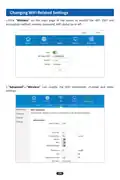
1.Click“Wireless”on the main page of the router to modify the WiFi SSID and
encryption method, wireless password, WiFi status on or off.
2“. Advanced”—“Wireless”can modify the WiFi bandwidth, channel and other
settings.
14

| General | Details |
|---|---|
| Name | TUGE TR10NA IOT 4G Router User Guide |
| Make | TUGE |
| Language | English |
| Filetype | PDF (Download) |
| File size | 0.1 MB |
 (1 votes, average: 5.00 out of 5)
 Loading...
If you have any questions regarding TUGE TR10NA IOT 4G Router User Guide, please ask here and describe the problem in detail.


ASUS GT-BE19000 WiFi 7 Tri Band Gaming Router User Guide

NEXXT NCM-X3000 Bolt AX3000 Router User Guide

ASUS GS-AX3000 Dual Band Gaming Router User Guide

D-Link N300 EAGLE PRO AI N300 4G Router User Guide

SEALEY CP20VTR 20V SV20 Series Cordless Trimming Router Instructions

cradlepoint PepWave MAX BR1 Pro 5G Mobile Router User Guide

NIGHTHAWK RAX5 4 Stream AX1600 Dual Band WiFi 6 Router User Guide

EDiMAX EW-7489WAX Wireless Router Installation Guide

Harvilon MT6833 5G Portable Wi-Fi Hotspot Esim Router User Guide

Tenda AC5 Wi-Fi 5 Router Installation Guide