
TUGE TR10NA IOT 4G Router User Guide




Equipment Management
Use a wireless device such as a cell phone or computer to connect to the Wi-Fi name of
this device, the device Wi-Fi name defaults to the SSID number, see the device label for
the default password.
Login via admin IP
1. The default management address of the device is“192.168.100.1”and the
password is“admin”.
2. Open the browser and enter the default management IP address 192.168.100.1 to
enter the login interface and enter the password to login.
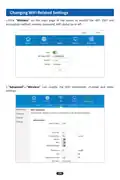
3. After logging in the homepage, you can see the basic information of the network,
and you can switch the language in the upper right corner.
1
2

| General | Details |
|---|---|
| Name | TUGE TR10NA IOT 4G Router User Guide |
| Make | TUGE |
| Language | English |
| Filetype | PDF (Download) |
| File size | 0.1 MB |
 (1 votes, average: 5.00 out of 5)
 Loading...
If you have any questions regarding TUGE TR10NA IOT 4G Router User Guide, please ask here and describe the problem in detail.


Urant UNT8 Wireless Router Installation Guide

DrayTek Vigor2865 Router User Guide

NETGEAR MR6450 5G Mobiler Router Instruction Manual

more eero 6+ TrueMesh Wi-Fi 6 Dual-Band Router User Guide

Cudy LT700 4G LTE CAT 6 Wi-Fi Router Installation Guide

GL-iNet GL-BE3600 Dual Band Wi-Fi 7 Travel Router User Manual

ZYXEL SCR 50AXE Secure Cloud-Managed Router with AXE5400 Tri-Band Wifi 6E User Guide

Cudy WR1500 WiFi 6 Trådløs Router Installation Guide

Cudy X6 AX1800 1800mbps Dual Band Wi-Fi 6 Router Installation Guide

Cudy AC1200 4G LTE Wi-Fi Router Instruction Manual