
Vigor 2136 Series Gigabit Broadband Router User Guide




3. Hardware Installation
This section will guide you to install the router through hardware connection and
configure the router’s settings through web browser.
3.1 Network Connection
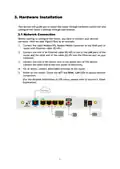
Before starting to configure the router, you have to connect your devices
correctly. Here we take Vigor2136ax as an example.
1. Connect the cable Modem/DSL Modem/Media Converter to any WAN port of
router with Ethernet cable (RJ-45).
2. Connect one end of an Ethernet cable (RJ-45) to one of the LAN ports of the
router and the other end of the cable (RJ-45) into the Ethernet port on your
computer.
3. Connect one end of the power cord to the power port of this device.
Connect the other end to the wall outlet of electricity.
4. For ac series, connect detachable antennas to the router.
5. Power on the router. Check the ACT and WAN, LAN LEDs to assure network
connection.
(For the detailed information of LED status, please refer to section 2. Panel
Explanation)
5

| General | Details |
|---|---|
| Name | Vigor 2136 Series Gigabit Broadband Router User Guide |
| Make | VIGOR |
| Language | English |
| Filetype | PDF (Download) |
| File size | 0.32 MB |
 (1 votes, average: 5.00 out of 5)
 Loading...
If you have any questions regarding Vigor 2136 Series Gigabit Broadband Router User Guide, please ask here and describe the problem in detail.


LINKSYS EA7500 AC1900 Max Stream Wifi Router User Guide

Woodpeckers REV033122 Multi Router Instructions

EWON EC71330 Cosy 131 Ethernet router Installation Guide

TP-Link RM100 Router WiFi 4G LTE 300MBPS User Manual

SEI ROBOTICS SEI540 ATV STB + Wireless Router User Manual

ASUS RT-AX52 AX1800 AiMesh Wireless Router User Guide

Cudy WR3000S AX3000 Gigabit Mesh WiFi 6 Router Installation Guide

TP-Link Archer AX72 AX5400 Multi-Gigabit Wi-Fi 6 Router Installation Guide

OzSpy HAIX1RT2MP Hidden Camera Router User Manual

NETGEAR MR6110 5G WiFi 6 Mobile Router User Guide