
Home > WaterWorld > WaterWorld AX3000 Wireless Dual Band Gigabit Router User Manual
WaterWorld AX3000 Wireless Dual Band Gigabit Router User Manual



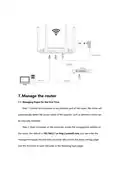




Step 2: Connect the external network port of the router to the LAN port of the
home gateway with a network cable.
Step 3: Connect wireless devices such as mobile phones to the wireless network of
the router, or connect the computer to any network port of the router with a
network cable.
6. Meshnetworking
6.1 Determine the master node: the default of the router is Agent in the factory
state, first of all, we must determine the router that we can now access the Internet
as the Controller router, , the steps of 7.1 to complete the quick setting, The router

| General | Details |
|---|---|
| Name | WaterWorld AX3000 Wireless Dual Band Gigabit Router User Manual |
| Make | WaterWorld |
| Language | English |
| Filetype | PDF (Download) |
| File size | 0.46 MB |
 (1 votes, average: 5.00 out of 5)
 Loading...
If you have any questions regarding WaterWorld AX3000 Wireless Dual Band Gigabit Router User Manual, please ask here and describe the problem in detail.


MEIG SRT838iPro 5G CPE WiFi Router User Manual

TP-Link AC1200 Wireless Dual Band Router Installation Guide

TCL HH40L1 Linkhub Router User Manual

ESUNSTAR AF792 Portable 4G Router User Manual

peplink U8G-P1MT08 MAX Transit Pro E 1Gbps Dual LTE Router Instructions

Cudy P4 Dual Band Whole Home Mesh Wi-Fi Router Installation Guide

GL iNet GL-XE3000NR Puli AX 5G NR Wi-Fi 6 Router User Guide

BROWAN COMMUNICATIONS INCORPORATION MI14 Wi-Fi 6 AX3000 Dual-Radio Router User Guide

ARISTA 7220R Series Enterprise WAN Router Instruction Manual

MERCUSYS MR47BE BE9300 Tri Band WiFi 7 Router User Guide