
westermo Merlin 4700 Series Cellular Router User Guide

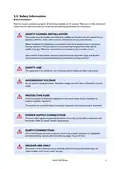


2.2. Safety Information
Before installation:
Read this manual completely and gather all information available on the product. Make sure it is fully understood.
Check that your application does not exceed the safe operating specifications for the product.
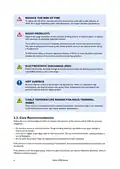
SAFETY DURING INSTALLATION
The product must be installed and operated by qualified service personnel and installed into an
apparatus cabinet or similar, where access is restricted to service personnel only.
Before energising and connecting communication cables to the product, ensure a protective
earthing conductor is first connected to the protective earthing terminal (only valid for
metallic housings). Westermo recommends a cross-sectional area of at least 4 mm2.
Upon removal of the product, disconnect the product from the power supply and all other
communication ports before disconnecting the protective earthing conductor.
SAFETY USE
This equipment is not suitable for use in locations where children are likely to be present.
HAZARDOUS VOLTAGE
Do not open an energised product. Hazardous voltage may occur when connected to a power
supply.
PROTECTIVE FUSE
It must be possible to disconnect manually from the power supply. Ensure compliance to
national installation regulations.
This product has no internal fuse and should be connected via an external fuse for protection.
POWER SUPPLY CONNECTION
There are safety regulations governing the power source that can be used in conjunction with
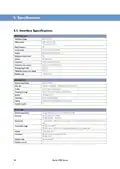
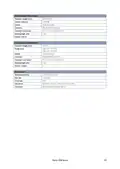
the product. Refer to chapter Interface Specifications.
EARTH CONNECTION
For correct function, the earth connection needs to be properly connected to a designated
protective earthing rail (only valid for metallic housings). Torque: 3.1 Nm.
INDOOR USE ONLY
The device is to be connected only to networks without routing to the outside plant. All
communication ports are for indoor use only.
Merlin 4700 Series
5

| General | Details |
|---|---|
| Name | westermo Merlin 4700 Series Cellular Router User Guide |
| Make | westermo |
| Language | English |
| Filetype | PDF (Download) |
| File size | 0.84 MB |
 (1 votes, average: 5.00 out of 5)
 Loading...
If you have any questions regarding westermo Merlin 4700 Series Cellular Router User Guide, please ask here and describe the problem in detail.

westermo Merlin 4700 Series VDSL Cellular Router User Guide

westermo MRD-405 4G LTE Router User Guide

westermo MRD-455-NA Cellular Router User Guide

Westermo Merlin 4100 Series Cellular Router User Guide

westermo 4400 Cellular Router User Guide


inseego FW2000e Wavemaker 5G Outdoor CPE Router Owner’s Manual

Tenda TX2L ProV1.0 WiFi 6 Router Installation Guide

ASUS TUF-AX4200 TUF Gaming AX4200 Dual Band WiFi Router User Guide

LANCOM SYSTEMS LANCOM OAP-830 Wireless Router User Guide

TRENDNET AX1800 Dual Band Wifi 6 Gigabit Dual Wan VPN SMB Router User Guide

TP-Link AX1800 Gigabit Dual Band Wi-Fi 6 Router User Manual

ASUS GT-AX6000 Dual-Band WiFi 6 Gaming Router User Guide

UBIQUITI UMR-US Mobile Router User Manual

MERCKU M6S Ms Router User Guide

TELTONIKA RUTM30 Compact 5G Router User Guide