
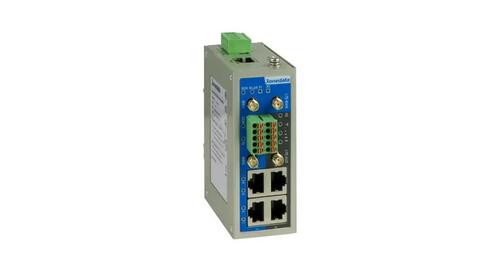
3onedata IRT5300L-5T2D-2P12_36 4G Wireless Router Installation Guide
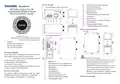


Panel Design
11.
12.
13.
14.
15.
16.
17.
18.
19.
20.
21.
22.
2.4G WiFi antenna interface (WiFi1) RS-
232/485/422 serial port
Serial port indicator (COM)
IO indicator (IO)
IO port (Reserved)
2.4G WiFi antenna interface (WiFi2) LAN
port indicator
100M LAN port
LTE main antenna interface (LTE-MAIN)
4G LTE indicator
LTE signal strength indicator
LTE slave antenna interface (LTE-AUX)
Top view, bottom view and rear view
IRT5300L-5T2D-2P12_36
Industrial 4G Wireless Router
Quick Installation Guide
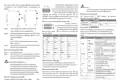
Mounting Dimension
Unit: mm
Front view and side view
3onedata Co., Ltd.
Address: 3/B, Zone 1, Baiwangxin High Technology
Industrial Park, Xili, Nanshan District,
Shenzhen
Tel: +86 0755-26702688
Fax: +86 0755-26703485
【Package Checklist】
Please check whether the package and accessories are intact
while using the industrial 4G router for the first time.
1 4G router x1 2. DIN-Rail mounting attachment
3. WIFI antenna x2 4. LTE antenna x2
5. Power adapter 6. SIM card ejection pin
7. Certification 8. Warranty card
Notice Before Mounting:
Don't place or install the device in area near water or
moisture, keep the relative humidity of the device
surrounding between 5%~95% without
condensation. Before powering on the device, check
the power specifications supported by the device to
prevent device damage due to overvoltage.
The device surface temperature is high after running;
please don't directly contact it to avoid scalding.
1.
2.
3.
4.
5.
6.
7.
8.
9.
10.
RESET button
Terminal block for power supply P1 input
Terminal block for power supply P2 input
SIM card slot
100M WAN port
Grounding screw
If any of these items are damaged or lost, please contact our
company or dealers, we will solve it ASAP.
Product Overview
DIN-Rail mounting kit
This product is DIN-Rail industrial 4G router. The model:
IRT5300L-5T2D-2P12_36 (1 100M WAN + 4 100M LAN + 1
RS-232/485/422 + 2 WiFi antennas + 2 LTE antennas)
Power supply indicator (P1-P2)
Wireless network indicator (WLAN)
Running indicator (RUN)
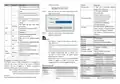
DIN-Rail Mounting

| General | Details |
|---|---|
| Name | 3onedata IRT5300L-5T2D-2P12_36 4G Wireless Router Installation Guide |
| Make | 3onedata |
| Language | English |
| Filetype | PDF (Download) |
| File size | 11.5 MB |
 (1 votes, average: 5.00 out of 5)
 Loading...
If you have any questions regarding 3onedata IRT5300L-5T2D-2P12_36 4G Wireless Router Installation Guide, please ask here and describe the problem in detail.

Vigor 2136 Series Gigabit Broadband Router User Guide

Xiaomi AX9000 Router User Manual

Urant UNT8 Wireless Router Installation Guide

TP-Link AX1800 Wi-Fi Gigabit Dual Band Wireless Router Installation Guide

DrayTek Vigor2135 Gigabit Broadband Router User Guide

trend T1ETS Electric Trim Router Instruction Manual

Milesight UR32S CCTV Router Owner’s Manual

alhua DH-AX18 Wireless Router User Manual

FESTOOL OF 1010 REBQ Electric Handheld Router Instructions

D-Link DIR-836L Wireless N750 Dual Band Gigabit Router Installation Guide