
×
- 1. Rog Rapture Gt-ax6000 Dual-band Gaming Router
- 2. English (Български → Hrvatski → Čeština → Dansk → Nederlands → Eesti)
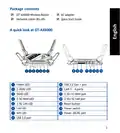
- 3. Package Contents (A Quick Look At Gt-ax6000 → Power Led → 4ghz Led → Ghz Led → Usb 3.2 Gen 1 Port → Lan 1 ~ 4 Ports)
- 4. Position Your Wireless Router (Keep The Wireless Router Away From Metal Obstructions → Always Update To The Latest Firmware → Ensure The Best Wireless Signal)
- 5. Preparing Your Modem
- 6. Setting Up Your Gt-ax6000 (Wired Connection → Wireless Connection)
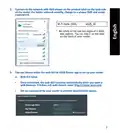
- 7. Connect To The Network With Ssid Shown On The Product Label On The Back Side (Web Gui Setup)
- 8. App Setup (Remembering Your Wireless Router Settings → Faq)
- 9. Бърз Преглед (Gt-ax6000 → Адаптер За Променлив Ток → Ръководство За Бърз Старт → Мрежов Кабел (rj-45) → Бърз Преглед На Вашия Gt-ax6000 → Индикатор На Захранването)
- 10. Разположение На Безжичния Рутер (За Постигане На Максимално Добро Предаване На Безжичните Сигнали → Технически Характеристики)
- 11. Подготовка На Модема (Забележка → Свържете Модема Си Към Рутера → Проверете Вашия Кабел/led Индикаторите)
- 12. Настройка На Gt-ax6000 (Кабелна Връзка → Безжична Връзка)
- 13. Свържете Се Към На Мрежата (ssid) (Wi-fi Име (ssid) → Можете Да Изберете Или Уеб Интерфейс Или Приложението Asus Router За Конфигуриране На Рутера → Настройка На Уеб Интерфейс)
- 14. Настройка На Приложението (Изтеглете Приложението Asus Router → Запаметяване На Безжичните Настройки На Вашия Рутер → Faq)
- 15. Sadržaj (Adapter Izmjeničnog Napajanja → Vodič Za Brzi Početak Rada → Brzi Pregled Uređaja Gt-ax6000 → Priključci Usb 3.2 Gen 1 → ,5g/1g Wan Ulaz → Gumb Za Resetiranje)
- 16. Postavljanje Bežičnog Usmjerivača (Kako Biste Ostvarili Najbolji Prijenos Signala Između Bežičnog Usmjerivača I S Njim Povezanih Mrežnih Uređaja → Tehnički Podaci)
- 17. Pripremanje Modema (Napomena → Unplug → Povežite Modem Na Usmjerivač → Uključite Kabelski/dsl Modem → Pogledajte Led Indikatore Kabelskog/dsl Modema)
- 18. Postavljanje Uređaja Gt-ax6000 (Žična Veza → Bežična Veza)
- 19. Povežite Se Pod Mrežnim (ssid) Prikazanim Na Naljepnici Proizvoda Sa Stražnje Strane Usmjerivača. Za Bolju Sigurnost Mreže, Promijenite Na J…
- 20. Podešavanje Aplikacije (Pamćenje Postavki Bežičnog Usmjerivača → Čpp)
- 21. Obsah Krabice (Stručná Příručka → Stručný Popis Přístroje Gt-ax6000 → Porty Lan 1 ~ 4 → Port Sítě Wan 2,5g/1g (internet) → Port Sítě Lan 2,5g/1g)
- 22. Umístění Směrovače (Udržujte Zařízení Mimo Kovové Překážky → Vždy Zaktualizujte Na Nejnovější Firmware → Poznámka)
- 23. Příprava Modemu (Poznámka → Unplug)
- 24. Nastavení Zařízení (Drátové Připojení → Bezdrátové Připojení)
- 25. Připojte Se K Názvu Sítě (ssid) (Nastavení Přes Webové Grafické Uživatelské Rozhraní)
- 26. Nastavení Pomocí Aplikace (Zapamatování Nastavení Bezdrátového Směrovače → Faq (odpovědi Na Časté Dotazy))
- 27. Pakkens Indhold (Gt-ax6000 → Kvikstartguide → Strøm Led → Usb 3.2 Gen 1-port → Lan 1~4 Porte → 5g/1g Wan-port)
- 28. Placering Af Din Router (Bemærkninge → Specifikationer)
- 29. Forberedelse Af Dit Modem (Bemærk)
- 30. Sådan Indstilles Din Router (Kableforbundet Forbindelse: → Trådløs Forbindelse)
- 31. Opret Forbindelse Til Netværksnavnet (ssid) (Opsætning Via Webgrænsefladen)
- 32. Opsætning Via Appen (Sådan Husker Du Dine Trådløse Routerindstillinger → Ofte Stillede Spørgsmål (faq))
- 33. Inhoud (Wisselstroomadapter → Beknopte Handleiding → Gt-ax6000 → Een Snelle Blik → Voedings-led → Usb 3.2 Gen. 1-poort)
- 34. Uw Draadloze Router Plaatsen (Voor De Beste Draadloze Signaaltransmissie Tussen De Draadloze Router En De Netwerkapparaten Die Erop Zijn Aangesloten, Moet U Het Volgende Doen: → Opmerking: → Specificaties:)
- 35. Uw Modem Voorbereiden (Koppel De Voedingskabel/dsl-modem Los → Opmerking: Ials U Dsl Voor Internet Gebruikt → Sluit Uw Modem Aan Op De Router → Schakel Uw Kabel/dsl-modem In → Controleer Of De Led Van De Kabel/dsl-modem Oplicht)
- 36. De Router Installeren (U Kunt Uw Router Instellen Via → Bekabelde Aansluiting → Draadloze Verbinding)
- 37. Maak Verbinding Met De Netwerknaam (ssid) (Instelling Grafische Webinterface)
- 38. App-instelling (Veelgestelde Vragen (faqs))
- 39. Pakendi Sisu (Kiire Ülevaade Ruuterile Gt-ax6000 → Toite Led Indikaator → ,4ghz Led Indikaator → Ghz Led Indikaator → Usb 2.0 Pordid → Usb 3.2 Gen 1 Pordid)
- 40. Traadita Ruuteri Paigutamine (Traadita Signaali Parimaks Edastuseks → Värskendage Süsteemi Alati Uusima Püsivaraga → Parima Kvaliteediga Traadita Signaali Tagamiseks → Märkused)
- 41. Teie Modemi Ettevalmistus (Märkus: → Unplug)
- 42. Ruuteri Häälestamine (Traadiga Ühendus → Traadita Ühendus)
- 43. Looge Ühendus Võrguga, Mille Nimi (ssid) On Toodud Ruuteri Tagaküljel Asuval Tootesildil. Võrgu Turvalisuse Suurendamiseks Valige Kordumatu …
- 44. Rakenduse Seadistamine (Traadita Ruuteri Sätete Meeles Pidamine → Korduma Kippuvad Küsimused (kkk))
- 45. Contenu De La Boîte (Aperçu Rapide De Votre Routeur Gt-ax6000 → Voyant D'alimentation → Voyant De Bande 2,4 Ghz → Voyant De Bande 5 Ghz → Port Usb 3.2 Gen 1 → Ports Réseau Local (lan) 1 À 4)
- 46. Placer Le Routeur Wi-fi (Optimisation De La Transmission Du Signal Wi-fi → Mise À Jour Du Routeur → Orientation Des Antennes Externes → Remarques)
- 47. Préparer Votre Modem
- 48. Configurer Votre Gt-ax6000 (Connexion Filaire → Connexion Wi-fi)
- 49. Connectez-vous Au Réseau Dont Le Nom (ssid) Est Affiché Sur L'étiquette Du Produit Située À L'arrière Du Routeur. Pour Garantir Une Plus Gra…
- 50. Configuration Via L'application (Asus Router → Se Rappeler Des Paramètres De Votre Routeur Wi-fi → Faq)
- 51. Pakkauksen Sisältö (Katsaus Gt-ax6000-sovellukseen → Virran Led-valo → ,4 Ghz Led-valo → Ghz Led-valo → Usb 3.2 Gen 1-portti → Nollauspainike)
- 52. Reitittimen Sijoittaminen (Varmistaaksesi Parhaan Signaalin Lähetyksen Langattoman Reitittimen Ja Siihen Liitettyjen Verkkolaitteiden Välillä, Tarkista, Että: → Päupdated Aina Uusimman Laiteohjelmiston. → Parhaan Mahdollisen Langattoman Signaalin Aikaansaamiseksi Suuntaa Neljä. → Huomaa: → Tekniset Tiedot:)
- 53. Modeemin Valmistelu (Huomautus → Unplug → Liitä Modeemi Reitittimeen → Kytke Virta Päälle → Tarkista Kaapelin/dsl-modeemin Led-valot)
- 54. Gt-ax6000:n Asettaminen (Langallinen Yhteys → Langaton Yhteys)
- 55. Koble Til Nettverksnavnet (ssid) Som Står Etiketten På Baksiden Av Ruteren. (Nettverkssikkerheten Kan Forbedres Ved At Du Bytter Ssid Og Velger Et Passord. → Graafisen Web-käyttöliittymän Asetus)
- 56. Sovelluksen Asetus (Asus Router → Langattoman Reitittimen Asetusten Muistaminen → Usein Kysyttyä (faq))
- 57. Verpackungsinhalt (Ihr Gt-ax6000 Auf Einen Blick → Betriebs-led → ,4-ghz-led → Ghz-led → Usb 3.2 (gen1)-anschluss → Lan-anschlüsse 1 ~ 4)
- 58. Platzieren Sie Ihren Wlan-router (Hinweise)
- 59. Ihr Modem Vorbereiten (Trennen → Hinweis)
- 60. Einrichten Ihres Gt-ax6000 (Kabelverbindung → Drahtlosverbindung)
- 61. Verbinden Sie Sich Mit Dem Netzwerk (Einrichtung Über Die Web-benutzeroberfläche)
- 62. Einrichtung Über Die App (Notieren Der Wlan-einstellungen Ihres Routers → Faq (häufig Gestellte Fragen))
- 63. Περιεχόμενα Συσκευασίας (Ασύρματος Δρομολογητής Gt-ax6000 → Καλωδιακού Δικτύου (rj-45) → Μετασχηματιστής Ρεύματος → Οδηγός Γρήγορης Έναρξης → Μια Γρήγορη Ματιά)
- 64. Τοποθέτηση Του Δρομολογητή Σας (Διατήρηση Της Συσκευής → Ενημέρωση Υλικολογισμικού → Προσανατολισμός Κεραίων → Τεχνικές Προδιαγραφές)
- 65. Προετοιμάστε Το Μόντεμ Σας (Αποσυνδέστε Το Καλώδιο Τροφοδοσίας/μόντεμ → Σημειωση: Αν Χρησιμοποιείτε Dsl Για Το Internet, Θα Χρειαστείτε Το Όνομα Χρήστη/κωδικό Πρόσβασης Από Τον Πάροχο Υπηρεσιών Internet (isp) Για Τη Σωστή Διαμόρφωση Του Δρομολογητή. → Συνδέστε Το Μόντεμ Στον Δρομολογητή Με Το Παρεχόμενο Καλώδιο Δικτύου. → Ενεργοποιήστε Το Καλώδιο/μόντεμ Dsl. → Ελέγξτε Τις Λυχνίες Led Του Καλωδίου/μόντεμ Dsl Για Να Βεβαιωθείτε Ότι Η Σύνδεση Είναι Ενεργή.)
- 66. Εγκατάσταση (Ενσύρματη Σύνδεση → Ασύρματη Σύνδεση)
- 67. Συνδεθείτε Στο Όνομα Δικτύου (ssid) (Εγκατάσταση Web Gui)
- 68. Εγκατάσταση Εφαρμογής (Πώς Να Θυμάστε Τις Ρυθμίσεις Του Ασύρματου Δρομολογητή → Συχνές Ερωτήσεις (faq))
- 69. Contenido Del Paquete (Gyors Üzembe Helyezési Útmutató → Gyors Áttekintése → Bekapcsolt Állapot Led → 4ghz Led → Ghz Led → Usb 3.2-es, 1. Generációs Port)
- 70. A Router Elhelyezése (A Vezeték Nélküli Router És A Hálózati Eszközök Közötti Legjobb Vezeték Nélküli Jelátvitel Érdekében Gondoskodjon A Következőkről: → Firmware Frissítése → Műszaki Adatok)
- 71. A Modem Előkészítése (Unplug → Csatlakoztassa A Modemet A Routerhez → Kapcsolja Be A Kábel-/dsl-modemet → Ellenőrizze A Kábel-/dsl-modem Led Jelzőfényeit)
- 72. Az Beállítása (Vezetékes Kapcsolat → Vezeték Nélküli Kapcsolat)
- 73. Csatlakozzon A Router Hátlapján Lévő Címkén Feltüntetett Hálózathoz (ssid). (A Router Beállításához Válassza A Weben Keresztül Elérhető Grafikus Felhasználói Felületet Vagy Az Asus Router Alkalmazást. → Beállítás A Webes Grafikus Felhasználói Felületen)
- 74. Beállítás Az Alkalmazással (Asus Router → A Vezeték Nélküli Router Beállításainak Megjegyzése → Gyakran Ismételt Kérdések (gyik))
- 75. Contenuto Della Confezione (Aspetto Del Vostro Gt-ax6000 → Led Di Alimentazione → Porta Usb 3.2 Gen 1 → Porte Lan 1 ~ 4 → Porta Wan 2,5g/1g → Pulsante Di Reset)
- 76. Posizionamento Del Vostro Router Wireless (Per Ottenere Una Migliore Trasmissione Del Segnale Tra Il Router Wireless E I Dispositivi Di Rete Connessi Assicuratevi Di: → Aggiornate Sempre All'ultimo Firmware Disponibile. → Note: → Specifiche:)
- 77. Preparazione Del Modem (Unplug)
- 78. Installazione Di Gt-ax6000 (Connessione Cablata → Connessione Senza Fili)
- 79. Stabilite La Connessione Alla Rete Senza Fili (Configurazione Tramite Interfaccia Web Gui)
- 80. Configurazione Tramite App (Asus Router → Prendete Nota Delle Impostazioni Del Router Wireless → Faq)
- 81. Pakuotės Turinys (Grei Engimo Darbui Vadovas → Trumpa Įrenginio Gt-ax6000 Apžvalga)
- 82. Vietos Išrinkimas Belaidžiam Maršruto Parinktuvui (Belaidžio Signalo Stiprinimas → Programinės Aparatinės Įrangos Atnaujinimas → Specifikacijos)
- 83. Modemas (Pastaba: Jei Naudojate Dsl Internetui, Norint Tinkamai Konfigūruoti Kelvedį Jums Prireiks Naudotojo Vardo Ir Slaptažodžio.)
- 84. Gt-ax6000 Nustatymas (Laidinis Ryšys → Žiniatinklio Naudotojo Sąsaja → Nustatykite Savo Kelvedžio Slaptažodį → Belaidis Ryšys)
- 85. Prisijunkite Prie Tinklo Naudodami Pavadinimą (ssid) (Asus Kelvedžio Programėlė → Internetinio Gui Sąranka)
- 86. Programėlės Sąranka (Įsiminkite Savo Belaidžio Kelvedžio Nustatymus → Duk)
- 87. Iepakojuma Saturs (Maiņstrāvas Adapteris → Tīkla Kabelis (rj-45) → Padomi Ātrai Darba Uzsākšanai → Īss Apraksts → Barošanas Led → Usb 3.2 Gen 1 Osta)
- 88. Bezvadu Maršrutētāja Novietošana (Ierīce Nav Novietota Blakus Metāliskiem Priekšmetiem Un Tiešā Saules Gaismā → Vienmēr Atjauniniet Jaunāko Programmatūru → Piezīmes → Tehniskie Dati)
- 89. Jūsu Modems Tiek Sagatavots Darbam (Unplug → Pievienojiet Modemu Maršrutētājam Ar Komplektā Esošo Tīkla Kabeli. → Pieslēdziet Barošanu Kabelim / Dsl Modemam. → Pārbaudiet Kabeļa / Dsl Modema Led Gaismiņas, Lai Pārliecinātos, Ka Savienojums Ir Aktīvs.)
- 90. Gt-ax6000 (Savienojums Ar Vadiem → Bezvadu Savienojums)
- 91. Pievienojieties Tīklam (Maršrutētāja Iestatīšanai → Tīmekļa Gui Iestatīšana)
- 92. Lietotnes Iestatīšana (Bezvadu Maršrutētāja Iestatījumu Atcerēšanās → Biežāk Uzdotie Jautājumi (faq))
- 93. Innhold I Pakken (En Snartitt → Strøm Led → ,4ghz Led → Ghz Led → Usb 3.2 Gen 1-port → Lan 1~4 Porter)
- 94. Plassere Ruteren (Omgivelsesforhold)
- 95. Forbereder Modemet (Iskopčajte Kabel Za Napajanje/dsl Modem → Napomena → Koble Modemet Til Ruteren Med Den Medfølgende Nettverkskabelen → Slå På Kabel-/dsl-modemet → Se Led-lampen På Kabel-/dsl-modemet For Å Kontrollere At Forbindelsen Er Aktiv)
- 96. Sette Opp Gt-ax6000 (Kablet Tilkobling → Trådløs Tilkobling)
- 97. Koble Til Nettverksnavnet (ssid) (Nettverkssikkerheten Kan Forbedres → Asus Route → Oppsett Med Web-brukergrensesnitt)
- 98. Oppsett Med App (Huske Innstillinger For Den Trådløse Ruteren → Spørsmål Og Svar)
- 99. Conteúdo Da Embalagem (Visão Geral Do Seu Gt-ax6000 → Led De Alimentação → Porta Usb 3.2 Geral 1 → Porta Wan 2,5g/1g → Botón Restablecer → Interruptor De Energia)
- 100. Colocação Do Router (Especificações)
- 101. Preparar O Modem (Unplug)
- 102. Configurar O Gt-ax6000 (Ligação Com Fios → Ligação Sem Fios)
- 103. Ligue Ao Nome De Rede (ssid) Indicado Na Etiqueta Do Produto Colada Na Traseira Do Router. Para Uma Maior Segurança De Rede, Mude Para Um Ss…
- 104. Configuração Com A Aplicação (Memorizar As Definições Do Seu Router Sem Fios → Perguntas Frequentes)
- 105. Zawartość Opakowania (Szybki Przegląd Routera Gt-ax6000 → Power Led → Port Usb 3.2 Gen 1 → Port Wan 2.5g /1g → Przycisk Reset → Port Wejścia Zasilania (wejście Prądu Stałego))
- 106. Pozycjonowanie Routera (Dla Zapewnienia Najlepszej Transmisji Sygnału Bezprzewodowego Pomiędzy Routerem Bezprzewodowym A Podłączonymi Urządzeniami Sieciowymi Należy Upewnić Się, Że:)
- 107. Przygotowanie Modemu (Uwaga)
- 108. Konfiguracja Gt-ax6000 (Połączenie Przewodowe → Połączenie Bezprzewodowe)
- 109. Nawiąż Połączenie Z Siecią (Konfiguracja Przez Graficzny Interfejs Użytkownika (gui) Strony Sieci Web)
- 110. Konfiguracja Przez Aplikację (Zapisanie Ustawień Routera Bezprzewodowego → Często Zadawane Pytania (faq) → Obsługa Klienta)
- 111. Комплект Поставки (Беспроводной Роутер Gt-ax6000 → Краткое Руководство → Быстрый Обзор Gt-ax6000 → Индикатор Питания → Порты Lan 1 ~ 4 → Порт Wan 2,5 Гбит/с / 1гбит/с)
- 112. Расположение Беспроводного Роутера (Для Улучшения Беспроводной Связи Между Роутером И Беспроводными Устройствами → Используйте Последнюю Прошивку → Температура При Работе → Влажность При Работе)
- 113. Подготовка Модема (Примечание)
- 114. Установка Роутера (Проводное Подключение → Беспроводное Подключение)
- 115. Подключитесь К Сети (ssid) (В Целях Безопасности Смените Ssid И Назначьте Пароль → Настройка Через Веб-интерфейс)
- 116. Настройка Через Приложение (Запоминание Настроек Беспроводного Роутера → Faq)
- 117. Conteúdo Da Embalagem (O Privire Rapidă Asupra Dispozitivului Gt-ax6000 → Led Alimentare → Port Usb 3.2 Gen 1 → Port Wan (internet) → Buton Resetare → Comutator Pornire/oprire)
- 118. Poziţionarea Ruterului (Pentru Transmisia Optimă A Semnalului Fără Fir → Actualizaţi Întotdeauna La Cel Mai Recent Firmware → Utilizaţi Numai Adaptorul Livrat În Pachet → Specificaţii)
- 119. Pregătirea Modemului (Deconectaţi Modemul Dsl/prin Cablu → Conectaţi Modemul La Ruter → Porniţi Modemul Dsl/prin Cablu → Verificaţi Indicatoarele Luminoase Led)
- 120. Configurarea Dispozitivului (Conexiune Cu Fir → Conexiune Fără Fir)
- 121. Conectaţi-vă La De Reţea (ssid) Afişat Pe Eticheta De Produs De Pe Partea Din Spate A Ruterului. Pentru O Securitate De Reţea Mai Bună, Modi…
- 122. Configurare Prin Aplicaţie (Descărcaţi Aplicaţia Ruterului Asus → Memorarea Setărilor Ruterului Fără Fir → Întrebări Frecvente (faq))
- 123. Contenido Del Paquete (Un Vistazo Rápido A Su Gt-ax6000 → Led De Alimentación → Puerto Usb 3.2 Gen 1 → Lan 1~4 Puertos → Puerto Wan De 2,5 Gb/1 Gb → Botón Restablecer)
- 124. Ubicar El Router Inalámbrico (Especificaciones)
- 125. Preparar El Módem (Nota: Si Utiliza Dsl Para Internet, Necesitará El Nombre De Usuario Y La Contraseña De Su Proveedor De Servicio De Internet (isp) Para Configurar Adecuadamente El Router.)
- 126. Configurar El Gt-ax6000 (Conexión Cableada → Conexión Inalámbrica)
- 127. Conéctese Al Nombre De Red (ssid) Mostrado En La Etiqueta Del Producto Que Se Encuentra En La Parte Posterior Del Router. Para Mejorar La Se…
- 128. Configuración Mediante La App (Descargue La Aplicación Asus Router → Recordar La Configuración Del Router Inalámbrico → Preguntas Más Frecuentes (p+f))
- 129. Sadržaj Paketa (Kratak Pregled Vašeg Gt-ax6000 → Svetleća Dioda Za Napajanje → Port Usb 3.2 Gen 1 → Taster Za Resetovanje → Prekidač Za Napajanje → Port Za Napajanje (dcin))
- 130. Postavljanje Vašeg Bežičnog Rutera (Za Najbolji Prenos Bežičnog Signala Između Bežičnog Rutera I Mrežnih Uređaja → Uvek Ažurirajte Na Najnoviji Firmver → Napomene)
- 131. Priprema Vašeg Modema (Napomena: Ukoliko Koristite Dsl Za Internet, Biće Vam Potrebni Korisničko Ime/lozinka Od Vašeg Internet Provajdera (isp) Da Ispravno Konfigurišete Ruter. → Povežite Svoj Modem Za Ruter Uz Pomoć Priloženog Mrežnog Kabla. → Uključite Svoj Kabl/dsl Modem. → Proverite Led Lampice Svog Kabla/dsl Modema Da Proverite Da Je Veza Aktivna.)
- 132. Podešavanje Vašeg Gt-ax6000 (Povezivanje Kablom → Bežično Povezivanje)
- 133. Povežite Se Za Ime Mreže (ssid) Prikazano Na Etiketi Proizvoda Na Poleđini Rutera. Za Bolju Bezbednost Mreže, Pređite Na Jedinstveni Ssid I …
- 134. Podešavanje Aplikacije (Pamćenje Podešavanja Bežičnog Rutera → Često Postavljana Pitanja (faqs) → Hitna Linija Za Potrošače → Uputstvo Za Korišćenje)
- 135. Obsah (Stručný Návod Na Obsluhu → Stručný Prehľad Vášho Zariadenia Gt-ax6000 → Led Indikátor Napájania → Port Usb 3.2 Gen 1 → Porty Lan 1 ~ 4 → Tlačidlo Na Resetovanie)
- 136. Umiestnenie Smerovača Bezdrôtovej Komunikácie (Najlepší Prenos Bezdrôtového Signálu → Umiestnenie Zariadenia → Aktualizácia Firmvéru → Najlepší Bezdrôtový Signál → Používanie Adaptéra → Špecifikácie)
- 137. Príprava Modemu (Unplug)
- 138. Inštalácia (Káblové Pripojenie → Bezdrôtové Pripojenie)
- 139. Pripojte Do Siete S Názvom (ssid) (Nastavenie Smerovača → Web Gui Setup)
- 140. App Setup (Uchovanie Údajov O Nastaveniach Bezdrôtového Smerovača → Často Kladené Otázky (faq))
- 141. Vsebina Paketa (Hiter Pogled Na Vaš Gt-ax6000 → Adapter Za Izmenični Tok → Omrežni Kabel (rj-45) → Vhod Usb 3,2 Gen 1 → Vhodi Lan 1~4 → Vhod 2,5g/1g Wan (internet))
- 142. Nastavitev Položaja Vašega Brezžičnega Usmerjevalnika (Postavite Brezžični Usmerjevalnik V Središčno Območje Za Najboljšo Brezžično Pokritost Omrežnih Naprav. → Vedno Posodabljajte Na Najnovejšo Strojno Programsko Opremo. → Tehnični Podatki)
- 143. Prioprava Modema (Izklopite Kabelski Modem/modem Dsl → Opomba → Priključite Modem Na Usmerjevalnik → Vklopite Kabelski Modem/modem Dsl → Preverite Lučke Led Kabelskega Modema/modema Dsl)
- 144. Nastavitev Usmerjevalnika Gt-ax6000 (Žična Povezava → Brezžična Povezava)
- 145. Vzpostavite Povezavo Z Omrežjem (ssid) (Nastavitev Usmerjevalnika → Nastavitev S Spletnim Gui)
- 146. Nastavitev Z Aplikacijo (Shranjevanje Nastavitev Brezžičnega Usmerjevalnika → Pogosto Zastavljena Vprašanja (faqs))
- 147. Förpackningens Innehåll (En Snabbtitt På Din Gt-ax6000 → Strömlampa → ,4ghz Led → Ghz Led → Usb 3.2 Gen 1 Port → Lan 1~4 Portar)
- 148. Placera Din Router (Specifikationer)
- 149. Förbered Ditt Modem (Anslut Ditt Modem Till Routern → Slå På Strömkabeln/dsl-modemet → Kontrollera Kabelns/dsl-modemets Lysdioder)
- 150. Inställning Av Router (Kabelanslutning → Trådlös Anslutning)
- 151. Anslut Till Nätverkets Namn (ssid) (Inställning Av Webbanvändargränssnitt)
- 152. App-inställning (Hämta Asus Router-app För Att Ställa In → Kom Ihåg Dina Trådlösa Routerinställningar → Vanliga Frågor)
- 153. Paket Içeriği (Gt-ax6000 Cihazınıza Hızlı Bir Bakış → Güç Led → Usb 3.2 Gen 1 Bağlantı Noktası → Lan 1 ~ 4 Bağlantı Noktaları → ,5g/1g Wan Port → Sýfýrla Düðmesi)
- 154. Yönlendiricinizi Yerleştirme (Kablosuz Sinyal Aktarımı Için Aşağıdakileri Sağlayınız → Ağ Aygıtları Için Maksimum Kablosuz Kapsama → Aygıtı Engelleyici Metal Cisimlerden Uzak Tutun → Daima En Son Aygıt Yazılımına Yükseltin → En Iyi Kablosuz Sinyalin Alındığından Emin Olmak Için → Teknik Özellikler)
- 155. Modeminizi Hazırlama (Kablo/dsl Modemi Kapatın → Internet Servis Sağlayıcınızdan Kullanıcı Adınızı/şifrenizi Almanız Gerekecektir → Modeminizi Yönlendiriciye Bağlayın → Bağlantının Etkin Olduğundan Emin Olun)
- 156. Gt-ax6000 Aygıtınızı Kurma (Kablolu Bağlantı → Kablosuz Bağlantı)
- 157. Yönlendiricinin Arka Tarafındaki Ürün Etiketinde Gösterilen Ağ Adına (ssid) Bağlanın. (Yönlendiricinizi Kurmak Için Ister Web Grafiksel Kullanıcı Arayüzünü Isterseniz De Asus Router Uygulamasını Tercih Edebilirsiniz. → Web Grafiksel Kullanıcı Arayüzü Kurulumu)
- 158. Uygulama Kurulumu (Asus Router → Sık Sorulan Sorular (ssslar) → Müşteri Yardım Hattı)
- 159. До Комплекту Входять (Швидкий Огляд → Адаптер Змінного Струму → Мережевий Кабель (rj-45) → Керівництво Для Початку Експлуатації → Порти Usb 3.2 Gen 1 → Порти Lan 1~4)
- 160. Розташування Бездротового Маршрутизатора (Технічні Характеристики)
- 161. Підготовка Модема (Вимкніть З Мережі Шнур Живлення/модем Dsl → Примітка → Підключіть Модем До Маршрутизатора → Підключіть До Електромережі Шнур Живлення/модем Dsl → Перевірте Шнур/світлодіодні Індикатори Модема Dsl)
- 162. Налаштування (Дротове Підключення → Бездротове Підключення)
- 163. Підключіться До Мережевої Назви (ssid) (Налаштування Через Графічний Веб-інтерфейс)
- 164. Налаштування Через Програму (Завантажте Програму Маршрутизатора Asus → Як Запамятати Налаштування Бездротового Маршрутизатора → Розповсюджені Питання)
- 165. האריזת תכולת Gt-ax6000 (ראוטר אלחוטי → מדריך השימוש → יציאות Lan 1~4 → יציאת 2.5g/1g Wan → נורית הפעל → לחצן Wps)
- 166. מיקום המכשירים והנתב (הכיסוי האלחוטי → עדכוני קושחה → האותות של איבוד → מפרטים)
- 167. הכנת סולל (הערה → Unplug → חבר כבל/dsl → הדלק את המודם → בדוק שנוריות החיווי → לוודא שהחיבור תקין)
- 168. הגדרת הראוטר (חיבור אלחוטי → חיבור כבל)
- 169. Wi-fi (ssid) (אבטחת הרשת → Asus Router → Gui- בממשק → הגדרה)
- 170. הגדרה (הפעל את ה-wi-fi → הגדרות הראוטר → שאלות נפוצות → מידע נוסף → עדכון קושחה → שירות לקוחות)
×
ASUS GT-AX6000 Dual Band Gaming Router User Guide


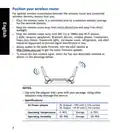














Position your wireless router
For optimal wireless transmission between the wireless router and connected
wireless devices, ensure that you:
•
•
•
Place the wireless router in a centralized area for a maximum wireless coverage
for the network devices.
Keep the wireless router away from metal obstructions and away from direct
sunlight.
Keep the wireless router away from 802.11g or 20MHz only Wi-Fi devices,
2.4GHz computer peripherals, Bluetooth devices, cordless phones, transformers,
heavy-duty motors, fluorescent lights, microwave ovens, refrigerators, and other
industrial equipment to prevent signal interference or loss.
Always update to the latest firmware. Visit the ASUS website at
http://www.asus.com to get the latest firmware updates.
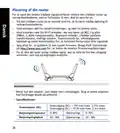
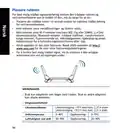
To ensure the best wireless signal, orient the four non-detachable antennas as
shown i n the drawings below.
•
•
NOTES:
•
Use only the adapter that came with your package. Using other
adapters may damage the device.
•
Specifications:
DC Power adapter
DC Output: +19V with 2.37A current
DC Output: +19.5V with 2.31A current
Operating Temperature 0~40oC
Storage
Storage
0~70oC
Operating Humidity
50~90%
20~90%
4

| General | Details |
|---|---|
| Name | ASUS GT-AX6000 Dual Band Gaming Router User Guide |
| Make | Asus |
| Language | English |
| Filetype | PDF (Download) |
| File size | 3.19 MB |
 (1 votes, average: 5.00 out of 5)
 Loading...
If you have any questions regarding ASUS GT-AX6000 Dual Band Gaming Router User Guide, please ask here and describe the problem in detail.

ASUS RT-AC86U AC2900 WiFi Gaming Router User Guide

ASUS AC1750 WiFi Dual Band Wireless Internet Router User Guide

ASUS TUF-AX5400 Dual Band WiFi 6 Router User Guide

ASUS ET12 ZenWiFi Pro AXE11000 Tri Band Router User Guide

ASUS RT-AX82U V2 AX5400 Dual Band WiFi Router User Guide

ASUS TUF-AX4200 Dual Band WiFi Router User Guide

ASUS GT-AX6000 Dual Band WiFi 6 Extendable Gaming Router User Guide

ASUS RT-N10U 150 mbps Wireless Router Instructions

ASUS RT-BE96U Tri Band WiFi Router User Guide

ASUS RT-BE88U Dual Band WiFi Router User Guide


Tenda RX27 Pro AX5700 Tri Band Gigabit Wi-Fi 6E Router Installation Guide

TP-Link AXE7800 Tri-Band Wi-Fi 6E Router Installation Guide

MR2000 Series Linksys Hydra 6 AX3000 Dual Band WiFi 6 Router User Guide

Peplink SDX Pro 24Gbps Modular Enterprise Branch Router User Guide

NETGEAR RAX5 Model AX1600 WiFi 6 Router User Guide

dahua DH-MAX18-3 MAX18 Mesh Wireless Router User Guide

ADTRAN 1200824G1 Netvanta 3458 Access Router User Guide

cradlepoint E110 Enterprise Branch Router User Manual

SWAGTEK M1C 4G LTE Mobile Router Installation Guide

Cisco RV160W Router User Guide
Table of Contents
- 1. Rog Rapture Gt-ax6000 Dual-band Gaming Router →
- 2. English - Български →
- 3. Package Contents - A Quick Look At Gt-ax6000 →
- 4. Position Your Wireless Router - Keep The Wireless Router Awa... →
- 5. Preparing Your Modem →
- 6. Setting Up Your Gt-ax6000 - Wired Connection →
- 7. Connect To The Network With Ssid Shown On The Product Label ... →
- 8. App Setup - Remembering Your Wireless Router Settings →
- 9. Бърз Преглед - Gt-ax6000 →
- 10. Разположение На Безжичния Рутер - За Постигане На Максимално... →
- 11. Подготовка На Модема - Забележка →
- 12. Настройка На Gt-ax6000 - Кабелна Връзка →
- 13. Свържете Се Към На Мрежата (ssid) - Wi-fi Име (ssid) →
- 14. Настройка На Приложението - Изтеглете Приложението Asus Rout... →
- 15. Sadržaj - Adapter Izmjeničnog Napajanja →
- 16. Postavljanje Bežičnog Usmjerivača - Kako Biste Ostvarili Naj... →
- 17. Pripremanje Modema - Napomena →
- 18. Postavljanje Uređaja Gt-ax6000 - Žična Veza →
- 19. Povežite Se Pod Mrežnim (ssid) Prikazanim Na Naljepnici Proi... →
- 20. Podešavanje Aplikacije - Pamćenje Postavki Bežičnog Usmjeriv... →
- 21. Obsah Krabice - Stručná Příručka →
- 22. Umístění Směrovače - Udržujte Zařízení Mimo Kovové Překážky →
- 23. Příprava Modemu - Poznámka →
- 24. Nastavení Zařízení - Drátové Připojení →
- 25. Připojte Se K Názvu Sítě (ssid) - Nastavení Přes Webové Graf... →
- 26. Nastavení Pomocí Aplikace - Zapamatování Nastavení Bezdrátov... →
- 27. Pakkens Indhold - Gt-ax6000 →
- 28. Placering Af Din Router - Bemærkninge →
- 29. Forberedelse Af Dit Modem - Bemærk →
- 30. Sådan Indstilles Din Router - Kableforbundet Forbindelse: →
- 31. Opret Forbindelse Til Netværksnavnet (ssid) - Opsætning Via ... →
- 32. Opsætning Via Appen - Sådan Husker Du Dine Trådløse Routerin... →
- 33. Inhoud - Wisselstroomadapter →
- 34. Uw Draadloze Router Plaatsen - Voor De Beste Draadloze Signa... →
- 35. Uw Modem Voorbereiden - Koppel De Voedingskabel/dsl-modem Lo... →
- 36. De Router Installeren - U Kunt Uw Router Instellen Via →
- 37. Maak Verbinding Met De Netwerknaam (ssid) - Instelling Grafi... →
- 38. App-instelling - Veelgestelde Vragen (faqs) →
- 39. Pakendi Sisu - Kiire Ülevaade Ruuterile Gt-ax6000 →
- 40. Traadita Ruuteri Paigutamine - Traadita Signaali Parimaks Ed... →
- 41. Teie Modemi Ettevalmistus - Märkus: →
- 42. Ruuteri Häälestamine - Traadiga Ühendus →
- 43. Looge Ühendus Võrguga, Mille Nimi (ssid) On Toodud Ruuteri T... →
- 44. Rakenduse Seadistamine - Traadita Ruuteri Sätete Meeles Pida... →
- 45. Contenu De La Boîte - Aperçu Rapide De Votre Routeur Gt-ax60... →
- 46. Placer Le Routeur Wi-fi - Optimisation De La Transmission Du... →
- 47. Préparer Votre Modem →
- 48. Configurer Votre Gt-ax6000 - Connexion Filaire →
- 49. Connectez-vous Au Réseau Dont Le Nom (ssid) Est Affiché Sur ... →
- 50. Configuration Via L'application - Asus Router →
- 51. Pakkauksen Sisältö - Katsaus Gt-ax6000-sovellukse... →
- 52. Reitittimen Sijoittaminen - Varmistaaksesi Parhaan Signaalin... →
- 53. Modeemin Valmistelu - Huomautus →
- 54. Gt-ax6000:n Asettaminen - Langallinen Yhteys →
- 55. Koble Til Nettverksnavnet (ssid) Som Står Etiketten På Baksi... →
- 56. Sovelluksen Asetus - Asus Router →
- 57. Verpackungsinhalt - Ihr Gt-ax6000 Auf Einen Blick →
- 58. Platzieren Sie Ihren Wlan-router - Hinweise →
- 59. Ihr Modem Vorbereiten - Trennen →
- 60. Einrichten Ihres Gt-ax6000 - Kabelverbindung →
- 61. Verbinden Sie Sich Mit Dem Netzwerk - Einrichtung Über Die W... →
- 62. Einrichtung Über Die App - Notieren Der Wlan-einstellungen I... →
- 63. Περιεχόμενα Συσκευασίας - Ασύρματος Δρομολογητής Gt-ax6000 →
- 64. Τοποθέτηση Του Δρομολογητή Σας - Διατήρηση Της Συσκευής →
- 65. Προετοιμάστε Το Μόντεμ Σας - Αποσυνδέστε Το Καλώδιο Τροφοδοσ... →
- 66. Εγκατάσταση - Ενσύρματη Σύνδεση →
- 67. Συνδεθείτε Στο Όνομα Δικτύου (ssid) - Εγκατάσταση Web Gui →
- 68. Εγκατάσταση Εφαρμογής - Πώς Να Θυμάστε Τις Ρυθμίσεις Του Ασύ... →
- 69. Contenido Del Paquete - Gyors Üzembe Helyezési Útmutató →
- 70. A Router Elhelyezése - A Vezeték Nélküli Router És A Hálózat... →
- 71. A Modem Előkészítése - Unplug →
- 72. Az Beállítása - Vezetékes Kapcsolat →
- 73. Csatlakozzon A Router Hátlapján Lévő Címkén Feltüntetett Hál... →
- 74. Beállítás Az Alkalmazással - Asus Router →
- 75. Contenuto Della Confezione - Aspetto Del Vostro Gt-ax6000 →
- 76. Posizionamento Del Vostro Router Wireless - Per Ottenere Una... →
- 77. Preparazione Del Modem - Unplug →
- 78. Installazione Di Gt-ax6000 - Connessione Cablata →
- 79. Stabilite La Connessione Alla Rete Senza Fili - Configurazio... →
- 80. Configurazione Tramite App - Asus Router →
- 81. Pakuotės Turinys - Grei Engimo Darbui Vadovas →
- 82. Vietos Išrinkimas Belaidžiam Maršruto Parinktuvui - Belaidži... →
- 83. Modemas - Pastaba: Jei Naudojate Dsl Internetui, Norint Tink... →
- 84. Gt-ax6000 Nustatymas - Laidinis Ryšys →
- 85. Prisijunkite Prie Tinklo Naudodami Pavadinimą (ssid) - Asus ... →
- 86. Programėlės Sąranka - Įsiminkite Savo Belaidžio Kelvedžio Nu... →
- 87. Iepakojuma Saturs - Maiņstrāvas Adapteris →
- 88. Bezvadu Maršrutētāja Novietošana - Ierīce Nav Novietota Blak... →
- 89. Jūsu Modems Tiek Sagatavots Darbam - Unplug →
- 90. Gt-ax6000 - Savienojums Ar Vadiem →
- 91. Pievienojieties Tīklam - Maršrutētāja Iestatīšanai →
- 92. Lietotnes Iestatīšana - Bezvadu Maršrutētāja Iestatījumu Atc... →
- 93. Innhold I Pakken - En Snartitt →
- 94. Plassere Ruteren - Omgivelsesforhold →
- 95. Forbereder Modemet - Iskopčajte Kabel Za Napajanje/dsl Modem →
- 96. Sette Opp Gt-ax6000 - Kablet Tilkobling →
- 97. Koble Til Nettverksnavnet (ssid) - Nettverkssikkerheten Kan ... →
- 98. Oppsett Med App - Huske Innstillinger For Den Trådløse Ruter... →
- 99. Conteúdo Da Embalagem - Visão Geral Do Seu Gt-ax6000 →
- 100. Colocação Do Router - Especificações →
- 101. Preparar O Modem - Unplug →
- 102. Configurar O Gt-ax6000 - Ligação Com Fios →
- 103. Ligue Ao Nome De Rede (ssid) Indicado Na Etiqueta Do Produto... →
- 104. Configuração Com A Aplicação - Memorizar As Definições Do Se... →
- 105. Zawartość Opakowania - Szybki Przegląd Routera Gt-ax6000 →
- 106. Pozycjonowanie Routera - Dla Zapewnienia Najlepszej Transmis... →
- 107. Przygotowanie Modemu - Uwaga →
- 108. Konfiguracja Gt-ax6000 - Połączenie Przewodowe →
- 109. Nawiąż Połączenie Z Siecią - Konfiguracja Przez Graficzny In... →
- 110. Konfiguracja Przez Aplikację - Zapisanie Ustawień Routera Be... →
- 111. Комплект Поставки - Беспроводной Роутер Gt-ax6000 →
- 112. Расположение Беспроводного Роутера - Для Улучшения Беспровод... →
- 113. Подготовка Модема - Примечание →
- 114. Установка Роутера - Проводное Подключение →
- 115. Подключитесь К Сети (ssid) - В Целях Безопасности Смените Ss... →
- 116. Настройка Через Приложение - Запоминание Настроек Беспроводн... →
- 117. Conteúdo Da Embalagem - O Privire Rapidă Asupra Dispozitivul... →
- 118. Poziţionarea Ruterului - Pentru Transmisia Optimă A Semnalul... →
- 119. Pregătirea Modemului - Deconectaţi Modemul Dsl/prin Cablu →
- 120. Configurarea Dispozitivului - Conexiune Cu Fir →
- 121. Conectaţi-vă La De Reţea (ssid) Afişat Pe Eticheta De Produs... →
- 122. Configurare Prin Aplicaţie - Descărcaţi Aplicaţia Ruterului ... →
- 123. Contenido Del Paquete - Un Vistazo Rápido A Su Gt-ax6000 →
- 124. Ubicar El Router Inalámbrico - Especificaciones →
- 125. Preparar El Módem - Nota: Si Utiliza Dsl Para Internet, Nece... →
- 126. Configurar El Gt-ax6000 - Conexión Cableada →
- 127. Conéctese Al Nombre De Red (ssid) Mostrado En La Etiqueta De... →
- 128. Configuración Mediante La App - Descargue La Aplicación Asus... →
- 129. Sadržaj Paketa - Kratak Pregled Vašeg Gt-ax6000 →
- 130. Postavljanje Vašeg Bežičnog Rutera - Za Najbolji Prenos Beži... →
- 131. Priprema Vašeg Modema - Napomena: Ukoliko Koristite Dsl Za I... →
- 132. Podešavanje Vašeg Gt-ax6000 - Povezivanje Kablom →
- 133. Povežite Se Za Ime Mreže (ssid) Prikazano Na Etiketi Proizvo... →
- 134. Podešavanje Aplikacije - Pamćenje Podešavanja Bežičnog Ruter... →
- 135. Obsah - Stručný Návod Na Obsluhu →
- 136. Umiestnenie Smerovača Bezdrôtovej Komunikácie - Najlepší Pre... →
- 137. Príprava Modemu - Unplug →
- 138. Inštalácia - Káblové Pripojenie →
- 139. Pripojte Do Siete S Názvom (ssid) - Nastavenie Smerovača →
- 140. App Setup - Uchovanie Údajov O Nastaveniach Bezdrôtového Sme... →
- 141. Vsebina Paketa - Hiter Pogled Na Vaš Gt-ax6000 →
- 142. Nastavitev Položaja Vašega Brezžičnega Usmerjevalnika - Post... →
- 143. Prioprava Modema - Izklopite Kabelski Modem/modem Dsl →
- 144. Nastavitev Usmerjevalnika Gt-ax6000 - Žična Povezava →
- 145. Vzpostavite Povezavo Z Omrežjem (ssid) - Nastavitev Usmerjev... →
- 146. Nastavitev Z Aplikacijo - Shranjevanje Nastavitev Brezžičneg... →
- 147. Förpackningens Innehåll - En Snabbtitt På Din Gt-ax6000 →
- 148. Placera Din Router - Specifikationer →
- 149. Förbered Ditt Modem - Anslut Ditt Modem Till Routern →
- 150. Inställning Av Router - Kabelanslutning →
- 151. Anslut Till Nätverkets Namn (ssid) - Inställning Av Webbanvä... →
- 152. App-inställning - Hämta Asus Router-app För Att Ställa In →
- 153. Paket Içeriği - Gt-ax6000 Cihazınıza Hızlı Bir Bakış →
- 154. Yönlendiricinizi Yerleştirme - Kablosuz Sinyal Aktarımı Için... →
- 155. Modeminizi Hazırlama - Kablo/dsl Modemi Kapatın →
- 156. Gt-ax6000 Aygıtınızı Kurma - Kablolu Bağlantı →
- 157. Yönlendiricinin Arka Tarafındaki Ürün Etiketinde Gösterilen ... →
- 158. Uygulama Kurulumu - Asus Router →
- 159. До Комплекту Входять - Швидкий Огляд →
- 160. Розташування Бездротового Маршрутизатора - Технічні Характер... →
- 161. Підготовка Модема - Вимкніть З Мережі Шнур Живлення/модем Ds... →
- 162. Налаштування - Дротове Підключення →
- 163. Підключіться До Мережевої Назви (ssid) - Налаштування Через ... →
- 164. Налаштування Через Програму - Завантажте Програму Маршрутиза... →
- 165. האריזת תכולת Gt-ax6000 - ראוטר אלחוטי →
- 166. מיקום המכשירים והנתב - הכיסוי האלחוטי →
- 167. הכנת סולל - הערה →
- 168. הגדרת הראוטר - חיבור אלחוטי →
- 169. Wi-fi (ssid) - אבטחת הרשת →
- 170. הגדרה - הפעל את ה-wi-fi →