
bond6 RGB Link Network Bonding Router User Manual

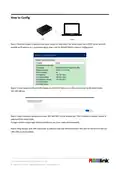


Screen logo Instruction
Power on the device first, waiting bonding for 2~5 minutes.
IP address will be seen after successful bonding.
No.1 USB port: disconnect to network;
Please check the SIM card installation and whether the SIM card runs out of
credits.
No.1 USB port: connect to network;
Signal value:0%~5%
No.1 USB port: connect to network;
Signal value:25%~50%
No.1 USB port: connect to network;
Signal value:50%~75%
No.1 USB port: connect to network;
Signal value:75%~100%
No.1 USB port: connect to network but does not acquire signal value, which
does not affect bonding.
Ethernet port: connect to network via network cable and be bonding.
Ethernet port: plug in network cable but does not connect to the network.
Please check whether the cable connection is normal.
Upload date speed,2 seconds later than actual speed.
Download date speed,2 seconds later than actual speed.
Battery level (once optional battery installed)
© Xiamen RGBlink Science & Technology Co., Ltd.
4

| General | Details |
|---|---|
| Name | bond6 RGB Link Network Bonding Router User Manual |
| Make | bond |
| Language | English |
| Filetype | PDF (Download) |
| File size | 0.31 MB |
 (1 votes, average: 5.00 out of 5)
 Loading...
If you have any questions regarding bond6 RGB Link Network Bonding Router User Manual, please ask here and describe the problem in detail.


TRUEFIT BAC-5051A E Airflow Measurement System Router User Guide

casa systems NTC-500 AurusXT 5G IoT Router Instructions

Peplink SDX Pro 24Gbps Modular Enterprise Branch Router User Guide

LINKSYS MX4200 Router Installation Guide

AntennaGear TX54 5G Dual Cellular Router Owner’s Manual

ime RUTM10 Router Instruction Manual

Ruijie RG-EW1800GX(PRO) Wi-Fi 6 Dual Band Router Installation Guide

TELTONIKA RUT301 Router User Guide

Asustek Computer RT-AX57 Wireless AX3000 Dual Band Gigabit Router User Guide

BROWAN COMMUNICATIONS INCORPORATION MI14 Wi-Fi 6 AX3000 Dual-Radio Router User Guide