
Linuxiac LinkStar-H68K Portable WiFi Pocket Router User Guide




Full
text
LinkStar-H68K-C D F Model Routing - Quick
Start Guide
2.6 Wireless bridges and network distribution methods
⚫
Wireless private LAN for second level routing, connected to the main WIFI route in the
hotel home and to electronic devices such as mobile PCs
WIFI, for applications such as home bedrooms, rented rooms in buildings and hotels on
business trips, the F version is recommended.
2.6.1 Device connection topology diagram
2.6.2 Distribution methods
⚫
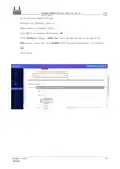
Step 1: Plug in the card, power on and self-start, H68K waiting for successful boot,
PC PC cable connected to ETH1, wired access to H68K backend.
⚫
Step 2: Click the [Wireless] button to enter the WIFI configuration page. Remove the
existing H68K hotspot [Delete].
Document version
20220901
15
Translator: GitHub@IcingTomato

| General | Details |
|---|---|
| Name | Linuxiac LinkStar-H68K Portable WiFi Pocket Router User Guide |
| Make | Linuxiac |
| Language | English |
| Filetype | PDF (Download) |
| File size | 0.99 MB |
 (1 votes, average: 5.00 out of 5)
 Loading...
If you have any questions regarding Linuxiac LinkStar-H68K Portable WiFi Pocket Router User Guide, please ask here and describe the problem in detail.


ZYXEL NBG7510 Dual Band WiFi 6 AX1800 Router User Guide

TP-Link Archer AX72 AX5400 Wi-Fi 6 Router Installation Guide

robustel R5020 Lite 5G Router Instruction Manual

NETGEAR AX1800 WiFi 6 Router User Guide

D-Link G530 5G Router Instructions

DrayTek Vigor3912 Series Security VPN Router User Guide

Tenda AC9 AC1200 Dual Band Gigabit WiFi Router Installation Guide

TP-Link AX5400 Multi Gigabit Wi-Fi Router User Guide

NETGEAR AXE7800 Tri-Band WiFi 6E Router User Manual

TP-Link G36 Gigabit VPN Router Installation Guide