
Linuxiac LinkStar-H68K Portable WiFi Pocket Router User Guide




Full
text
LinkStar-H68K-C D F Model Routing - Quick
Start Guide
⚫
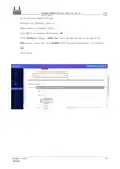
Step 2: Erase the firmware
Double click [RKDevTool] in the [RKDevTool_Release_v2.84 - for downloading OP firmware]
folder
Click the [Upgrade Firmware] button
Click on the [Firmware] button and select [H68K-Android-Firmware-0828-for-Erasing-Flash.img].
Plug one end of the [TYPC-C cable] into your computer USB
Insert the [card picker thimble] into the H68K [spanner hole], press the upgrade button
inside the [spanner hole], there is a feeling of the button springing back the other end of
the [TYPC-C data cable] into the H68K [TYPC-C connector] to keep the button
pressed during the power-up process
The download tool will bring up [Found a MASKROM device].
and wait for it to finish erasing.
Click on [Erase Flash]
Translator: GitHub@IcingTomato

| General | Details |
|---|---|
| Name | Linuxiac LinkStar-H68K Portable WiFi Pocket Router User Guide |
| Make | Linuxiac |
| Language | English |
| Filetype | PDF (Download) |
| File size | 0.99 MB |
 (1 votes, average: 5.00 out of 5)
 Loading...
If you have any questions regarding Linuxiac LinkStar-H68K Portable WiFi Pocket Router User Guide, please ask here and describe the problem in detail.


Acer 954318 Wave 7 Wi-Fi Mesh Router User Manual

TP-Link Archer AX55 Pro AX3000 Multi-Gigabit Wi-Fi 6 Router Installation Guide

PoEWit R10 Preconfiguration Enterprise Class Router User Manual

HALNY HLE-3GM Router Installation Guide

HERCULES HE042 Compact Trim Router Owner’s Manual

TP-Link RM100 Router WiFi 4G LTE 300MBPS User Manual

Asustek Computer RT-AX57 Wireless AX3000 Dual Band Gigabit Router User Guide

LINKSYS N600 Dual Band Router User Guide

ASUS RT-BE96U Tri Band WiFi Router User Guide

ASUS RT-AX68U WiFi 6 Router User Guide