
Linuxiac LinkStar-H68K Portable WiFi Pocket Router User Guide




Full
text
LinkStar-H68K-C D F Model Routing - Quick
Start Guide
2.3 Backstage access
⚫
Step 1: Insert the card, power on and self-start, wait until the No. 1 indicator light
turns on, then the H68K OP mode is successfully powered on.
◼ Step 2: Connect one end of the cable to the H68K ETH1 and the other end to the PC
network port; H68K ETH0 istheWAN portand ETH1 2 3 is the LAN port. The PC PC
needs to be set to DHCP mode (as shown below).
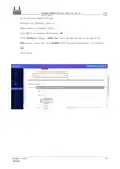
◼ Step 3: Type 192.168.100.1 into your computer's browser, enter and the login screen
will pop up. Note that some open source firmware
192.168.100.1
User name: root Password password
Document version
20220901
7
Translator: GitHub@IcingTomato

| General | Details |
|---|---|
| Name | Linuxiac LinkStar-H68K Portable WiFi Pocket Router User Guide |
| Make | Linuxiac |
| Language | English |
| Filetype | PDF (Download) |
| File size | 0.99 MB |
 (1 votes, average: 5.00 out of 5)
 Loading...
If you have any questions regarding Linuxiac LinkStar-H68K Portable WiFi Pocket Router User Guide, please ask here and describe the problem in detail.


Digital Alert Systems R232 Multi Port RF Router Installation Guide

cradlepoint S5A037A Enterprise Branch Router User Manual

TP-Link Archer AX72 AX5400 Multi-Gigabit Wi-Fi 6 Router Installation Guide

MERCUSYS MB230-4G Wireless 4G LTE Router Installation Guide

TOTOLINK X2000R AX1500 Wireless Dual Band Gigabit Router Installation Guide

CISCO cBR Series Converged Broadband Router User Guide

TP-Link EU_V3.2 MU MIMO Wi-Fi Router User Guide

Getic MikroTik CCR2004-16G-2S+PC Cloud Core Router User Manual

westermo MRD-405 4G LTE Router User Guide

LINKSYS MX4200 Router Installation Guide