
Linuxiac LinkStar-H68K Portable WiFi Pocket Router User Guide




Full
text
LinkStar-H68K-C D F Model Routing - Quick
Start Guide
Plug one end of the [TYPC-C cable] into your computer USB
Insert the [card picker thimble] into the H68K [spanner hole], press the upgrade button
inside the [spanner hole], there is a feeling of the button springing back the other end of
the [TYPC-C data cable] into the H68K [TYPC-C connector] Keep the button pressed
during power-up
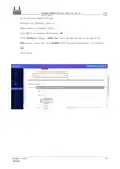
The download tool will bring up [Found a MASKROM device].
Click on [Erase Flash]
and wait for it to finish erasing.
The card picker ejector pin is used with gentle pressure, please do not poke the button
with a strong miracle.
Click on the [Upgrade] button, the right window will show the progress of the download,
wait for the successful boot up (indicator 1 blinking),thedownload tool will pop up [Found
an ADB device].
Document version
20220901
28
Translator: GitHub@IcingTomato

| General | Details |
|---|---|
| Name | Linuxiac LinkStar-H68K Portable WiFi Pocket Router User Guide |
| Make | Linuxiac |
| Language | English |
| Filetype | PDF (Download) |
| File size | 0.99 MB |
 (1 votes, average: 5.00 out of 5)
 Loading...
If you have any questions regarding Linuxiac LinkStar-H68K Portable WiFi Pocket Router User Guide, please ask here and describe the problem in detail.


TP-Link BE3600 Wi-Fi 7 Portable Router User Guide

YINUO-LINK Y6 300Mbps WiFi LTE Router Installation Guide

KEENETIC KN-1310 Wireless Router User Guide

YiOBYiOR 300Mbps U8 Wireless WiFi Repeater Range Extender Router Installation Guide

DrayTek Vigor2766 Series GFast Security Router User Guide

MikroTik RBwAPG-5HacD2HnD Wireless Router User Guide

Cudy WR1200 Dual Band Wi-Fi Router Installation Guide

D-Link DIR-2660 AC2600 Smart Mesh Wifi Router Installation Guide

MERCUSYS AC12G Wireless Router Installation Guide

Harvilon MT6833 5G Portable Wi-Fi Hotspot Esim Router User Guide