
Home > NET MODULE > NET MODULE NB1601 Router User Manual
×
- 1. Netmodule Router Nb1601 (User Manual For Software Version 4.4 → Manual Version 1.13 → Netmodule Ag, Switzerland → May 20, 2021)
- 2. Installation (Setup → Configuration → Specifications → Licensing Information → User Responsibilities → Support Information)
- 3. Welcome To Netmodule (Installation → Installation Of The Micro-sim Card → Installation Of The Gsm/umts/lte Antenna → Installation Of The Wlan Antennas → Installation Of The Bluetooth Antenna → Installation Of The Gnss Antenna → Configuration)
- 4. Usb (Serial Port → Digital I/o → Bluetooth Low Energy → Gnss → Routing → Firewall)
- 5. Software (Configuration → Troubleshooting → Keys And Certificates → Licensing → Command Line Interface → Factory Configuration)
- 6. Initial Login (Wan Links → Wan Settings → Lan Ip Configuration → Wlan Management → Wlan Configuration → Dhcp Server)
- 7. Webserver (Vrrpconfiguration → Itxptconfiguration → Itxptfmstoip → Itxptgnss → Itxpttime → Useraccounts)
- 8. Environmentalconditions (Nb1601interfaces → Nb1601statusindicators → Ethernetstatusindicators → Mobileinterfaceemea → Mobileinterfacenorthamerica → Mobileantennaportspecification)
- 9. Welcome (Installation Procedure → Commissioning The Device → Configuration And Maintenance → Helpful Information → Router Features → Sample Sdk Script)
- 10. Conformity (Safety Instructions → Compliance Information → Information About The Accessories / Changes To The Device)
- 11. Information About The Device Interfaces (General Safety Instructions)
- 12. Declarationofconformity (Wastedisposal → Nationalrestrictions)
- 13. Open Source Software (Acknowledgements)
- 14. User Manual For Nrsw Version 4.4 (Specifications → Appearance)
- 15. Features (Installation → Configuration → Setup → Options → Modular Approach → Contact Information)
- 16. Environmental Conditions (Input Voltage → Operating Temperature Range → Storage Temperature Range → Humidity → Altitude → Over-voltage Category)
- 17. User Manual For Nrsw Version 4.4
- 18. User Manual For Nrsw Version 4.4 (Extension Interface Ext 2 → Usb 2.0 Host Port, Can Be Used For Software/configuration Updates. → Reboot And Factory Reset Button → Fastethernet Switch Ports, Can Be Used As Lan Or Wan Interface. → Sma Female Connectors For Mimo Lte 2 Antenna Or Mimo Wlan 2 Antenna. → Power Supply 12-24 V Dc.)
- 19. Vpn Connection Status (Extension Interface State → System State Indicators → Ethernet Status Indicators → Configuration In Ui Led Settings)
- 20. User Manual For Nrsw Version 4.4 (Reset → Reboot The System → Factory Reset)
- 21. Mobile Interface Emea (Mobile Interface North America → Mobile Interface Apac → Mobile Antenna Port Specification)
- 22. Bluetooth (Wlan → Max. Allowed Cable Length → Max. Allowed Antenna Gain → Min. Distance Between Collocated Radio Transmitter Antennas → Min. Distance Between People And Antenna → Connector Type)
- 23. Gnss (Usb 2.0 Host Port)
- 24. Ethernet Connectors (Specification → Pin Assignment)
- 25. Power Supply (pwr) (Serial Rs-232)
- 26. Digital Output (Digital Input)
- 27. Pin Terminal Block (Pin Assignment → Extension Port 1 → Available Options → Connector Type)
- 28. Com/io Shield (option Sc) (Pin Assignment)
- 29. User Manual For Nrsw Version 4.4 (Xcan Shield (option 2c) → Specifications → Pin Assignment)
- 30. Extension (Available Options → Fxs Port Specification → Feature → Specification → Pin Assignment Of Rj-11 Fxs Connector)
- 31. Installation (Installation Of The Micro-sim Card → Installation Of The Gsm/umts/lte Antenna)
- 32. Installation Of The Wlan Antennas (Attention: Following Points Must Be Observed When Installing The Antennas → Antenna Port → Lte/umts Antenna Port Types → Wlan Antenna Port Types)
- 33. Installation Of The Bluetooth Antenna (Installation Of The Gnss Antenna → Installation Of The Local Area Network)
- 34. Installation Of The Power Supply
- 35. Configuration (Firststeps → Initialaccess → Webmanager → Commandlineinterface → Dhcp → Routersoftwareupdates)
- 36. Admin Password Setup (Configure Automatic Mobile Data Connection → Recovery)
- 37. Serial Console Login (Recovery Image)
- 38. Home (Interfaces → Routing → Firewall → Vpn → Services → System)
- 39. Gnss (Ethernet → Lan → Bridges → Bluetooth → Dhcp → Openvpn)
- 40. Ospf (Dyndns → System Status → Sdk)
- 41. Interfaces (Wan → Wan Link Management → Link Management → Settings → Configuration → Ip Settings)
- 42. Installation Prerequisites (Wan Link Priorities → Link Configuration → Link Management → Operation Modes → Traffic Distribution)
- 43. Wan Link Operation Modes (Wan Link Settings → Ip Pass-through Settings)
- 44. Wan Settings (Tcp Maximum Segment Size → Mss Adjustment → Ip Settings → Configuration → Interfaces → Administration)
- 45. Link Supervision (Link Management → Settings → Ethernet Port Setup → Vlan Management → Ip Settings → Configuration)
- 46. User Manual For Nrsw Version 4.4 (Supervision Settings → Ping Interval → Retry Interval → Max. Number Of Failed Trials → Emergency Action)
- 47. Ethernet Port Assignment (Port Assignment → Link Settings → Link Management → Ip Settings → Configuration → Administration)
- 48. Ethernet Link Settings (Port Assignment → Link Settings → Vlan Management → Ip Settings → Configuration → Administration)
- 49. Vlan Management (Ip Settings → Port Setup → Configuration → Administration → Network Interface → Wan)
- 50. Ip Settings (Ip Address Management → Link Management → Port Setup → Vlan Management → Administration → Configuration)
- 51. Lanipsettings (Wanmode → Wanipsettings → Mtu → Pppoeconfiguration → Pppoeusername → Pppoepassword)
- 52. Mobile Modems (Sims → Ip Settings → Configuration → Link Management → Wlan → Administration)
- 53. User Manual For Nrsw Version 4.4 (Registering To A Network → Pin Unlocking → Network Registration Attempt → Setting A Specific Service Type → Assigning A Fixed Operator → Network Scan)
- 54. Configuration (Wwan Sim Configuration → Pin Code → Puk Code → Default Modem → Preferred Service → Registration Mode)
- 55. Wwan Interfaces (Mobile Interfaces → Link Management → Settings → Configuration → Ip Settings → Administration)
- 56. Wwan Connection Parameters (Wan Advanced Parameters)
- 57. Wlan Management (Link Management → Ip Settings → Configuration → Operational Mode → Antenna Recommendations → Administrative Status)
- 58. Configurable Parameters For Access-point, Client Mode, Mesh Point And Any Dual Mode (Wlan Management → Running As Access Point Or Dual Mode, You Can Further Configure The Following Settings → Running As Client, You Can Further Configure The Following Settings → Available Operation Modes Are)
- 59. User Manual For Nrsw Version 4.4
- 60. Wlanmesh-pointmanagement (Operationtype → Radioband → Channel)
- 61. Wlan Configuration (Wlan Client Configuration → Wpa/wpa2 Mixed Mode → Wpa Cipher → Identity → Passphrase → Required Signal Strength)
- 62. Wlan Access-point Configuration (Ssid → Security Mode → Wpa / Cipher → Ip Settings → Bridges → Port Setup)
- 63. Wlan Access-point Configuration (Wlan Security Modes → Security Mode → Wpa/wpa2 Mixed Mode → Wpa Cipher → Identity → Passphrase)
- 64. Meshid (Wlan Mesh-point Configuration → The Desired Security Mode → Security Mode → Enable Gate Announcements)
- 65. Wlan Mesh-point Security Modes (Meshid Is Disabled → None → Sae → No Authentication, Provides An Open Network → Sae (simultaneous Authentication Of Equals) Is A Secure Password-based Authentication And Key Establishment Protocol)
- 66. Wlan Ip Settings (Wlan1 Ip Settings → Ip Settings → Network Mode → Bridge Interface → Configuration → Vlan Management)
- 67. User Manual For Nrsw Version 4.4 (Wlan Bridging Features → Iapp → Pre-auth)
- 68. Software (Bridge Settings → Administrative Status → Ip Address → Netmask → Mtu)
- 69. Usb (Usb Administration → Port Setup → Ip Settings → Configuration → Wan → Administration)
- 70. Usb Devices (Connected Usb Devices → Enabled Usb Devices → Ip Settings → Configuration → Administration → Wan)
- 71. Usb Autorun (Authentication → Running A Script → Configuration Update → Software Update)
- 72. Serial Port Usage (Login Console → Device Server → Modem Bridge → Modem Emulator → Sdk)
- 73. User Manual For Nrsw Version 4.4 (Configuration → Ip Settings → Port Setup → Vlan Management → Link Management → Wlan → Administration)
- 74. Logout (Interfaces → Routing → Firewall → Vpn → Services → System)
- 75. User Manual For Nrsw Version 4.4 (Serial Settings → Protocol On Tcp/ip → Server Settings → Allow Remote Control → Stop Bits → Allow Clients From)
- 76. User Manual For Nrsw Version 4.4 (Serial Port Settings → Physical Protocol → Baud Rate → Hardware Flow Control → Incoming Connections Via Telnet → Phonebook Entries)
- 77. Digital I/o Configuration (Ip Settings → Port Setup → Vlan Management → Link Management → Administration → Configuration)
- 78. Bluetooth Settings (Administrative Status)
- 79. Gnss Module Configuration (Gnss Assisted Gps Configuration → Gnss Server Configuration → Accuracy → Fix Frame Interval → Administrative Status → Operation Mode)
- 80. Gnss Server Configuration (Allow Clients From → Clients Start Mode → Data Transfer Modes → Access Restrictions)
- 81. Gnss Information (Gnss Satellite Information → Gnss Supervision → Enable Or Disable Gnss Supervision → Max. Downtime → Emergency Action → Parameter)
- 82. Routing (Static Routes → Extended Routes → Multipath Routes → Igmp Proxy → Bgp → Ospf)
- 83. User Manual For Nrsw Version 4.4 (Static Route Configuration → Gateway → Interface → Metric → Flags)
- 84. Extended Routing (Static Routes → Extended Routes → Interface Source → Destination → Multipath Routes → Administration)
- 85. Multipath (Static Routes → Extended Routes → Bgp → Ospf → Mobile Ip → Qos)
- 86. Mobile Ip Configuration (Primary Home Agent Address → Secondary Home Agent Address → Home Address → Security Parameter Index (spi) → Authentication Type)
- 87. Mobile Ip Configuration (Shared Secret → Life Time → Udp Encapsulation → Mobile Network Address → Mobile Network Mask)
- 88. Homeagentsetup (Configurationformobilenodes → Interfaces → Routing → Firewall → Vpn → Services)
- 89. Mobile Ip Node Configuration (Shared Secret)
- 90. Qualityofservice (Qosadministration → Qosclassification → Qosinterfaceparameters → Bandwidthcongestion → Downstreambandwidth → Upstreambandwidth)
- 91. Qos Default Queues (Qos Queue Parameters → Qos Service Parameters)
- 92. Multicast Routing Configuration (Igmp Proxy Settings → Multicast Routing Settings → Static Routes → Static Multicast Route)
- 93. Ospf General Settings (Ospf Interfaces → Ospf Networks → Authentication → Redistribute Routes → Disable Bgp When Vrrp → Cost)
- 94. Bgp General Settings (Bgp Neighbors → Bgp Networks)
- 95. Firewall (Administration → Address/port Groups → Filtering Rules → Firewall Address Groups)
- 96. Firewall (Interfaces → Routing → Vpn → Services → System → Firewall Filtering Rules)
- 97. User Manual For Nrsw Version 4.4 (Firewall Rule Configuration → Protocol → Destination Port(s))
- 98. Napt (Firewall → Masquerading → Administration → Address / Port Groups → Filtering Rules → Interface)
- 99. Napt Inbound Rules (Firewall → Napt Rules Inbound → Administration → Inbound Rules → Outbound Rules → Apply)
- 100. Parameter (Ports → Inboundnaptrules → Naptoutboundrules → Rewrite Source Address → Rewrite Source Port)
- 101. Vpn (Openvpn → Tunnel Configuration → Client Management → Ipsec → Pptp → L2tp)
- 102. Tunnel Configuration (Client Management → Openvpn Tunnel 1 Configuration → Ipsec → Administration → Operation Mode → Manage Keys And Certificates)
- 103. Openvpn Client Configuration (Openvpn Configuration → Openvpn Authentication → Encryption → Digest → Mtu → Parameter)
- 104. Openvpn Options (Openvpn Expert Configuration (client) → Client Expert Files)
- 105. Openvpn Expert Configuration (server) (Server Expert Files → Keep In Mind That A Certificate Becomes Valid Once Its Validity Time Has Been Reached)
- 106. Client Management (Tunnel Configuration → Networking → Administration → Vpn → Firewall → Routing)
- 107. Ipsec (Mechanism Description → Ah → Esp → Sa → Internet Security Association Key Management Protocol (isakmp) → Negotiating Keys For Encryption And Authentication)
- 108. Administration (Tunnel Configuration → Client Management → Ipsec Administration → Pptp Administration → L2tp Administration → Gre Administration)
- 109. Configuration (Interfaces → Routing → Firewall → Vpn → Services → System)
- 110. Ipsec General Settings (Ike Authentication → Ipsec Ike Authentication Settings → Remote Id Type → Ipsec Xauth Settings)
- 111. Ike Proposal (Ipsec Proposal → Perfect Forward Secrecy → Encapsulation Mode → Ipsec Protocol → Force Encapsulation → Networks)
- 112. Ipsec Network Settings (Local Network → Local Netmask → Peer Network → Peer Netmask → Nat Address → Client Management)
- 113. Pptp Administration (Tunnel Configuration → Client Management → Ipsec Administration → L2tp Administration → Vpn → Services)
- 114. User Manual For Nrsw Version 4.4 (Tunnel Configuration → Pptp Tunnel 1 Configuration → Server Listen Address → Server Address → Client Address Range → Username → Password)
- 115. Pptp Client Management (Tunnel Configuration → Client Management → Administration → Vpn → Interfaces → Routing)
- 116. Gre Configuration (Peer Address → Device Type For This Tunnel → Local Tunnel Address → Local Tunnel Netmask → Remote Network → Tunnel Key)
- 117. L2tp Configuration (Transport Protocol → Local Ip → Remote Ip → Local Port → Remote Port → Mtu)
- 118. Dial-in Server Configuration (Administrative Status → Modem → User → Password → Address Range Start → Address Range Size)
- 119. User Manual For Nrsw Version 4.4
- 120. Sdk (Netmodule-specific Application Programming Interface (api) → The Language → Example Scripts → Contact Support)
- 121. Send/retrieve Sms (Send E-mail → Read/write From/to Serial Device → Control Digital Input/output Ports → Run Tcp/udp Servers → Access Files Of Mounted Media (e.g. An Usb Stick) → Perform Config/software Updates)
- 122. Api Function Nb_status (Using The Dump Function → Reconfiguration With Nb_config_set → Querying Configuration Entities → Running Cli In Interactive Mode)
- 123. Running Sdk (Scripts And Triggers → Uploading Scripts → Editing Scripts → Specifying Triggers → Testing Section → Troubleshooting Issues)
- 124. Administration (Sdk Administration → Dhcp Server → Dns Server → Ntp Server → Dynamic Dns → Voice Gateway)
- 125. Job Management (Interfaces → Routing → Firewall → Vpn → Services → System)
- 126. User Manual For Nrsw Version 4.4 (Sdk Script Parameters → Sdk Job Parameters → Trigger → Script → Arguments → Pages)
- 127. Testing (Sdk Sample Application)
- 128. User Manual For Nrsw Version 4.4 (Warning: Will Enable The First Wan Link Configured On The System → Warning: Will Disable The First Wan Link Configured On The System → Warning: Initiates A Reboot Of The System → Warning: Turns On The First Digital Output Port → Warning: Turns Off The First Digital Output Port → Warning: Turns On The Second Digital Output Port → Warning: Turns Off The Second Digital Output Port)
- 129. Dhcp Server Management (Administration → Job Management → Testing → Network → Interface → Operation Mode)
- 130. Dhcp Server Settings (Persistent Leases → Dhcp Options → Only Allow Static Hosts → Dhcp Static Hosts Settings)
- 131. Dns Server Administration (Dns Server Configuration → Dhcp Server → Dynamic Dns → Ntp Server → Administrative Status → Dns Server Settings)
- 132. User Manual For Nrsw Version 4.4
- 133. User Manual For Nrsw Version 4.4 (Dns Static Hosts Settings → Parameter → Address → Hostname)
- 134. Ntp Server Configuration (Ntp Server Administration → Administrative Status → Poll Interval → Allowed Hosts → Dhcp Server → Dns Server)
- 135. Dynamic Dns (Dyndns Administration → Dhcp Server → Dns Server → Ntp Server → Dyndns Update Services → Web Server)
- 136. Dynamic Dns Settings (Provider → Dynamic Address → Hostname → Port → Username → Password)
- 137. E-mail Client Configuration (E-mail Client Settings → Administrative Status → Server Address → Server Port → Authentication Method → Encryption)
- 138. User Manual For Nrsw Version 4.4 (E-mail Client Settings → Password Used For Authentication)
- 139. Event Notification Settings (E-mail Address → Phone Number → Snmp Host → Snmp Port → Username → Password)
- 140. Sms Administration (Modem Configuration → Mobile Sims Configuration → Sending Messages → Received Messages Handling → Administrative Status → Request Delivery Report)
- 141. Sms Sim Configuration (Routing & Filtering → Status → Testing)
- 142. Ssh/telnet Server Configuration (Telnet Server Configuration → Ssh Server Configuration → Disable Admin Login → Disable Password-based Login → Web Server → Dynamic Dns)
- 143. User Manual For Nrsw Version 4.4 (Ssh Server Settings → Administrative Status → Server Port → Disable Login For Admin Users → Disable Admin Login → Disable Password-based Login Keys)
- 144. Snmp Agent (Supported Mibs → Vendor Mib Oid Assignment → Facilities For Device Management)
- 145. Snmpconfiguration (Snmpagentconfiguration → Dhcpserver → Dnsserver → Ntpserver → Dynamicdns → E-mail)
- 146. Snmp Authentication (Snmpv3 Authentication → Snmpv1/v2c Authentication → Typical Snmp Commands)
- 147. Getting The Current Config Hash: (Restarting The Device: → Running A Configuration Update: → Getting The Configuration Update Status: → Running A Software Update: → Getting The Software Update Status: → Setting The Update Operation:)
- 148. Switching To Alternative Software: (Switching To Alternative Config: → Getting The Alternative Config Description: → Getting The Alternative Config Hash: → Getting The Alternative Software Version: → Getting The Alternative Software Hash: → Listing Discovered Devices:)
- 149. Web Server Configuration (Administration → Web Server Settings → Https Security → Manage Keys And Certificates → Enable Cli-php → Job Management)
- 150. Mqtt Broker (Please Set Up Appropriate Firewall Rules → Keys And Certificates For Tls Encryption → Mqtt Broker Service Parameters → Administrative Status → Port → Tls Encryption)
- 151. Softflow Settings (Interface → Destination Address Of The Traffic Data → Port Of The Destination Address → Host Address → Protocol Version → Maximum Flows)
- 152. Discovery Configuration (Enabled Protocols → Supported Protocols → Link Layer Discovery Protocol → Cisco Discovery Protocol → Foundry Discovery Protocol → Nortel Discovery Protocol)
- 153. Redundancy (Interfaces → Routing → Firewall → Vpn → Services → System)
- 154. User Manual For Nrsw Version 4.4 (Redundancy Configuration → Role → Vid → Interface → Virtual Gateway Address)
- 155. User Manual For Nrsw Version 4.4 (Itxpt → Configuration → Itxpt Administration → Network Interface)
- 156. Fms To Ip Options (Multicast Period → Can Interfaces → Databases)
- 157. Fms To Ip Database Format (The Parameter Group Number (pgn) And The Suspect Parameter Number (spn) → More Information Can Be Found In Sae-j1939 Standard)
- 158. Pgn Definition (Parameter → Name → Pgn → Length → Spns)
- 159. Spn Definition (Nummerical Spn → Status Spn → String Spn)
- 160. User Manual For Nrsw Version 4.4
- 161. User Manual For Nrsw Version 4.4
- 162. User Manual For Nrsw Version 4.4 (Itxpt Vehicletoip → Parameter → Enable)
- 163. Voice Gateway (Administration → Endpoints → Routing → Job Management → Testing → Sip Settings)
- 164. Voice Gateway Administration Settings (Sip Interface → Sip Port → Sip Register Expires → Voice Endpoints → Voice Gateway Endpoint Types → Voice-over-mobile Audio Profiles)
- 165. Voice-over-mobile Audio Profiles (Bluetooth → Endpoint Settings Voice-over-mobile → Endpoint Settings Sip (registrar) → Endpoint Settings Sip (direct) → Endpoint Settings Sip (user-agent) → Parameter)
- 166. User Manual For Nrsw Version 4.4 (Endpoint Settings Sip (user-agent) → Parameter → Register → Expires)
- 167. Voice Routing (Voice Gateway Routing Settings → Source → Mode → Destination)
- 168. Client Configuration (X-lite Configuration → Parameter → User Id → Sip Domain → Password → Display Name)
- 169. System Settings (User Accounts → Software Update → Configuration → Troubleshooting → Keys & Certificates → Licensing)
- 170. User Manual For Nrsw Version 4.4 (System Settings → Syslog Settings → Storage Devices → Led Settings)
- 171. Bootloader Settings (Time & Region → Time Synchronisation → User Accounts → Software Update → Configuration → Troubleshooting)
- 172. Time Synchronisation (Ntp Server → Time Zone → Daylight Saving Changes → Virtualization → Virtualization Settings → Install)
- 173. Install (Guest Networking → Guest Devices → Guest Limits → Reboot)
- 174. Authentication (User Accounts → Software Update → Configuration → Troubleshooting → Keys & Certificates → Licensing)
- 175. User Accounts Management (Remote Authentication → Primary Radius Configuration → Software Update → File Configuration → Troubleshooting → Keys & Certificates)
- 176. User Manual For Nrsw Version 4.4 (Remote Authentication Settings → Radius Server → Radius Secret → Authentication Port → Accounting Port → Use For Login → The Radius Server Address)
- 177. Software Update (Manual Software Update → Update Operation → Url → Administrator Password → Attention)
- 178. Automatic Software Update (Module Firmware Update)
- 179. Modulefirmwareupdate (Softwareprofiles)
- 180. Configuration (Manual File Configuration → Automatic Updates → File Configuration → Troubleshooting → Tech Support → Licensing)
- 181. Automatic File Configuration (Automatic Updates → Reboot → Authentication → User Accounts → Factory Configuration → Troubleshooting)
- 182. Factory Configuration (Software Update → Authentication → User Accounts → Initiate Factory Reset → Configuration → Troubleshooting)
- 183. User Manual For Nrsw Version 4.4 (Troubleshooting → Network Debugging → Automatic Software Update → Parameter)
- 184. System Debugging (User Accounts → Remote Authentication → Software Update → Configuration → File Configuration → Troubleshooting)
- 185. Tech Support (System Settings → Authentication → Software Update → Configuration → Troubleshooting → Keys & Certificates)
- 186. Keys & Certificates (Configuration → User Accounts → Web Server → Ssh Server → Openvpn → Troubleshooting)
- 187. Sshauthorization (Openvpn → Ipsec → Wlan → Authorities → Certificatesections → Certificateoperations)
- 188. Configuration (Interfaces → Routing → Firewall → Vpn → Services → System)
- 189. Parameter (Certificate Configuration → Scep Configuration → Passphrase → Dh Primes → Signature → Expiry Period)
- 190. Authorities (Certificate Enrollment → Ca Certificate Verification → Ssl Client Connections → Retrieving Ca Certificates → Self-signed Authorities → Pem-encoded Certificate Files)
- 191. Licensing (License Installation → Software Update → Configuration → Troubleshooting → Keys & Certificates → User Accounts)
- 192. User Manual For Nrsw Version 4.4 (Oss Notice → Acknowledgements)
- 193. User Manual For Nrsw Version 4.4
- 194. Command Line Interface (General Usage)
- 195. Gettingconfigparameters (Printhelp → Availablecommands)
- 196. Settingconfigparameters (Checkingconfigcompleted → Gettingstatusinformation)
- 197. User Manual For Nrsw Version 4.4 (Lan Interface Status → Wan Interface Status → Openvpn Connection Status → Ipsec Connection Status → Pptp Connection Status → Firewall Status → Qos Status)
- 198. Manage Keys And Certificates (Restarting Services → Perform Software Update → Perform Module Firmware Update → Update Configuration → Update Licenses → Install Ssh Authorized Keys)
- 199. Firewall And Napt (Gps Daemon → Gre Connections → Ipsec Connections → Openvpn Connections → Pptp Connections → Wlan Interfaces)
- 200. Resetting System (Rebooting System → Running Shell Commands → Working With History → Cli-php)
- 201. Usage (Available Keys → Output Format → Notes → Response → Examples → Key Usage)
- 202. Get-getconfigurationparameter (Set-setconfigurationparameter → Restart-restartasystemservice)
- 203. Reboot - Trigger System Reboot (Reset - Run Factory Reset → Update - Update System Facilities → Send - Send Sms)
- 204. User Manual For Nrsw Version 4.4 (The Sms Daemon Must Be Properly Configured Prior To Using That Function → The E-mail Client Must Be Properly Configured Prior To Using That Function → The Address Has To Be A Valid E-mail Address Such As Abc@abc.com → The Argument Card Specifies The Card Module Index (e.g. 0 For Wwan0))
- 205. User Manual For Nrsw Version 4.4
- 206. Appendix (Abbreviations → Access Point Name → Maximum Segment Size → Maximum Transmission Unit → Domain Name System → Dynamic Host Configuration Protocol)
- 207. User Manual For Nrsw Version 4.4 (System Events → Abbreviations)
- 208. User Manual For Nrsw Version 4.4
- 209. User Manual For Nrsw Version 4.4 (Dynamic Dns Update Succeeded → Dynamic Dns Update Failed → Usb Storage Device Has Been Added → Usb Storage Device Has Been Removed → System Is Now Master Router → System Is Now Backup Router)
- 210. Factoryconfiguration
- 211. User Manual For Nrsw Version 4.4
- 212. Sdk (Examples → Event → Description → Warning)
- 213. Remote-mail.are (Scan-mobile.are → Scan-wlan.are → Send-mail.are → Send-sms.are → Serial-readwrite.are → Set-ipsec-route.are)
- 214. Transfer-file.are (Udp-msg-server.are → Update-config.are → Voice-dispatcher-audio.are → Webpage.are → Write-config.are)
×
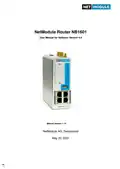
NET MODULE NB1601 Router User Manual


























NB1601
User Manual for NRSW version 4.4
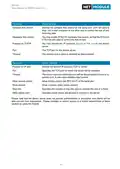
Label
VPN
Color
●g
State
On
Function
VPN connection is up.
●g
Blinking VPN is up and waiting for a connection.
❍
Off
Off
VPN connection down.
EXT
❍
Extension is disabled.
●g●y●r
On/ The EXT LED indicates the state of the extension interfaces:
˘
Blinking GNSS (default), DIO, CAN, Serial, BLE, âAe˛ or user specific
(control via SDK or container)
The configuration is done in the UI LED settings.
Optional: the signal strength of wireless interfaces could be indi-
cated (LTE, WiFi, BLE, ..).
SYS
Shows the overall system state. This could be derived from
health indicators such as:
– all services up and running
– overall throughput is normal
– CPU load is normal
– the supervisor
– . . .
– User application (state set by user in SDK or container)
●g
●g
●r
On
System operation state: normal
Blinking System operation state: during startup
On
System operation state: emergency, watchdog, failure
Table 3.3.: NB1601 Status Indicators
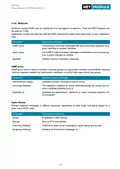
Ethernet LEDs
The following table describes the Ethernet status indicators.
Label
Color
State
On
Function
S
(Speed)
●y
Link (10 Mbit/s or100 Mbit/s
❍
Off
On
No Link
Link
L/A
(Link/Ac-
tivity)
●g
●g
Blinking Activity
❍
Off
No Link
Table 3.4.: Ethernet Status Indicators
19

| General | Details |
|---|---|
| Name | NET MODULE NB1601 Router User Manual |
| Make | NET MODULE |
| Language | English |
| Filetype | PDF (Download) |
| File size | 3.35 MB |
 (1 votes, average: 5.00 out of 5)
 Loading...


Woodline DadoRight Dado Jig for Router Instructions

TP-Link XGB430v Pro BE7200 Dual-Band Wi-Fi 7 XGS-PON Router Owner’s Manual

POYNTING EPOYNT-4 Outdoor LTE-5G Antenna and Router Enclosure User Guide

ZETTABEAM AX3000 Wi-Fi 6 Router Installation Guide

inseego FX3100 Wavemaker 5G Router User Guide

HUAWEI Router User Guide

D-Link DIR-X5460 AX5400 Wi-Fi 6 Router User Guide

Cudy X6 AX1800 1800mbps Dual Band Wi-Fi 6 Router Installation Guide

TELTONIKA OTD140 4G Outdoor Router User Guide

U Speed T262-T21D AX1500 Dual Band Wi-Fi 6 Router Installation Guide
Table of Contents
- 1. Netmodule Router Nb1601 - User Manual For Software Version 4... →
- 2. Installation - Setup →
- 3. Welcome To Netmodule - Installation →
- 4. Usb - Serial Port →
- 5. Software - Configuration →
- 6. Initial Login - Wan Links →
- 7. Webserver - Vrrpconfiguration →
- 8. Environmentalconditi... - Nb1601interfaces →
- 9. Welcome - Installation Procedure →
- 10. Conformity - Safety Instructions →
- 11. Information About The Device Interfaces - General Safety Ins... →
- 12. Declarationofconform... - Wastedisposal →
- 13. Open Source Software - Acknowledgements →
- 14. User Manual For Nrsw Version 4.4 - Specifications →
- 15. Features - Installation →
- 16. Environmental Conditions - Input Voltage →
- 17. User Manual For Nrsw Version 4.4 →
- 18. User Manual For Nrsw Version 4.4 - Extension Interface Ext 2 →
- 19. Vpn Connection Status - Extension Interface State →
- 20. User Manual For Nrsw Version 4.4 - Reset →
- 21. Mobile Interface Emea - Mobile Interface North America →
- 22. Bluetooth - Wlan →
- 23. Gnss - Usb 2.0 Host Port →
- 24. Ethernet Connectors - Specification →
- 25. Power Supply (pwr) - Serial Rs-232 →
- 26. Digital Output - Digital Input →
- 27. Pin Terminal Block - Pin Assignment →
- 28. Com/io Shield (option Sc) - Pin Assignment →
- 29. User Manual For Nrsw Version 4.4 - Xcan Shield (option 2c) →
- 30. Extension - Available Options →
- 31. Installation - Installation Of The Micro-sim Card →
- 32. Installation Of The Wlan Antennas - Attention: Following Poi... →
- 33. Installation Of The Bluetooth Antenna - Installation Of The ... →
- 34. Installation Of The Power Supply →
- 35. Configuration - Firststeps →
- 36. Admin Password Setup - Configure Automatic Mobile Data Conne... →
- 37. Serial Console Login - Recovery Image →
- 38. Home - Interfaces →
- 39. Gnss - Ethernet →
- 40. Ospf - Dyndns →
- 41. Interfaces - Wan →
- 42. Installation Prerequisites - Wan Link Priorities →
- 43. Wan Link Operation Modes - Wan Link Settings →
- 44. Wan Settings - Tcp Maximum Segment Size →
- 45. Link Supervision - Link Management →
- 46. User Manual For Nrsw Version 4.4 - Supervision Settings →
- 47. Ethernet Port Assignment - Port Assignment →
- 48. Ethernet Link Settings - Port Assignment →
- 49. Vlan Management - Ip Settings →
- 50. Ip Settings - Ip Address Management →
- 51. Lanipsettings - Wanmode →
- 52. Mobile Modems - Sims →
- 53. User Manual For Nrsw Version 4.4 - Registering To A Network →
- 54. Configuration - Wwan Sim Configuration →
- 55. Wwan Interfaces - Mobile Interfaces →
- 56. Wwan Connection Parameters - Wan Advanced Parameters →
- 57. Wlan Management - Link Management →
- 58. Configurable Parameters For Access-point, Client Mode, Mesh P... →
- 59. User Manual For Nrsw Version 4.4 →
- 60. Wlanmesh-pointmanage... - Operationtype →
- 61. Wlan Configuration - Wlan Client Configuration →
- 62. Wlan Access-point Configuration - Ssid →
- 63. Wlan Access-point Configuration - Wlan Security Modes →
- 64. Meshid - Wlan Mesh-point Configuration →
- 65. Wlan Mesh-point Security Modes - Meshid Is Disabled →
- 66. Wlan Ip Settings - Wlan1 Ip Settings →
- 67. User Manual For Nrsw Version 4.4 - Wlan Bridging Features →
- 68. Software - Bridge Settings →
- 69. Usb - Usb Administration →
- 70. Usb Devices - Connected Usb Devices →
- 71. Usb Autorun - Authentication →
- 72. Serial Port Usage - Login Console →
- 73. User Manual For Nrsw Version 4.4 - Configuration →
- 74. Logout - Interfaces →
- 75. User Manual For Nrsw Version 4.4 - Serial Settings →
- 76. User Manual For Nrsw Version 4.4 - Serial Port Settings →
- 77. Digital I/o Configuration - Ip Settings →
- 78. Bluetooth Settings - Administrative Status →
- 79. Gnss Module Configuration - Gnss Assisted Gps Configuration →
- 80. Gnss Server Configuration - Allow Clients From →
- 81. Gnss Information - Gnss Satellite Information →
- 82. Routing - Static Routes →
- 83. User Manual For Nrsw Version 4.4 - Static Route Configuratio... →
- 84. Extended Routing - Static Routes →
- 85. Multipath - Static Routes →
- 86. Mobile Ip Configuration - Primary Home Agent Address →
- 87. Mobile Ip Configuration - Shared Secret →
- 88. Homeagentsetup - Configurationformobi... →
- 89. Mobile Ip Node Configuration - Shared Secret →
- 90. Qualityofservice - Qosadministration →
- 91. Qos Default Queues - Qos Queue Parameters →
- 92. Multicast Routing Configuration - Igmp Proxy Settings →
- 93. Ospf General Settings - Ospf Interfaces →
- 94. Bgp General Settings - Bgp Neighbors →
- 95. Firewall - Administration →
- 96. Firewall - Interfaces →
- 97. User Manual For Nrsw Version 4.4 - Firewall Rule Configurati... →
- 98. Napt - Firewall →
- 99. Napt Inbound Rules - Firewall →
- 100. Parameter - Ports →
- 101. Vpn - Openvpn →
- 102. Tunnel Configuration - Client Management →
- 103. Openvpn Client Configuration - Openvpn Configuration →
- 104. Openvpn Options - Openvpn Expert Configuration (client) →
- 105. Openvpn Expert Configuration (server) - Server Expert Files →
- 106. Client Management - Tunnel Configuration →
- 107. Ipsec - Mechanism Description →
- 108. Administration - Tunnel Configuration →
- 109. Configuration - Interfaces →
- 110. Ipsec General Settings - Ike Authentication →
- 111. Ike Proposal - Ipsec Proposal →
- 112. Ipsec Network Settings - Local Network →
- 113. Pptp Administration - Tunnel Configuration →
- 114. User Manual For Nrsw Version 4.4 - Tunnel Configuration →
- 115. Pptp Client Management - Tunnel Configuration →
- 116. Gre Configuration - Peer Address →
- 117. L2tp Configuration - Transport Protocol →
- 118. Dial-in Server Configuration - Administrative Status →
- 119. User Manual For Nrsw Version 4.4 →
- 120. Sdk - Netmodule-specific Application Programming Interface (... →
- 121. Send/retrieve Sms - Send E-mail →
- 122. Api Function Nb_status - Using The Dump Function →
- 123. Running Sdk - Scripts And Triggers →
- 124. Administration - Sdk Administration →
- 125. Job Management - Interfaces →
- 126. User Manual For Nrsw Version 4.4 - Sdk Script Parameters →
- 127. Testing - Sdk Sample Application →
- 128. User Manual For Nrsw Version 4.4 - Warning: Will Enable The ... →
- 129. Dhcp Server Management - Administration →
- 130. Dhcp Server Settings - Persistent Leases →
- 131. Dns Server Administration - Dns Server Configuration →
- 132. User Manual For Nrsw Version 4.4 →
- 133. User Manual For Nrsw Version 4.4 - Dns Static Hosts Settings →
- 134. Ntp Server Configuration - Ntp Server Administration →
- 135. Dynamic Dns - Dyndns Administration →
- 136. Dynamic Dns Settings - Provider →
- 137. E-mail Client Configuration - E-mail Client Settings →
- 138. User Manual For Nrsw Version 4.4 - E-mail Client Settings →
- 139. Event Notification Settings - E-mail Address →
- 140. Sms Administration - Modem Configuration →
- 141. Sms Sim Configuration - Routing & Filtering →
- 142. Ssh/telnet Server Configuration - Telnet Server Configuratio... →
- 143. User Manual For Nrsw Version 4.4 - Ssh Server Settings →
- 144. Snmp Agent - Supported Mibs →
- 145. Snmpconfiguration - Snmpagentconfigurati... →
- 146. Snmp Authentication - Snmpv3 Authentication →
- 147. Getting The Current Config Hash: - Restarting The Device: →
- 148. Switching To Alternative Software: - Switching To Alternativ... →
- 149. Web Server Configuration - Administration →
- 150. Mqtt Broker - Please Set Up Appropriate Firewall Rules →
- 151. Softflow Settings - Interface →
- 152. Discovery Configuration - Enabled Protocols →
- 153. Redundancy - Interfaces →
- 154. User Manual For Nrsw Version 4.4 - Redundancy Configuration →
- 155. User Manual For Nrsw Version 4.4 - Itxpt →
- 156. Fms To Ip Options - Multicast Period →
- 157. Fms To Ip Database Format - The Parameter Group Number (pgn)... →
- 158. Pgn Definition - Parameter →
- 159. Spn Definition - Nummerical Spn →
- 160. User Manual For Nrsw Version 4.4 →
- 161. User Manual For Nrsw Version 4.4 →
- 162. User Manual For Nrsw Version 4.4 - Itxpt Vehicletoip →
- 163. Voice Gateway - Administration →
- 164. Voice Gateway Administration Settings - Sip Interface →
- 165. Voice-over-mobile Audio Profiles - Bluetooth →
- 166. User Manual For Nrsw Version 4.4 - Endpoint Settings Sip (us... →
- 167. Voice Routing - Voice Gateway Routing Settings →
- 168. Client Configuration - X-lite Configuration →
- 169. System Settings - User Accounts →
- 170. User Manual For Nrsw Version 4.4 - System Settings →
- 171. Bootloader Settings - Time & Region →
- 172. Time Synchronisation - Ntp Server →
- 173. Install - Guest Networking →
- 174. Authentication - User Accounts →
- 175. User Accounts Management - Remote Authentication →
- 176. User Manual For Nrsw Version 4.4 - Remote Authentication Set... →
- 177. Software Update - Manual Software Update →
- 178. Automatic Software Update - Module Firmware Update →
- 179. Modulefirmwareupdate - Softwareprofiles →
- 180. Configuration - Manual File Configuration →
- 181. Automatic File Configuration - Automatic Updates →
- 182. Factory Configuration - Software Update →
- 183. User Manual For Nrsw Version 4.4 - Troubleshooting →
- 184. System Debugging - User Accounts →
- 185. Tech Support - System Settings →
- 186. Keys & Certificates - Configuration →
- 187. Sshauthorization - Openvpn →
- 188. Configuration - Interfaces →
- 189. Parameter - Certificate Configuration →
- 190. Authorities - Certificate Enrollment →
- 191. Licensing - License Installation →
- 192. User Manual For Nrsw Version 4.4 - Oss Notice →
- 193. User Manual For Nrsw Version 4.4 →
- 194. Command Line Interface - General Usage →
- 195. Gettingconfigparamet... - Printhelp →
- 196. Settingconfigparamet... - Checkingconfigcomple... →
- 197. User Manual For Nrsw Version 4.4 - Lan Interface Status →
- 198. Manage Keys And Certificates - Restarting Services →
- 199. Firewall And Napt - Gps Daemon →
- 200. Resetting System - Rebooting System →
- 201. Usage - Available Keys →
- 202. Get-getconfigurationparameter - Set-setconfigurationparamete... →
- 203. Reboot - Trigger System Reboot - Reset - Run Factory Reset →
- 204. User Manual For Nrsw Version 4.4 - The Sms Daemon Must Be Pr... →
- 205. User Manual For Nrsw Version 4.4 →
- 206. Appendix - Abbreviations →
- 207. User Manual For Nrsw Version 4.4 - System Events →
- 208. User Manual For Nrsw Version 4.4 →
- 209. User Manual For Nrsw Version 4.4 - Dynamic Dns Update Succee... →
- 210. Factoryconfiguration →
- 211. User Manual For Nrsw Version 4.4 →
- 212. Sdk - Examples →
- 213. Remote-mail.are - Scan-mobile.are →
- 214. Transfer-file.are - Udp-msg-server.are →