
Home > NET MODULE > NET MODULE NB1601 Router User Manual
×
- 1. Netmodule Router Nb1601 (User Manual For Software Version 4.4 → Manual Version 1.13 → Netmodule Ag, Switzerland → May 20, 2021)
- 2. Installation (Setup → Configuration → Specifications → Licensing Information → User Responsibilities → Support Information)
- 3. Welcome To Netmodule (Installation → Installation Of The Micro-sim Card → Installation Of The Gsm/umts/lte Antenna → Installation Of The Wlan Antennas → Installation Of The Bluetooth Antenna → Installation Of The Gnss Antenna → Configuration)
- 4. Usb (Serial Port → Digital I/o → Bluetooth Low Energy → Gnss → Routing → Firewall)
- 5. Software (Configuration → Troubleshooting → Keys And Certificates → Licensing → Command Line Interface → Factory Configuration)
- 6. Initial Login (Wan Links → Wan Settings → Lan Ip Configuration → Wlan Management → Wlan Configuration → Dhcp Server)
- 7. Webserver (Vrrpconfiguration → Itxptconfiguration → Itxptfmstoip → Itxptgnss → Itxpttime → Useraccounts)
- 8. Environmentalconditions (Nb1601interfaces → Nb1601statusindicators → Ethernetstatusindicators → Mobileinterfaceemea → Mobileinterfacenorthamerica → Mobileantennaportspecification)
- 9. Welcome (Installation Procedure → Commissioning The Device → Configuration And Maintenance → Helpful Information → Router Features → Sample Sdk Script)
- 10. Conformity (Safety Instructions → Compliance Information → Information About The Accessories / Changes To The Device)
- 11. Information About The Device Interfaces (General Safety Instructions)
- 12. Declarationofconformity (Wastedisposal → Nationalrestrictions)
- 13. Open Source Software (Acknowledgements)
- 14. User Manual For Nrsw Version 4.4 (Specifications → Appearance)
- 15. Features (Installation → Configuration → Setup → Options → Modular Approach → Contact Information)
- 16. Environmental Conditions (Input Voltage → Operating Temperature Range → Storage Temperature Range → Humidity → Altitude → Over-voltage Category)
- 17. User Manual For Nrsw Version 4.4
- 18. User Manual For Nrsw Version 4.4 (Extension Interface Ext 2 → Usb 2.0 Host Port, Can Be Used For Software/configuration Updates. → Reboot And Factory Reset Button → Fastethernet Switch Ports, Can Be Used As Lan Or Wan Interface. → Sma Female Connectors For Mimo Lte 2 Antenna Or Mimo Wlan 2 Antenna. → Power Supply 12-24 V Dc.)
- 19. Vpn Connection Status (Extension Interface State → System State Indicators → Ethernet Status Indicators → Configuration In Ui Led Settings)
- 20. User Manual For Nrsw Version 4.4 (Reset → Reboot The System → Factory Reset)
- 21. Mobile Interface Emea (Mobile Interface North America → Mobile Interface Apac → Mobile Antenna Port Specification)
- 22. Bluetooth (Wlan → Max. Allowed Cable Length → Max. Allowed Antenna Gain → Min. Distance Between Collocated Radio Transmitter Antennas → Min. Distance Between People And Antenna → Connector Type)
- 23. Gnss (Usb 2.0 Host Port)
- 24. Ethernet Connectors (Specification → Pin Assignment)
- 25. Power Supply (pwr) (Serial Rs-232)
- 26. Digital Output (Digital Input)
- 27. Pin Terminal Block (Pin Assignment → Extension Port 1 → Available Options → Connector Type)
- 28. Com/io Shield (option Sc) (Pin Assignment)
- 29. User Manual For Nrsw Version 4.4 (Xcan Shield (option 2c) → Specifications → Pin Assignment)
- 30. Extension (Available Options → Fxs Port Specification → Feature → Specification → Pin Assignment Of Rj-11 Fxs Connector)
- 31. Installation (Installation Of The Micro-sim Card → Installation Of The Gsm/umts/lte Antenna)
- 32. Installation Of The Wlan Antennas (Attention: Following Points Must Be Observed When Installing The Antennas → Antenna Port → Lte/umts Antenna Port Types → Wlan Antenna Port Types)
- 33. Installation Of The Bluetooth Antenna (Installation Of The Gnss Antenna → Installation Of The Local Area Network)
- 34. Installation Of The Power Supply
- 35. Configuration (Firststeps → Initialaccess → Webmanager → Commandlineinterface → Dhcp → Routersoftwareupdates)
- 36. Admin Password Setup (Configure Automatic Mobile Data Connection → Recovery)
- 37. Serial Console Login (Recovery Image)
- 38. Home (Interfaces → Routing → Firewall → Vpn → Services → System)
- 39. Gnss (Ethernet → Lan → Bridges → Bluetooth → Dhcp → Openvpn)
- 40. Ospf (Dyndns → System Status → Sdk)
- 41. Interfaces (Wan → Wan Link Management → Link Management → Settings → Configuration → Ip Settings)
- 42. Installation Prerequisites (Wan Link Priorities → Link Configuration → Link Management → Operation Modes → Traffic Distribution)
- 43. Wan Link Operation Modes (Wan Link Settings → Ip Pass-through Settings)
- 44. Wan Settings (Tcp Maximum Segment Size → Mss Adjustment → Ip Settings → Configuration → Interfaces → Administration)
- 45. Link Supervision (Link Management → Settings → Ethernet Port Setup → Vlan Management → Ip Settings → Configuration)
- 46. User Manual For Nrsw Version 4.4 (Supervision Settings → Ping Interval → Retry Interval → Max. Number Of Failed Trials → Emergency Action)
- 47. Ethernet Port Assignment (Port Assignment → Link Settings → Link Management → Ip Settings → Configuration → Administration)
- 48. Ethernet Link Settings (Port Assignment → Link Settings → Vlan Management → Ip Settings → Configuration → Administration)
- 49. Vlan Management (Ip Settings → Port Setup → Configuration → Administration → Network Interface → Wan)
- 50. Ip Settings (Ip Address Management → Link Management → Port Setup → Vlan Management → Administration → Configuration)
- 51. Lanipsettings (Wanmode → Wanipsettings → Mtu → Pppoeconfiguration → Pppoeusername → Pppoepassword)
- 52. Mobile Modems (Sims → Ip Settings → Configuration → Link Management → Wlan → Administration)
- 53. User Manual For Nrsw Version 4.4 (Registering To A Network → Pin Unlocking → Network Registration Attempt → Setting A Specific Service Type → Assigning A Fixed Operator → Network Scan)
- 54. Configuration (Wwan Sim Configuration → Pin Code → Puk Code → Default Modem → Preferred Service → Registration Mode)
- 55. Wwan Interfaces (Mobile Interfaces → Link Management → Settings → Configuration → Ip Settings → Administration)
- 56. Wwan Connection Parameters (Wan Advanced Parameters)
- 57. Wlan Management (Link Management → Ip Settings → Configuration → Operational Mode → Antenna Recommendations → Administrative Status)
- 58. Configurable Parameters For Access-point, Client Mode, Mesh Point And Any Dual Mode (Wlan Management → Running As Access Point Or Dual Mode, You Can Further Configure The Following Settings → Running As Client, You Can Further Configure The Following Settings → Available Operation Modes Are)
- 59. User Manual For Nrsw Version 4.4
- 60. Wlanmesh-pointmanagement (Operationtype → Radioband → Channel)
- 61. Wlan Configuration (Wlan Client Configuration → Wpa/wpa2 Mixed Mode → Wpa Cipher → Identity → Passphrase → Required Signal Strength)
- 62. Wlan Access-point Configuration (Ssid → Security Mode → Wpa / Cipher → Ip Settings → Bridges → Port Setup)
- 63. Wlan Access-point Configuration (Wlan Security Modes → Security Mode → Wpa/wpa2 Mixed Mode → Wpa Cipher → Identity → Passphrase)
- 64. Meshid (Wlan Mesh-point Configuration → The Desired Security Mode → Security Mode → Enable Gate Announcements)
- 65. Wlan Mesh-point Security Modes (Meshid Is Disabled → None → Sae → No Authentication, Provides An Open Network → Sae (simultaneous Authentication Of Equals) Is A Secure Password-based Authentication And Key Establishment Protocol)
- 66. Wlan Ip Settings (Wlan1 Ip Settings → Ip Settings → Network Mode → Bridge Interface → Configuration → Vlan Management)
- 67. User Manual For Nrsw Version 4.4 (Wlan Bridging Features → Iapp → Pre-auth)
- 68. Software (Bridge Settings → Administrative Status → Ip Address → Netmask → Mtu)
- 69. Usb (Usb Administration → Port Setup → Ip Settings → Configuration → Wan → Administration)
- 70. Usb Devices (Connected Usb Devices → Enabled Usb Devices → Ip Settings → Configuration → Administration → Wan)
- 71. Usb Autorun (Authentication → Running A Script → Configuration Update → Software Update)
- 72. Serial Port Usage (Login Console → Device Server → Modem Bridge → Modem Emulator → Sdk)
- 73. User Manual For Nrsw Version 4.4 (Configuration → Ip Settings → Port Setup → Vlan Management → Link Management → Wlan → Administration)
- 74. Logout (Interfaces → Routing → Firewall → Vpn → Services → System)
- 75. User Manual For Nrsw Version 4.4 (Serial Settings → Protocol On Tcp/ip → Server Settings → Allow Remote Control → Stop Bits → Allow Clients From)
- 76. User Manual For Nrsw Version 4.4 (Serial Port Settings → Physical Protocol → Baud Rate → Hardware Flow Control → Incoming Connections Via Telnet → Phonebook Entries)
- 77. Digital I/o Configuration (Ip Settings → Port Setup → Vlan Management → Link Management → Administration → Configuration)
- 78. Bluetooth Settings (Administrative Status)
- 79. Gnss Module Configuration (Gnss Assisted Gps Configuration → Gnss Server Configuration → Accuracy → Fix Frame Interval → Administrative Status → Operation Mode)
- 80. Gnss Server Configuration (Allow Clients From → Clients Start Mode → Data Transfer Modes → Access Restrictions)
- 81. Gnss Information (Gnss Satellite Information → Gnss Supervision → Enable Or Disable Gnss Supervision → Max. Downtime → Emergency Action → Parameter)
- 82. Routing (Static Routes → Extended Routes → Multipath Routes → Igmp Proxy → Bgp → Ospf)
- 83. User Manual For Nrsw Version 4.4 (Static Route Configuration → Gateway → Interface → Metric → Flags)
- 84. Extended Routing (Static Routes → Extended Routes → Interface Source → Destination → Multipath Routes → Administration)
- 85. Multipath (Static Routes → Extended Routes → Bgp → Ospf → Mobile Ip → Qos)
- 86. Mobile Ip Configuration (Primary Home Agent Address → Secondary Home Agent Address → Home Address → Security Parameter Index (spi) → Authentication Type)
- 87. Mobile Ip Configuration (Shared Secret → Life Time → Udp Encapsulation → Mobile Network Address → Mobile Network Mask)
- 88. Homeagentsetup (Configurationformobilenodes → Interfaces → Routing → Firewall → Vpn → Services)
- 89. Mobile Ip Node Configuration (Shared Secret)
- 90. Qualityofservice (Qosadministration → Qosclassification → Qosinterfaceparameters → Bandwidthcongestion → Downstreambandwidth → Upstreambandwidth)
- 91. Qos Default Queues (Qos Queue Parameters → Qos Service Parameters)
- 92. Multicast Routing Configuration (Igmp Proxy Settings → Multicast Routing Settings → Static Routes → Static Multicast Route)
- 93. Ospf General Settings (Ospf Interfaces → Ospf Networks → Authentication → Redistribute Routes → Disable Bgp When Vrrp → Cost)
- 94. Bgp General Settings (Bgp Neighbors → Bgp Networks)
- 95. Firewall (Administration → Address/port Groups → Filtering Rules → Firewall Address Groups)
- 96. Firewall (Interfaces → Routing → Vpn → Services → System → Firewall Filtering Rules)
- 97. User Manual For Nrsw Version 4.4 (Firewall Rule Configuration → Protocol → Destination Port(s))
- 98. Napt (Firewall → Masquerading → Administration → Address / Port Groups → Filtering Rules → Interface)
- 99. Napt Inbound Rules (Firewall → Napt Rules Inbound → Administration → Inbound Rules → Outbound Rules → Apply)
- 100. Parameter (Ports → Inboundnaptrules → Naptoutboundrules → Rewrite Source Address → Rewrite Source Port)
- 101. Vpn (Openvpn → Tunnel Configuration → Client Management → Ipsec → Pptp → L2tp)
- 102. Tunnel Configuration (Client Management → Openvpn Tunnel 1 Configuration → Ipsec → Administration → Operation Mode → Manage Keys And Certificates)
- 103. Openvpn Client Configuration (Openvpn Configuration → Openvpn Authentication → Encryption → Digest → Mtu → Parameter)
- 104. Openvpn Options (Openvpn Expert Configuration (client) → Client Expert Files)
- 105. Openvpn Expert Configuration (server) (Server Expert Files → Keep In Mind That A Certificate Becomes Valid Once Its Validity Time Has Been Reached)
- 106. Client Management (Tunnel Configuration → Networking → Administration → Vpn → Firewall → Routing)
- 107. Ipsec (Mechanism Description → Ah → Esp → Sa → Internet Security Association Key Management Protocol (isakmp) → Negotiating Keys For Encryption And Authentication)
- 108. Administration (Tunnel Configuration → Client Management → Ipsec Administration → Pptp Administration → L2tp Administration → Gre Administration)
- 109. Configuration (Interfaces → Routing → Firewall → Vpn → Services → System)
- 110. Ipsec General Settings (Ike Authentication → Ipsec Ike Authentication Settings → Remote Id Type → Ipsec Xauth Settings)
- 111. Ike Proposal (Ipsec Proposal → Perfect Forward Secrecy → Encapsulation Mode → Ipsec Protocol → Force Encapsulation → Networks)
- 112. Ipsec Network Settings (Local Network → Local Netmask → Peer Network → Peer Netmask → Nat Address → Client Management)
- 113. Pptp Administration (Tunnel Configuration → Client Management → Ipsec Administration → L2tp Administration → Vpn → Services)
- 114. User Manual For Nrsw Version 4.4 (Tunnel Configuration → Pptp Tunnel 1 Configuration → Server Listen Address → Server Address → Client Address Range → Username → Password)
- 115. Pptp Client Management (Tunnel Configuration → Client Management → Administration → Vpn → Interfaces → Routing)
- 116. Gre Configuration (Peer Address → Device Type For This Tunnel → Local Tunnel Address → Local Tunnel Netmask → Remote Network → Tunnel Key)
- 117. L2tp Configuration (Transport Protocol → Local Ip → Remote Ip → Local Port → Remote Port → Mtu)
- 118. Dial-in Server Configuration (Administrative Status → Modem → User → Password → Address Range Start → Address Range Size)
- 119. User Manual For Nrsw Version 4.4
- 120. Sdk (Netmodule-specific Application Programming Interface (api) → The Language → Example Scripts → Contact Support)
- 121. Send/retrieve Sms (Send E-mail → Read/write From/to Serial Device → Control Digital Input/output Ports → Run Tcp/udp Servers → Access Files Of Mounted Media (e.g. An Usb Stick) → Perform Config/software Updates)
- 122. Api Function Nb_status (Using The Dump Function → Reconfiguration With Nb_config_set → Querying Configuration Entities → Running Cli In Interactive Mode)
- 123. Running Sdk (Scripts And Triggers → Uploading Scripts → Editing Scripts → Specifying Triggers → Testing Section → Troubleshooting Issues)
- 124. Administration (Sdk Administration → Dhcp Server → Dns Server → Ntp Server → Dynamic Dns → Voice Gateway)
- 125. Job Management (Interfaces → Routing → Firewall → Vpn → Services → System)
- 126. User Manual For Nrsw Version 4.4 (Sdk Script Parameters → Sdk Job Parameters → Trigger → Script → Arguments → Pages)
- 127. Testing (Sdk Sample Application)
- 128. User Manual For Nrsw Version 4.4 (Warning: Will Enable The First Wan Link Configured On The System → Warning: Will Disable The First Wan Link Configured On The System → Warning: Initiates A Reboot Of The System → Warning: Turns On The First Digital Output Port → Warning: Turns Off The First Digital Output Port → Warning: Turns On The Second Digital Output Port → Warning: Turns Off The Second Digital Output Port)
- 129. Dhcp Server Management (Administration → Job Management → Testing → Network → Interface → Operation Mode)
- 130. Dhcp Server Settings (Persistent Leases → Dhcp Options → Only Allow Static Hosts → Dhcp Static Hosts Settings)
- 131. Dns Server Administration (Dns Server Configuration → Dhcp Server → Dynamic Dns → Ntp Server → Administrative Status → Dns Server Settings)
- 132. User Manual For Nrsw Version 4.4
- 133. User Manual For Nrsw Version 4.4 (Dns Static Hosts Settings → Parameter → Address → Hostname)
- 134. Ntp Server Configuration (Ntp Server Administration → Administrative Status → Poll Interval → Allowed Hosts → Dhcp Server → Dns Server)
- 135. Dynamic Dns (Dyndns Administration → Dhcp Server → Dns Server → Ntp Server → Dyndns Update Services → Web Server)
- 136. Dynamic Dns Settings (Provider → Dynamic Address → Hostname → Port → Username → Password)
- 137. E-mail Client Configuration (E-mail Client Settings → Administrative Status → Server Address → Server Port → Authentication Method → Encryption)
- 138. User Manual For Nrsw Version 4.4 (E-mail Client Settings → Password Used For Authentication)
- 139. Event Notification Settings (E-mail Address → Phone Number → Snmp Host → Snmp Port → Username → Password)
- 140. Sms Administration (Modem Configuration → Mobile Sims Configuration → Sending Messages → Received Messages Handling → Administrative Status → Request Delivery Report)
- 141. Sms Sim Configuration (Routing & Filtering → Status → Testing)
- 142. Ssh/telnet Server Configuration (Telnet Server Configuration → Ssh Server Configuration → Disable Admin Login → Disable Password-based Login → Web Server → Dynamic Dns)
- 143. User Manual For Nrsw Version 4.4 (Ssh Server Settings → Administrative Status → Server Port → Disable Login For Admin Users → Disable Admin Login → Disable Password-based Login Keys)
- 144. Snmp Agent (Supported Mibs → Vendor Mib Oid Assignment → Facilities For Device Management)
- 145. Snmpconfiguration (Snmpagentconfiguration → Dhcpserver → Dnsserver → Ntpserver → Dynamicdns → E-mail)
- 146. Snmp Authentication (Snmpv3 Authentication → Snmpv1/v2c Authentication → Typical Snmp Commands)
- 147. Getting The Current Config Hash: (Restarting The Device: → Running A Configuration Update: → Getting The Configuration Update Status: → Running A Software Update: → Getting The Software Update Status: → Setting The Update Operation:)
- 148. Switching To Alternative Software: (Switching To Alternative Config: → Getting The Alternative Config Description: → Getting The Alternative Config Hash: → Getting The Alternative Software Version: → Getting The Alternative Software Hash: → Listing Discovered Devices:)
- 149. Web Server Configuration (Administration → Web Server Settings → Https Security → Manage Keys And Certificates → Enable Cli-php → Job Management)
- 150. Mqtt Broker (Please Set Up Appropriate Firewall Rules → Keys And Certificates For Tls Encryption → Mqtt Broker Service Parameters → Administrative Status → Port → Tls Encryption)
- 151. Softflow Settings (Interface → Destination Address Of The Traffic Data → Port Of The Destination Address → Host Address → Protocol Version → Maximum Flows)
- 152. Discovery Configuration (Enabled Protocols → Supported Protocols → Link Layer Discovery Protocol → Cisco Discovery Protocol → Foundry Discovery Protocol → Nortel Discovery Protocol)
- 153. Redundancy (Interfaces → Routing → Firewall → Vpn → Services → System)
- 154. User Manual For Nrsw Version 4.4 (Redundancy Configuration → Role → Vid → Interface → Virtual Gateway Address)
- 155. User Manual For Nrsw Version 4.4 (Itxpt → Configuration → Itxpt Administration → Network Interface)
- 156. Fms To Ip Options (Multicast Period → Can Interfaces → Databases)
- 157. Fms To Ip Database Format (The Parameter Group Number (pgn) And The Suspect Parameter Number (spn) → More Information Can Be Found In Sae-j1939 Standard)
- 158. Pgn Definition (Parameter → Name → Pgn → Length → Spns)
- 159. Spn Definition (Nummerical Spn → Status Spn → String Spn)
- 160. User Manual For Nrsw Version 4.4
- 161. User Manual For Nrsw Version 4.4
- 162. User Manual For Nrsw Version 4.4 (Itxpt Vehicletoip → Parameter → Enable)
- 163. Voice Gateway (Administration → Endpoints → Routing → Job Management → Testing → Sip Settings)
- 164. Voice Gateway Administration Settings (Sip Interface → Sip Port → Sip Register Expires → Voice Endpoints → Voice Gateway Endpoint Types → Voice-over-mobile Audio Profiles)
- 165. Voice-over-mobile Audio Profiles (Bluetooth → Endpoint Settings Voice-over-mobile → Endpoint Settings Sip (registrar) → Endpoint Settings Sip (direct) → Endpoint Settings Sip (user-agent) → Parameter)
- 166. User Manual For Nrsw Version 4.4 (Endpoint Settings Sip (user-agent) → Parameter → Register → Expires)
- 167. Voice Routing (Voice Gateway Routing Settings → Source → Mode → Destination)
- 168. Client Configuration (X-lite Configuration → Parameter → User Id → Sip Domain → Password → Display Name)
- 169. System Settings (User Accounts → Software Update → Configuration → Troubleshooting → Keys & Certificates → Licensing)
- 170. User Manual For Nrsw Version 4.4 (System Settings → Syslog Settings → Storage Devices → Led Settings)
- 171. Bootloader Settings (Time & Region → Time Synchronisation → User Accounts → Software Update → Configuration → Troubleshooting)
- 172. Time Synchronisation (Ntp Server → Time Zone → Daylight Saving Changes → Virtualization → Virtualization Settings → Install)
- 173. Install (Guest Networking → Guest Devices → Guest Limits → Reboot)
- 174. Authentication (User Accounts → Software Update → Configuration → Troubleshooting → Keys & Certificates → Licensing)
- 175. User Accounts Management (Remote Authentication → Primary Radius Configuration → Software Update → File Configuration → Troubleshooting → Keys & Certificates)
- 176. User Manual For Nrsw Version 4.4 (Remote Authentication Settings → Radius Server → Radius Secret → Authentication Port → Accounting Port → Use For Login → The Radius Server Address)
- 177. Software Update (Manual Software Update → Update Operation → Url → Administrator Password → Attention)
- 178. Automatic Software Update (Module Firmware Update)
- 179. Modulefirmwareupdate (Softwareprofiles)
- 180. Configuration (Manual File Configuration → Automatic Updates → File Configuration → Troubleshooting → Tech Support → Licensing)
- 181. Automatic File Configuration (Automatic Updates → Reboot → Authentication → User Accounts → Factory Configuration → Troubleshooting)
- 182. Factory Configuration (Software Update → Authentication → User Accounts → Initiate Factory Reset → Configuration → Troubleshooting)
- 183. User Manual For Nrsw Version 4.4 (Troubleshooting → Network Debugging → Automatic Software Update → Parameter)
- 184. System Debugging (User Accounts → Remote Authentication → Software Update → Configuration → File Configuration → Troubleshooting)
- 185. Tech Support (System Settings → Authentication → Software Update → Configuration → Troubleshooting → Keys & Certificates)
- 186. Keys & Certificates (Configuration → User Accounts → Web Server → Ssh Server → Openvpn → Troubleshooting)
- 187. Sshauthorization (Openvpn → Ipsec → Wlan → Authorities → Certificatesections → Certificateoperations)
- 188. Configuration (Interfaces → Routing → Firewall → Vpn → Services → System)
- 189. Parameter (Certificate Configuration → Scep Configuration → Passphrase → Dh Primes → Signature → Expiry Period)
- 190. Authorities (Certificate Enrollment → Ca Certificate Verification → Ssl Client Connections → Retrieving Ca Certificates → Self-signed Authorities → Pem-encoded Certificate Files)
- 191. Licensing (License Installation → Software Update → Configuration → Troubleshooting → Keys & Certificates → User Accounts)
- 192. User Manual For Nrsw Version 4.4 (Oss Notice → Acknowledgements)
- 193. User Manual For Nrsw Version 4.4
- 194. Command Line Interface (General Usage)
- 195. Gettingconfigparameters (Printhelp → Availablecommands)
- 196. Settingconfigparameters (Checkingconfigcompleted → Gettingstatusinformation)
- 197. User Manual For Nrsw Version 4.4 (Lan Interface Status → Wan Interface Status → Openvpn Connection Status → Ipsec Connection Status → Pptp Connection Status → Firewall Status → Qos Status)
- 198. Manage Keys And Certificates (Restarting Services → Perform Software Update → Perform Module Firmware Update → Update Configuration → Update Licenses → Install Ssh Authorized Keys)
- 199. Firewall And Napt (Gps Daemon → Gre Connections → Ipsec Connections → Openvpn Connections → Pptp Connections → Wlan Interfaces)
- 200. Resetting System (Rebooting System → Running Shell Commands → Working With History → Cli-php)
- 201. Usage (Available Keys → Output Format → Notes → Response → Examples → Key Usage)
- 202. Get-getconfigurationparameter (Set-setconfigurationparameter → Restart-restartasystemservice)
- 203. Reboot - Trigger System Reboot (Reset - Run Factory Reset → Update - Update System Facilities → Send - Send Sms)
- 204. User Manual For Nrsw Version 4.4 (The Sms Daemon Must Be Properly Configured Prior To Using That Function → The E-mail Client Must Be Properly Configured Prior To Using That Function → The Address Has To Be A Valid E-mail Address Such As Abc@abc.com → The Argument Card Specifies The Card Module Index (e.g. 0 For Wwan0))
- 205. User Manual For Nrsw Version 4.4
- 206. Appendix (Abbreviations → Access Point Name → Maximum Segment Size → Maximum Transmission Unit → Domain Name System → Dynamic Host Configuration Protocol)
- 207. User Manual For Nrsw Version 4.4 (System Events → Abbreviations)
- 208. User Manual For Nrsw Version 4.4
- 209. User Manual For Nrsw Version 4.4 (Dynamic Dns Update Succeeded → Dynamic Dns Update Failed → Usb Storage Device Has Been Added → Usb Storage Device Has Been Removed → System Is Now Master Router → System Is Now Backup Router)
- 210. Factoryconfiguration
- 211. User Manual For Nrsw Version 4.4
- 212. Sdk (Examples → Event → Description → Warning)
- 213. Remote-mail.are (Scan-mobile.are → Scan-wlan.are → Send-mail.are → Send-sms.are → Serial-readwrite.are → Set-ipsec-route.are)
- 214. Transfer-file.are (Udp-msg-server.are → Update-config.are → Voice-dispatcher-audio.are → Webpage.are → Write-config.are)
×
NET MODULE NB1601 Router User Manual


























NB1601
User Manual for NRSW version 4.4
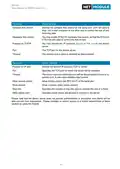
IKE Proposal
This section can be used to configure the phase 1 settings:
Parameter
IPsec IKE Proposal Settings
Negotiation mode
Choose the desired negotiation mode. Preferably, main mode should
be used but aggressive mode might be applicable when dealing with
dynamic endpoint addresses.
Encryption algorithm
Authentication algorithm
IKE Diffie-Hellman Group
SA life time
The desired IKE encryption method (we recommend AES256)
The desired IKE authentication method (we prefer SHA1 over MD5)
The IKE Diffie-Hellman Group
The lifetime of Security Associations
Perfect Forward Secrecy
Specifies whether Perfect Forward Secrecy (PFS) should be used.
This feature increases security as PFS avoids penetration of the key-
exchange protocol and prevents compromisation of previous keys.
Pseudo-random function
PRF algorithms that can optionally be used.
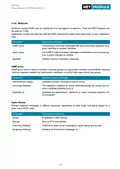
IPsec Proposal
This section can be used to configure the phase 2 settings:
Parameter
IPsec Proposal Settings
Encapsulation mode
IPsec protocol
The desired encapsulation mode (Tunnel or Transport)
The desired IPsec protocol (AH or ESP)
Encryption algorithm
Authentication algorithm
SA life time
The desired IKE encryption method (we recommend AES256)
The desired IKE authentication method (we prefer SHA1 over MD5)
The lifetime of Security Associations
Perfect forward secrecy Specifies whether Perfect Forward Secrecy (PFS) should be used.
(PFS)
This feature increases security as PFS avoids penetration of the key-
exchange protocol and prevents compromisation of previous keys.
Force encapsulation
Force UDP encapsulation for ESP packets even if no NAT situation is
detected.
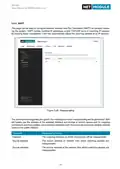
Networks
When creating Security Associations, IPsec will keep track of routed networks within the tunnel. Pack-
ets will be only transmitted when a valid SA with matching source and destination network is present.
Therefore, you may need to specify the networks right and left of the endpoints by applying the follow-
ing settings:
111

| General | Details |
|---|---|
| Name | NET MODULE NB1601 Router User Manual |
| Make | NET MODULE |
| Language | English |
| Filetype | PDF (Download) |
| File size | 3.35 MB |
 (1 votes, average: 5.00 out of 5)
 Loading...
If you have any questions regarding NET MODULE NB1601 Router User Manual, please ask here and describe the problem in detail.


TP-Link AX6000 8-Stream Wi-Fi 6 Router Installation Guide

TP-Link Archer VR600 Wireless DSL Modem Router Installation Guide

Sagemcom Fast 5298 Fiber Wireless Router User Guide
JUOVI J8301 AC1200 Gigabit Router User Guide

TRANSLITE GLOBAL TL-HWR-13 Dual Band Smart Wireless Router Owner’s Manual

BIGXI AX1800 Wireless Router Installation Guide

SDMC AX3000 Dual Band Mesh Router User Guide

DIGI WR21-M52A-DE1-TB TransPort WR21 Cellular Router User Guide

D-Link DSR-250V2 5-Gigabit Port VPN Router Installation Guide

Inverto OneNet PROx MESH WI-FI Router User Guide
Table of Contents
- 1. Netmodule Router Nb1601 - User Manual For Software Version 4... →
- 2. Installation - Setup →
- 3. Welcome To Netmodule - Installation →
- 4. Usb - Serial Port →
- 5. Software - Configuration →
- 6. Initial Login - Wan Links →
- 7. Webserver - Vrrpconfiguration →
- 8. Environmentalconditi... - Nb1601interfaces →
- 9. Welcome - Installation Procedure →
- 10. Conformity - Safety Instructions →
- 11. Information About The Device Interfaces - General Safety Ins... →
- 12. Declarationofconform... - Wastedisposal →
- 13. Open Source Software - Acknowledgements →
- 14. User Manual For Nrsw Version 4.4 - Specifications →
- 15. Features - Installation →
- 16. Environmental Conditions - Input Voltage →
- 17. User Manual For Nrsw Version 4.4 →
- 18. User Manual For Nrsw Version 4.4 - Extension Interface Ext 2 →
- 19. Vpn Connection Status - Extension Interface State →
- 20. User Manual For Nrsw Version 4.4 - Reset →
- 21. Mobile Interface Emea - Mobile Interface North America →
- 22. Bluetooth - Wlan →
- 23. Gnss - Usb 2.0 Host Port →
- 24. Ethernet Connectors - Specification →
- 25. Power Supply (pwr) - Serial Rs-232 →
- 26. Digital Output - Digital Input →
- 27. Pin Terminal Block - Pin Assignment →
- 28. Com/io Shield (option Sc) - Pin Assignment →
- 29. User Manual For Nrsw Version 4.4 - Xcan Shield (option 2c) →
- 30. Extension - Available Options →
- 31. Installation - Installation Of The Micro-sim Card →
- 32. Installation Of The Wlan Antennas - Attention: Following Poi... →
- 33. Installation Of The Bluetooth Antenna - Installation Of The ... →
- 34. Installation Of The Power Supply →
- 35. Configuration - Firststeps →
- 36. Admin Password Setup - Configure Automatic Mobile Data Conne... →
- 37. Serial Console Login - Recovery Image →
- 38. Home - Interfaces →
- 39. Gnss - Ethernet →
- 40. Ospf - Dyndns →
- 41. Interfaces - Wan →
- 42. Installation Prerequisites - Wan Link Priorities →
- 43. Wan Link Operation Modes - Wan Link Settings →
- 44. Wan Settings - Tcp Maximum Segment Size →
- 45. Link Supervision - Link Management →
- 46. User Manual For Nrsw Version 4.4 - Supervision Settings →
- 47. Ethernet Port Assignment - Port Assignment →
- 48. Ethernet Link Settings - Port Assignment →
- 49. Vlan Management - Ip Settings →
- 50. Ip Settings - Ip Address Management →
- 51. Lanipsettings - Wanmode →
- 52. Mobile Modems - Sims →
- 53. User Manual For Nrsw Version 4.4 - Registering To A Network →
- 54. Configuration - Wwan Sim Configuration →
- 55. Wwan Interfaces - Mobile Interfaces →
- 56. Wwan Connection Parameters - Wan Advanced Parameters →
- 57. Wlan Management - Link Management →
- 58. Configurable Parameters For Access-point, Client Mode, Mesh P... →
- 59. User Manual For Nrsw Version 4.4 →
- 60. Wlanmesh-pointmanage... - Operationtype →
- 61. Wlan Configuration - Wlan Client Configuration →
- 62. Wlan Access-point Configuration - Ssid →
- 63. Wlan Access-point Configuration - Wlan Security Modes →
- 64. Meshid - Wlan Mesh-point Configuration →
- 65. Wlan Mesh-point Security Modes - Meshid Is Disabled →
- 66. Wlan Ip Settings - Wlan1 Ip Settings →
- 67. User Manual For Nrsw Version 4.4 - Wlan Bridging Features →
- 68. Software - Bridge Settings →
- 69. Usb - Usb Administration →
- 70. Usb Devices - Connected Usb Devices →
- 71. Usb Autorun - Authentication →
- 72. Serial Port Usage - Login Console →
- 73. User Manual For Nrsw Version 4.4 - Configuration →
- 74. Logout - Interfaces →
- 75. User Manual For Nrsw Version 4.4 - Serial Settings →
- 76. User Manual For Nrsw Version 4.4 - Serial Port Settings →
- 77. Digital I/o Configuration - Ip Settings →
- 78. Bluetooth Settings - Administrative Status →
- 79. Gnss Module Configuration - Gnss Assisted Gps Configuration →
- 80. Gnss Server Configuration - Allow Clients From →
- 81. Gnss Information - Gnss Satellite Information →
- 82. Routing - Static Routes →
- 83. User Manual For Nrsw Version 4.4 - Static Route Configuratio... →
- 84. Extended Routing - Static Routes →
- 85. Multipath - Static Routes →
- 86. Mobile Ip Configuration - Primary Home Agent Address →
- 87. Mobile Ip Configuration - Shared Secret →
- 88. Homeagentsetup - Configurationformobi... →
- 89. Mobile Ip Node Configuration - Shared Secret →
- 90. Qualityofservice - Qosadministration →
- 91. Qos Default Queues - Qos Queue Parameters →
- 92. Multicast Routing Configuration - Igmp Proxy Settings →
- 93. Ospf General Settings - Ospf Interfaces →
- 94. Bgp General Settings - Bgp Neighbors →
- 95. Firewall - Administration →
- 96. Firewall - Interfaces →
- 97. User Manual For Nrsw Version 4.4 - Firewall Rule Configurati... →
- 98. Napt - Firewall →
- 99. Napt Inbound Rules - Firewall →
- 100. Parameter - Ports →
- 101. Vpn - Openvpn →
- 102. Tunnel Configuration - Client Management →
- 103. Openvpn Client Configuration - Openvpn Configuration →
- 104. Openvpn Options - Openvpn Expert Configuration (client) →
- 105. Openvpn Expert Configuration (server) - Server Expert Files →
- 106. Client Management - Tunnel Configuration →
- 107. Ipsec - Mechanism Description →
- 108. Administration - Tunnel Configuration →
- 109. Configuration - Interfaces →
- 110. Ipsec General Settings - Ike Authentication →
- 111. Ike Proposal - Ipsec Proposal →
- 112. Ipsec Network Settings - Local Network →
- 113. Pptp Administration - Tunnel Configuration →
- 114. User Manual For Nrsw Version 4.4 - Tunnel Configuration →
- 115. Pptp Client Management - Tunnel Configuration →
- 116. Gre Configuration - Peer Address →
- 117. L2tp Configuration - Transport Protocol →
- 118. Dial-in Server Configuration - Administrative Status →
- 119. User Manual For Nrsw Version 4.4 →
- 120. Sdk - Netmodule-specific Application Programming Interface (... →
- 121. Send/retrieve Sms - Send E-mail →
- 122. Api Function Nb_status - Using The Dump Function →
- 123. Running Sdk - Scripts And Triggers →
- 124. Administration - Sdk Administration →
- 125. Job Management - Interfaces →
- 126. User Manual For Nrsw Version 4.4 - Sdk Script Parameters →
- 127. Testing - Sdk Sample Application →
- 128. User Manual For Nrsw Version 4.4 - Warning: Will Enable The ... →
- 129. Dhcp Server Management - Administration →
- 130. Dhcp Server Settings - Persistent Leases →
- 131. Dns Server Administration - Dns Server Configuration →
- 132. User Manual For Nrsw Version 4.4 →
- 133. User Manual For Nrsw Version 4.4 - Dns Static Hosts Settings →
- 134. Ntp Server Configuration - Ntp Server Administration →
- 135. Dynamic Dns - Dyndns Administration →
- 136. Dynamic Dns Settings - Provider →
- 137. E-mail Client Configuration - E-mail Client Settings →
- 138. User Manual For Nrsw Version 4.4 - E-mail Client Settings →
- 139. Event Notification Settings - E-mail Address →
- 140. Sms Administration - Modem Configuration →
- 141. Sms Sim Configuration - Routing & Filtering →
- 142. Ssh/telnet Server Configuration - Telnet Server Configuratio... →
- 143. User Manual For Nrsw Version 4.4 - Ssh Server Settings →
- 144. Snmp Agent - Supported Mibs →
- 145. Snmpconfiguration - Snmpagentconfigurati... →
- 146. Snmp Authentication - Snmpv3 Authentication →
- 147. Getting The Current Config Hash: - Restarting The Device: →
- 148. Switching To Alternative Software: - Switching To Alternativ... →
- 149. Web Server Configuration - Administration →
- 150. Mqtt Broker - Please Set Up Appropriate Firewall Rules →
- 151. Softflow Settings - Interface →
- 152. Discovery Configuration - Enabled Protocols →
- 153. Redundancy - Interfaces →
- 154. User Manual For Nrsw Version 4.4 - Redundancy Configuration →
- 155. User Manual For Nrsw Version 4.4 - Itxpt →
- 156. Fms To Ip Options - Multicast Period →
- 157. Fms To Ip Database Format - The Parameter Group Number (pgn)... →
- 158. Pgn Definition - Parameter →
- 159. Spn Definition - Nummerical Spn →
- 160. User Manual For Nrsw Version 4.4 →
- 161. User Manual For Nrsw Version 4.4 →
- 162. User Manual For Nrsw Version 4.4 - Itxpt Vehicletoip →
- 163. Voice Gateway - Administration →
- 164. Voice Gateway Administration Settings - Sip Interface →
- 165. Voice-over-mobile Audio Profiles - Bluetooth →
- 166. User Manual For Nrsw Version 4.4 - Endpoint Settings Sip (us... →
- 167. Voice Routing - Voice Gateway Routing Settings →
- 168. Client Configuration - X-lite Configuration →
- 169. System Settings - User Accounts →
- 170. User Manual For Nrsw Version 4.4 - System Settings →
- 171. Bootloader Settings - Time & Region →
- 172. Time Synchronisation - Ntp Server →
- 173. Install - Guest Networking →
- 174. Authentication - User Accounts →
- 175. User Accounts Management - Remote Authentication →
- 176. User Manual For Nrsw Version 4.4 - Remote Authentication Set... →
- 177. Software Update - Manual Software Update →
- 178. Automatic Software Update - Module Firmware Update →
- 179. Modulefirmwareupdate - Softwareprofiles →
- 180. Configuration - Manual File Configuration →
- 181. Automatic File Configuration - Automatic Updates →
- 182. Factory Configuration - Software Update →
- 183. User Manual For Nrsw Version 4.4 - Troubleshooting →
- 184. System Debugging - User Accounts →
- 185. Tech Support - System Settings →
- 186. Keys & Certificates - Configuration →
- 187. Sshauthorization - Openvpn →
- 188. Configuration - Interfaces →
- 189. Parameter - Certificate Configuration →
- 190. Authorities - Certificate Enrollment →
- 191. Licensing - License Installation →
- 192. User Manual For Nrsw Version 4.4 - Oss Notice →
- 193. User Manual For Nrsw Version 4.4 →
- 194. Command Line Interface - General Usage →
- 195. Gettingconfigparamet... - Printhelp →
- 196. Settingconfigparamet... - Checkingconfigcomple... →
- 197. User Manual For Nrsw Version 4.4 - Lan Interface Status →
- 198. Manage Keys And Certificates - Restarting Services →
- 199. Firewall And Napt - Gps Daemon →
- 200. Resetting System - Rebooting System →
- 201. Usage - Available Keys →
- 202. Get-getconfigurationparameter - Set-setconfigurationparamete... →
- 203. Reboot - Trigger System Reboot - Reset - Run Factory Reset →
- 204. User Manual For Nrsw Version 4.4 - The Sms Daemon Must Be Pr... →
- 205. User Manual For Nrsw Version 4.4 →
- 206. Appendix - Abbreviations →
- 207. User Manual For Nrsw Version 4.4 - System Events →
- 208. User Manual For Nrsw Version 4.4 →
- 209. User Manual For Nrsw Version 4.4 - Dynamic Dns Update Succee... →
- 210. Factoryconfiguration →
- 211. User Manual For Nrsw Version 4.4 →
- 212. Sdk - Examples →
- 213. Remote-mail.are - Scan-mobile.are →
- 214. Transfer-file.are - Udp-msg-server.are →