
REGIN M4G951 Router Instructions


EN
INSTRUCTION
M4G951
The router is not locked to any network provider. It is recommended to
choose a network provider where you can get SIM cards with a fixed rate
or sufficient data traffic since data usage can vary between applications.
Connections and antennas
Technical Data
Connections
RJ45 (3 LAN, 1 WAN), WiFi
TCP/IP
5
6
7
8
Communication
Mobile network
4G (LTE) – Cat 4 up to 150 Mbps, 3G – up to 42 Mbps,
2G – up to 236.8 kbps
Ethernet
IEEE 802.3, IEEE 802.3u standards
3 LAN 10/100 Mbps Ethernet ports
1 WAN 10/100 Mbps Ethernet port
WiFi
IEEE 802.11 b/g/n WiFi standards
2
SIM card slots
Software
Open VPN, IPsec, GRE, L2TP, PPTP
Dynamic DNS
SIM-card switch controlled by signal, data limit, roaming
Firmware update from bootloader via WebUI
IN20095 REV. A, 2024-02-02
3
4
2
1
Power Supply
9 - 30 V DC. Wall adapter included.
<7 W
Caution! Read and understand the instruction before using the product.
Power
consumption
Operating
-40 °C ... +75 °C
temperature
Caution! Ensure that the installation complies with local safety
regulations.
Dimensions
(HxWxD)
110 mm x 50 mm x 100 mm
Weight
287 g
Warning! Before installation or maintenance, the power supply must first
be disconnected in order to prevent potentially lethal electric shocks! In-
stallation or maintenance of this unit should only be carried out by quali-
fied personnel. The manufacturer is not responsible for any eventual
damage or injury caused by inadequate skills during installation, or through
removal of or deactivation of any safety devices.
Housing
Aluminum
9
11
10
Installation
Place the router in a clear and open space, since walls, doors and other
obstacles can reduce the signal strength.
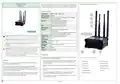
Figure 1 Router connections and antennas
Function
1. Insert the pointed end of the SIM ejection tool included in the SIM
KIT into the small hole located next to each SIM card slot on the
back of M4G951.
① LAN1 port
② LAN2 port
③ LAN3 port
④ WAN port
⑦ WiFi antenna
⑧ WiFi antenna
⑨ Signal strength
⑩ Connection status
⑪ Power
M4G951 is a router used between TCP/IP connected controllers and a
wireless, mobile 4G/GPRS network.
2. Push the SIM ejection tool into the small hole to open each SIM card
slot.
The router has a built in DHCP function and can handle multiple
external units. The router can be used as a WiFi hotspot. It is, however,
recommended to turn off the WiFi or protect the network with a secure
password in order to limit data usage.
3. Install one or two SIM cards, gently push each SIM card holder to
close it.
⑤ Mobile antenna
⑥ Mobile antenna
4. Attach the mobile to the MOBILE connections and the WiFi
antennas to the WIFI connections on the back of the router.
M4G951 has built in dynamic DNS which makes the router easy to find
over the internet. The Port Forward software makes it easy to find and
connect to the different units in the application.
5. Connect the power adapter to the front of the device. Connect the
other end to a power outlet.
M4G951
1 (5)


| General | Details |
|---|---|
| Name | REGIN M4G951 Router Instructions |
| Make | REGIN |
| Language | English |
| Filetype | PDF (Download) |
| File size | 0.2 MB |
 (1 votes, average: 5.00 out of 5)
 Loading...
If you have any questions regarding REGIN M4G951 Router Instructions, please ask here and describe the problem in detail.


CNC3D QB2 CNC Router User Guide

D-Link DWR-960 Wi-Fi Router Instruction Manual

BEC RidgeWave 7000 R26 MaxRange Gigabit LTE Outdoor Router Owner’s Manual

neptronic RPB11 BACnet Router Installation Guide

TP-Link TL-WR841N Wireless N Router Installation Guide

HITRON CODA-4582 Cable Modem Router User Guide

Sagemcom Fast 5298 Fiber Wireless Router User Guide

TP-Link deco 7100000984 Router Installation Guide

TP-Link Archer MR600 Wireless 4G LTE Router Installation Guide

ASUS XT12 AX11000 Tri Band WiFi Router User Guide