
Taiko Audio Extreme Router User Guide





First authenꢁcaꢁon
Open a web browser on the device connected to the Audio Router. Enter the
router’s IP address in the browser’s address bar. By default, the IP address of
the router is 192.168.100.1
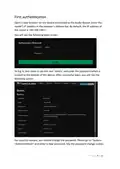
You will see the following login screen:
To log in, you need to use the user ‘admin’ and enter the password which is
located at the boꢀom of the device. Aſter successful login, you will see the
following screen:
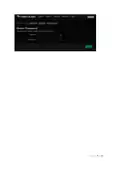
For security reasons, you should change the password. Please go to “System-
>Administraꢁon” and enter a new password. See the password change screen:
P a g e 8 | 14

| General | Details |
|---|---|
| Name | Taiko Audio Extreme Router User Guide |
| Make | Taiko |
| Language | English |
| Filetype | PDF (Download) |
| File size | 0.2 MB |
 (1 votes, average: 5.00 out of 5)
 Loading...
If you have any questions regarding Taiko Audio Extreme Router User Guide, please ask here and describe the problem in detail.

Taiko TAP0016 Audio Extreme Router User Manual


Ruijie EG105GWX All-In-One Wireless Router User Manual

CASTLENET EBM522C Mesh Wi-Fi Router Installation Guide

D-Link DIR-822 AC1200 Wave 2 WiFi Router Instruction Manual

TP-Link Archer AC1900 MU MIMO Wi-Fi Router Installation Guide

Lazy pro AC1200 Reliable Dual Band WiFi Router User Guide

inseego 5G Router FG2000 User Guide

TELTONIKA RUT976 5G Router User Guide

Mercury NF18ACV-NC2-R6B023 Netcomm WiFi Router User Guide

Dynalink DL-WRX36 WiFi 6 AX3600 Router User Guide

ASUS GT-AX11000 Pro ROG Rapture Pro Tri-band Gaming Router User Guide