
Taiko Audio Extreme Router User Guide





The Concept
Housed in the same beauꢁful 22 x 22 x 5 cm / 9 x 9 x 2 inch solid copper chassis
as the Taiko Audio Extreme Switch, the Taiko Audio Extreme Router yields a
significant lowering of noise by controlling the amount and flow of data on the
network.
A basic setup would be for the user to connect the Extreme Music Server to a
generic router directly or via a generic network switch. This setup can be
upgraded by adding the Taiko Audio Extreme Network Card and Extreme
Network Switch to achieve a significant improvement in Sound Quality. To raise
the bar even further, the user can add the Extreme Router to create an audio
exclusive (isolated) network unimpaired by typical home network processes
and traffic.
The Router has a single WAN ("input") network port which connects to your
home network to provide internet access for the audio network. It has 3
separately configurable outputs, one of which connects to your music server or,
preferably, the Extreme Switch. the 2 others can be used for addiꢁonal desired
connecꢁvity, such as for example a dedicated wifi Access Point and/or a wired
control computer.
All networking parameters can be defined and thus allow full control over the
data stream being delivered to the Taiko Audio Extreme Switch and/or Extreme
Music Server.
P a g e 2 | 14
Features
• One SFP port that can accept a DAC cable.
• 4 RJ45 ports of which 3 can be used when the DAC port is enabled.
• The Router can be used to create a separate Audio-only network in
series with (connected downstream of) your Internet Service Provider-
supplied modem/router or any other router.
• Serve as a NAS (for music storage), 2 external USB drives can be
connected.
P a g e 3 | 14
Safety
The Taiko Audio Extreme Router is the perfect soluꢁon for networks requiring
more than the standard router. This high-performing router is based on the
NXP Layerscape® chipset technology and specifically selected router firmware
to provide the utmost security. With the Taiko Audio Extreme Router, you can
have full access to your network while keeping malicious actors out.
This router was carefully designed with the help of specialized cyber-security
engineers to ensure that all possible scenarios to reduce the risk of a data
breach and miꢁgate their impact were taken into consideraꢁon.
It is protected against unauthorized access and malicious acꢁvity, including
disabling services, segmentaꢁon of the hardware to restrict access, configuring
firewalls, and performing regular updates. Unlike other routers on the market,
the Taiko Audio Extreme Router is designed for long-term availability and use,
with regular soſtware updates for the next 5 years and a physical TPM that
provides secure and tamper-proof hardware-based storage for encrypꢁon keys
and other sensiꢁve data. This ensures that malicious actors can’t access the
audio router and its audio network and that any firmware or soſtware updates
are verified and secure. With a TPM, the risk of unauthorized access, hacking,
and data breaches are greatly reduced, providing users with peace of mind
when it comes to the security of their audio network.
P a g e 4 | 14
Baꢀling Networking Noise
(Simplified explanaꢀon)
We are taking a 180-degree angle approach to networking noise relaꢁve
to the more common methods that are currently used.
Think of the following analogy:
1) Being stuck in a silent room with a leaking water tap into a bucket of
water.
2) Those same drops of water falling into an ocean with you on the beach
enjoying the sound of waves.
Our approach is to not drown out irregular noise by hiding it in a
wideband high noise floor but rather to make the offending noise itself
inaudible allowing you to relax in that silent room and enjoy the sound of
silence.
In a normal home setup with an X number of devices, smart TVs,
streaming devices, desktop computers, notebooks, smartphones, tablets,
smart lighꢁng, smart household appliances, etc., adding more devices
with a relaꢁvely small increase in total network acꢁvity is not very
noꢁceable.
However, when you create a new network for audio, using a dedicated
router, with a bare minimum of devices, with overall very low acꢁvity, and
the acꢁvity is controlled on the router and connected devices, any
addiꢁonal device creaꢁng addiꢁonal and uncontrolled network acꢁvity
suddenly does become noꢁceable.
P a g e 5 | 14

Installaꢁon
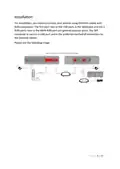
For installaꢁon, you need to connect your devices using Ethernet cables with
RJ45 connectors. The first port next to the USB ports is the WAN port and the 2
RJ45 ports next to the WAN RJ45 port are general purpose ports. The SFP
connecter is used as a LAN port and is the preferred method of connecꢁon to
the Extreme Switch.
Please see the following image.
P a g e 6 | 14

| General | Details |
|---|---|
| Name | Taiko Audio Extreme Router User Guide |
| Make | Taiko |
| Language | English |
| Filetype | PDF (Download) |
| File size | 0.2 MB |
 (1 votes, average: 5.00 out of 5)
 Loading...
If you have any questions regarding Taiko Audio Extreme Router User Guide, please ask here and describe the problem in detail.

Taiko TAP0016 Audio Extreme Router User Manual


AVRTX AVRT9 Portable APRS Track Router User Manual

HMS NETWORKS CANbridge NT Lua ADK Bridge Router User Guide

ASUS ET12 ZenWiFi Pro AXE11000 Tri Band Router User Guide

LANCOM 1781-4G VPN Router User Guide

GUDE OF 1200 E Router Instructions

GL iNet GL-B3000 Marble AX3000 Wireless Router User Guide

Helmholz 700-875-WIF51 REX 100 Router User Guide

Tenda 4G03 N300 Wi-Fi 4G LTE Router Installation Guide

Cudy AX1800 WiFi 6 Mesh Router Instructions

CISCO cBR Series Converged Broadband Router User Guide