
Taiko Audio Extreme Router User Guide





Network setup
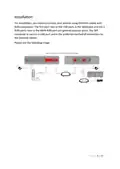
You can set up your Internet connecꢁon.
By default, the router uses Dynamic Host Configuraꢁon Protocol (DHCP) to
obtain Internet access parameters. Therefore, the Internet connecꢁon should
work automaꢁcally aſter turning on the router. Most Routers will work this way.
If you know that your router does not provide DHCP, then you need to
configure access to the Internet in accordance with the recommendaꢁons of
your provider.
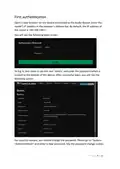
Please, go to “Network->Interfaces” and click on the “Edit” buꢀon on the line
where the WAN/eth0 interface is located. See the screenshot below:
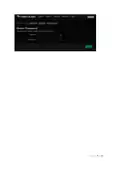
You can set it to manual or specify another protocol for Internet access.
P a g e 10 | 14

| General | Details |
|---|---|
| Name | Taiko Audio Extreme Router User Guide |
| Make | Taiko |
| Language | English |
| Filetype | PDF (Download) |
| File size | 0.2 MB |
 (1 votes, average: 5.00 out of 5)
 Loading...
If you have any questions regarding Taiko Audio Extreme Router User Guide, please ask here and describe the problem in detail.

Taiko TAP0016 Audio Extreme Router User Manual


LANCOM 1793VAW VPN Router User Guide

LANCOM SYSTEMS 1930EF Gigabit Ethernet Black Wired Router User Guide

Mercury Netgear D7000 Fibre Modem Router User Guide

OptConnect neo 4 Cellular Router User Manual

HFCL Weave Home Mesh Router User Guide

DrayTek Vigor 1000B Multi WAN Load Balancing Router User Guide

TELTONIKA RUT360100100 DIN Rail Router User Guide

GL iNet GL-X3000NR 5G NR WiFi 6 Router User Guide

D-Link BE3600 Mesh Gigabit Wireless Router Installation Guide

Tenda RE6L Pro Wi-Fi 7 Router Installation Guide