
Tenda RX12V1.0 Wi-Fi 6 6E Router Installation Guide





























FAQ
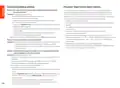
English: Safety Precautions
Q1: I cannot log in to the web UI by visiting tendawifi.com. What should I do?
Before performing an operation, read the operation instructions and precautions to be
taken, and follow them to prevent accidents. The warning and danger items in other
documents do not cover all the safety precautions that must be followed. They are
only supplementary information, and the installation and maintenance personnel need
to understand the basic safety precautions to be taken.
A1: Try the following solutions:
•
•
If you are using a WiFi-enabled device, such as a smartphone:
− Ensure that it connects to the WiFi network of the router.
− Ensure that the cellular network (mobile data) of the device is disabled.
If you are using a wired device, such as a computer:
- The device is for indoor usage only.
− Ensure that tendawifi.com is entered correctly in the address bar, rather
than the search bar of the web browser.
- For desktop mounting, the device must be horizontally mounted for safe use.
- If the device supports wall mounting, the device is only suitable for mounting at
heights ≤ 2 m.
− Ensure that the computer is connected to the LAN port of the router properly
using an Ethernet cable.
- Do not use the device in a place where wireless devices are not allowed.
- Please use the included power adapter.
− Ensure that the computer is set to Obtain an IP address automatically
and Obtain DNS server address automatically.
- The mains plug is used as the disconnect device, and shall remain readily operable.
- Operating environment: Temperature: 0℃ – 40℃; Humidity: (10% – 90%) RH,
non-condensing; Storage environment: Temperature: -40℃ to +70℃; Humidity:
(5% – 90%) RH, non-condensing.
If the problem persists, reset the router by referring to Q2 and try again.
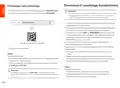
Q2: How to restore my device to factory settings?
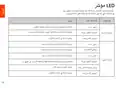
A2: When your device is working properly, hold down the RST or Reset button of
your device using a needle-like item (such as a pin) for about 8 seconds, and
release it when the LED indicator blinks red fast. When the LED indicator lights
solid green, your device is reset successfully.
- Do not use the power adapter if its plug or cord is damaged.
- Disassembling or modifying the device or its accessories without authorization voids
the warranty, and might cause safety hazards.
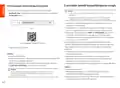
Q3: When I use the product as a router, I cannot access the internet after the
configuration. What should I do?
A3: Try the following solutions:
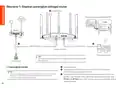
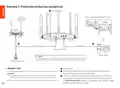
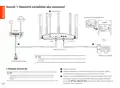
• Check whether the WAN port of the router is connected to a modem or
Ethernet jack properly.
• Log in to the web UI of the router and navigate to the Internet Settings page.
Follow the instructions on the page to solve the problem.
If the problem persists, try the following solutions:
• For WiFi-enabled devices:
− Check whether your WiFi-enabled devices are connected to the WiFi network
of the router.
− Visit tendawifi.com to log in to the web UI and change your WiFi name and
WiFi password on the WiFi Settings page. Then try again.
• For wired devices:
− Check whether your wired devices are connected to a LAN port properly.
− Check whether wired devices are set to Obtain an IP address automatically
and Obtain DNS server address automatically.
05

| General | Details |
|---|---|
| Name | Tenda RX12V1.0 Wi-Fi 6 6E Router Installation Guide |
| Make | Tenda |
| Language | English |
| Filetype | PDF (Download) |
| File size | 5.62 MB |
 (1 votes, average: 5.00 out of 5)
 Loading...
If you have any questions regarding Tenda RX12V1.0 Wi-Fi 6 6E Router Installation Guide, please ask here and describe the problem in detail.

Tenda AXE5700 Wi-Fi 6E Router User Manual

Tenda AX1800 Wi-Fi 6 5G NR Router User Manual

Tenda RX2LP Dual Band Gigabit Wi-Fi 6 Router Installation Guide

Tenda TX2L ProV1.0 WiFi 6 Router Installation Guide

Tenda 4G09V1.0 Wifi Router User Manual

Tenda AC19 Dual Band Gigabit WiFi Router Installation Guide

Tenda 4G06V1.0 4G LTE and VoLTE Router User Guide

Tenda 4G03 N300 Wi-Fi 4G LTE Router Installation Guide

Tenda N300 WiFi VDSL/ADSL Modem Router V300 Installation Guide

Tenda AC9 AC1200 Dual Band Gigabit WiFi Router Installation Guide


NRadio Technologies CC 4G LTE Router Installation Guide

HUAWEI AX3 WiFi Pro Quad-Core WiFi 6 Router User Guide

BEC 7000 R26-W Gigabit LTE Outdoor Router with Hotspot User Guide

NEXTIVITY Shield Megafi Wireless Wan Router User Guide

Winstars NM3015 AX3000 Dual Band Wi-Fi 6 Mesh Router Installation Guide

xiaomi RA67 AX1800 Mi Router User Manual
Ubiquiti UMR-Ultra Mobile Router Installation Guide

TP-Link Archer C20 Wireless Dual Band Router Installation Guide

ZYXEL NR2301 5G NR Portable Router User Guide

NETGEAR Orbi RBR350 WiFi 6 Dual-band Mesh Router User Manual