
WESTMANN GigaSpire BLAST U6 Router User Guide



NETWORK USAGE
KEEP TRACK AND MONITOR THE USAGE
FOR EACH DEVICE.
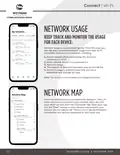
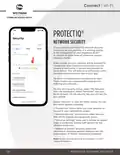
Network usage is organized by device. From this view, you
can see basic information about usage from each Wi-Fi
connected device on your network, including:
1. Device identification and whether the device is
connected to Wi-Fi.
2. What network device it is connected to.
3. Network usage.
4. The amount of data that has been used by this device.
5. Network usage is updated each time you run a
bandwidth test through the app.
Note: This feature is only available with a GigaSpire BLAST.
NETWORK MAP
From the dashboard, you can select “My Network.” This will
show any units connected in your network. Next, tap into
your Wi-Fi network from the “Networks” tab. From here, tap
into the “Map” section to view devices connected to your
system. You can tap on the “Mesh” icon to get performance
information and devices connected at that mesh unit.
12
NETWORK USAGE | NETWORK MAP

| General | Details |
|---|---|
| Name | WESTMANN GigaSpire BLAST U6 Router User Guide |
| Make | WESTMANN |
| Language | English |
| Filetype | PDF (Download) |
| File size | 1.02 MB |
 (1 votes, average: 5.00 out of 5)
 Loading...
If you have any questions regarding WESTMANN GigaSpire BLAST U6 Router User Guide, please ask here and describe the problem in detail.


BEC RidgeWave 7000 R26 MaxRange Gigabit LTE Outdoor Router Owner’s Manual

CNCU DZB200 Easy Route CNC Router Instructions

Cudy WR1200 AC1200 Dual Band Wi-Fi Router Installation Guide

TP-Link EU_V3.2 MU MIMO Wi-Fi Router User Guide

SMAWAVE SRE410 LTE CPE Router User Guide

NETGEAR NIGHTHAWK BE6500 Tri Band Wi-Fi 7 Router User Guide

robustel R1510 4G LTE Router User Manual

legrand RT-20 High Performance Gigabit Router User Guide

TP-Link AX53 Internet Router User Guide

ZYXEL LTE5388-M804 4G LTE-A Pro Router User Guide