
CHEECENT QX210 Cellular Router User Guide

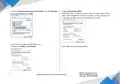
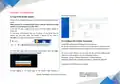
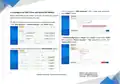


> Fill in password in “WPA passphrase”, Don’t change other parameters,
6.3 Configure the WiFi (Client and Master/AP Modes)
click “SUBMIT” button.
Besides Wired Ethernet and Cellular connection, this router also supports
WiFi connection: Client and Master/AP modes.
① WiFi Client Mode: Make the router join your existing WiFi network.
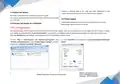
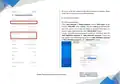
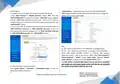
> Click “Basic Network” > “Wireless Network”, click “SCAN” button
> “Interface Configuration” > “Mode” Select “Client”, double check “ESSID”
(WiFi name) and “Wireless Security” > “Key” (password) is correct, click
“SAVE & APPLY” button.
> Select the WiFi network you want to join, click “JOIN NETWORK” button
9
Website: www.keennew.com
Qixiang Technology, Contact Us for purchasing
Email: sales@keennew.com
Whatsapp: +86 13249165907


| General | Details |
|---|---|
| Name | CHEECENT QX210 Cellular Router User Guide |
| Make | CHEECENT |
| Language | English |
| Filetype | PDF (Download) |
| File size | 0.45 MB |
 (1 votes, average: 5.00 out of 5)
 Loading...
If you have any questions regarding CHEECENT QX210 Cellular Router User Guide, please ask here and describe the problem in detail.


TP-Link TLMR6400 Wireless 4G LTE Router Installation Guide

TCL LINKHUB HH40L2 Wi-Fi Router User Manual

D-LINK DWR-978 5G AC2600 Wi-Fi Router User Guide

Cudy X6 AX1800 1800mbps Dual Band Smart Wi-Fi 6 Router Installation Guide

accelerated 6300-LX USB Router User Guide

mikrotik RB960PGS Hex PoE 5-Port Router User Manual

PoEWit R10 Preconfiguration Enterprise Class Router User Manual

POYNTING EPOYNT-4 Outdoor LTE-5G Antenna and Router Enclosure User Guide

Cudy WR3000 AX3000 Gigabit Wi-Fi 6 Mesh Router Installation Guide

TP-Link BE805 Archer Wi-Fi 7 Router User Guide