
CHEECENT QX210 Cellular Router User Guide

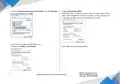
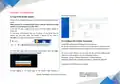
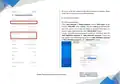


5.3 Choose “Internet Protocol Version 4 (TCP/IPv4)” and click “Properties”.
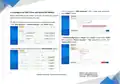
2.) Use the following IP address
Configured a static IP address manually within the same subnet of the
router, router LAN default IP address is 192.168.1.1, so static IP address set
as 192.168.1.xxx (XXX can be any number between 2 to 254).
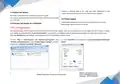
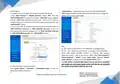
5.4 Two ways for configuring the IP address of PC.
1) Obtain an “IP address automatically”:
5.5 Click “OK” to finish the configuration.
5
Website: www.keennew.com
Qixiang Technology, Contact Us for purchasing
Email: sales@keennew.com
Whatsapp: +86 13249165907


| General | Details |
|---|---|
| Name | CHEECENT QX210 Cellular Router User Guide |
| Make | CHEECENT |
| Language | English |
| Filetype | PDF (Download) |
| File size | 0.45 MB |
 (1 votes, average: 5.00 out of 5)
 Loading...
If you have any questions regarding CHEECENT QX210 Cellular Router User Guide, please ask here and describe the problem in detail.


YINUOLINK Y7 AC1200 Wi-Fi Nano Router Installation Guide

LANCOM 884 VoIP Router User Guide

LINKSYS WRT54G Wireless G Router Instructions

Pix-Link AX02 Wi-Fi 6 Router Installation Guide

eero Max 7 Mesh Wifi Router Owner’s Manual

MAXVIEW Roam 5G WiFi Router User Guide

ASUS ZenWiFi Pro ET12 AXE11000 Tri Band Router User Guide

MERCUSYS MR62X Wireless Router Installation Guide

TP-Link TL-WR902AC Mbps Wireless Portable Mini Travel Router Owner’s Manual

TP-Link AC1200 Dual Band Wi-Fi Router Installation Guide