
CHEECENT QX210 Cellular Router User Guide

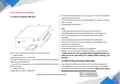
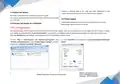
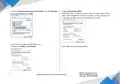


3.Hardware Introduction
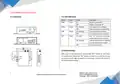
3.1 Overview
3.2 LED Indicators
Name
PWR
Color
Status
On
Description
Green
Router is powered on
Off
Router is powered off
WAN
LAN
NET
Green
Green
Green
On, blinking
Off
Link connection is working
Link connection is not working
Link connection is working
Link connection is not working
Join the network successfully
and worked in good condition
Joining the network, or working
in a low-level network signal
Fail to join network
On, blinking
Off
On, solid
On, blinking
Off
3.3 Reset Button
After power on the router, press and hold the “RST” button for more than
15 seconds, then release the “RST” button, and wait for around one minute,
you will see all LEDs light on, wait for a few seconds, it returns the router to
the factory default setting.
2
Website: www.keennew.com
Qixiang Technology, Contact Us for purchasing
Email: sales@keennew.com
Whatsapp: +86 13249165907


| General | Details |
|---|---|
| Name | CHEECENT QX210 Cellular Router User Guide |
| Make | CHEECENT |
| Language | English |
| Filetype | PDF (Download) |
| File size | 0.45 MB |
 (1 votes, average: 5.00 out of 5)
 Loading...
If you have any questions regarding CHEECENT QX210 Cellular Router User Guide, please ask here and describe the problem in detail.

REPUBLIC OF GAMERS GT-BE19000 WiFi 7 Tri Band Gaming Router User Guide

eero Pro 6E Mesh Router User Guide

verizon CR1000 Access Point Router Instructions

NEXTIVITY Shield Megafi Wireless Wan Router User Guide

SAX1V1R Spectrum WiFi 6 Router User Guide: Troubleshoot & Personalize

COMFAST WR619AC V2 1200Mbps Wireless Router User Manual

eero SN10001 Outdoor 7 PoE Mesh Wi-Fi Router Installation Guide

motorola Q14 Mesh WiFi 6E Router User Guide

Tenda RX27 Pro AX5700 Tri Band Gigabit Wi-Fi 6E Router Installation Guide

MikroTik G8-b Wireless Router User Guide