
dahua DH-MAX18-3 MAX18 Mesh Wireless Router User Guide











Quick Start Guide
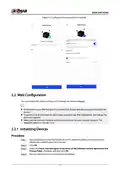
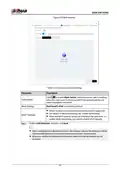
Figure 2-7 WLAN connection settings
Table 2-1 Descriptions of WLAN parameters
Parameter
Description
Select Same as the device login password, and then the
password of WLAN will be the same as the login password of the
device.
WLAN Password
Dual-band 2.4/5G
Enable Dual-band 2.4/5G by default, and then strongest Wi-Fi
signal will be automatically selected.
Only when Dual-band 2.4/5G is enabled, the name of 2.4 GHz
and 5 GHz will be the same. You will automatically connect to
the fastest network.
SSID
Select from Low , Middle and High. The higher the power is,
the larger the area the signal will cover.
Power
Step 4 Configure mesh settings, and then click Next.
9

| General | Details |
|---|---|
| Name | dahua DH-MAX18-3 MAX18 Mesh Wireless Router User Guide |
| Make | Dahua |
| Language | English |
| Filetype | PDF (Download) |
| File size | 0.3 MB |
 (1 votes, average: 5.00 out of 5)
 Loading...
If you have any questions regarding dahua DH-MAX18-3 MAX18 Mesh Wireless Router User Guide, please ask here and describe the problem in detail.

dahua AX1500 Wi-Fi6 Wireless Router Instruction Manual

dahua N300 Wireless Router User Guide

dahua DH-AX30 Wireless Router User Manual


ASUS GS-AX3000 Dual Band Gaming Router User Guide

TP-Link TL-WR3002X Wi-Fi 6 Portable Router Installation Guide

acer WA-36W12FU-AKAA 6E Predator Connect W6 Wi-Fi Router User Manual

intwine connect ICG-150 Cellular Router User Guide

TP-Link 7106508102 Deco Router Installation Guide

ASUS XD4 Plus Dual Band Wi-Fi Router User Guide

GRANDSTREAM HT812 Analog FXS IP Gateway 2 Port + NAT Router User Guide

D-Link N300 EAGLE PRO AI N300 4G Router User Guide

ASUS RT-AX55 Dual Band Router User Guide

Taiko Audio V16.x22069 Extreme Router User Manual