
dahua DH-MAX18-3 MAX18 Mesh Wireless Router User Guide











Quick Start Guide
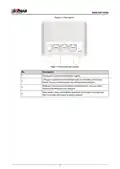
Figure 1-3 Rear panel
Table 1-2 Rear panel description
No.
Description
Power port. Connects to the power supply.
1
LAN port. Connects to wired devices such as computers and set top
boxes. You can switch between the WAN port and LAN port.
2
3
4
WAN port. Connects to the modem or Ethernet port. You can switch
between the WAN port and LAN port.
Reset button. Press and hold the button for more than 5 seconds, and
then the router will restore its factory defaults.
2

| General | Details |
|---|---|
| Name | dahua DH-MAX18-3 MAX18 Mesh Wireless Router User Guide |
| Make | Dahua |
| Language | English |
| Filetype | PDF (Download) |
| File size | 0.3 MB |
 (1 votes, average: 5.00 out of 5)
 Loading...
If you have any questions regarding dahua DH-MAX18-3 MAX18 Mesh Wireless Router User Guide, please ask here and describe the problem in detail.

dahua AX1500 Wi-Fi6 Wireless Router Instruction Manual

dahua N300 Wireless Router User Guide

dahua DH-AX30 Wireless Router User Manual


PANORAMA ANTENNAS Megalodon All in One Antenna 5G Dual Modem Router Owner’s Manual

NEXXT NCM-X3000 Bolt AX3000 Router User Guide

xiaomi R4AC 4A Mi Router User Manual

TELTONIKA RUT260 LTE Router User Manual

COMFAST WR619AC V2 1200Mbps Wireless Router User Manual

SEALEY CP20VTR Cordless Trimming Router Instruction Manual

ASUS DSL-N12U 11N 300MBps Wireless ADSL Modem Router User Guide
Cudy AC1200 WiFi Mesh Router User Guide

D-Link DIR-890L AC3200 Ultra Wi-Fi Router Installation Guide

ASUS RT-AX53U Dual Band Wi-Fi Router User Guide