
dahua DH-MAX18-3 MAX18 Mesh Wireless Router User Guide



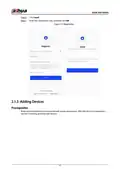








Quick Start Guide
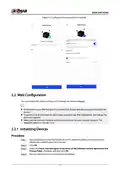
Figure 2-5 Configure time zone and Wi-Fi network
2.2 Web Configuration
You can initialize the device and log in to it through the device webpage.
●
For first-time use or after the device is restored to its factory defaults, you need to initialize the
device.
●
●
To protect your device, keep the admin login password safe after initialization, and change the
password regularly.
Make sure that the local computer and the device are on the same network segment. The
default IP address is 192.168.1.110.
2.2.1 Initializing Devices
Procedure
Step 1 Open web browser, enter dahuawifi.com or the default IP address of the device in the
address bar, and then press the Enter key.
Step 2 Click OK.
Step 3 Select the I have read and agree to the terms of the Software License Agreement and
Privacy Policy checkbox, and then click OK.
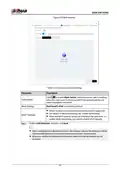
Step 4 Set your password and an associated email address.
7

| General | Details |
|---|---|
| Name | dahua DH-MAX18-3 MAX18 Mesh Wireless Router User Guide |
| Make | Dahua |
| Language | English |
| Filetype | PDF (Download) |
| File size | 0.3 MB |
 (1 votes, average: 5.00 out of 5)
 Loading...
If you have any questions regarding dahua DH-MAX18-3 MAX18 Mesh Wireless Router User Guide, please ask here and describe the problem in detail.

dahua AX1500 Wi-Fi6 Wireless Router Instruction Manual

dahua N300 Wireless Router User Guide

dahua DH-AX30 Wireless Router User Manual


Woodline DadoRight Dado Jig for Router Instructions

Mercury TD-W8960 Modem Router User Manual

NETGEAR RS150 Nighthawk WiFi 7 Dual-Band Router Owner’s Manual

D-Link DIR-X6080Z Multi Gigabit Wi-Fi 6 Router Instruction Manual

Tenda MF6V1.0 4G LTE Mobile Wi-Fi Router Installation Guide

amber AC2600 WiFi Router User Guide

GRANDSTREAM HT812 Analog FXS IP Gateway 2 Port + NAT Router User Guide

verizon CR100A Wireless Router User Guide

ADTRAN 1200824G1 Netvanta 3458 Access Router User Guide

Adtran 854-(v)6 Service Delivery Gateway WiFi 6 2.5G Router User Guide