
dahua DH-MAX18-3 MAX18 Mesh Wireless Router User Guide











Quick Start Guide
1 Connecting the Router
Figure 1-1 Connect the router
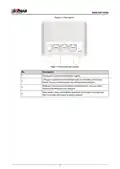
Figure 1-2 Front panel
Table 1-1 Indicator and button descriptions
No.
Indicator/button Description
Press and hold the button for more than 5 seconds to start
mesh networking.
1
Pairing button
Mesh networking is enabled by default. You need to log in to
the webpage or the WiLynk app to disable the function.
●
Red light is solid on: The router is turned on but not
connected to the network.
●
Green light is solid on:The router is turned on and
connected to the network.
●
Green and red light flash: Mesh networking.
●
Green light of the sub router is solid on for 5 seconds and
then off: Pairing was successful.
2
Indicator status
●
The light is off: The router is turned off and set as off.
The lights of the sub router are off: Mesh networking and
repeater networking was successful.
1

| General | Details |
|---|---|
| Name | dahua DH-MAX18-3 MAX18 Mesh Wireless Router User Guide |
| Make | Dahua |
| Language | English |
| Filetype | PDF (Download) |
| File size | 0.3 MB |
 (1 votes, average: 5.00 out of 5)
 Loading...
If you have any questions regarding dahua DH-MAX18-3 MAX18 Mesh Wireless Router User Guide, please ask here and describe the problem in detail.

dahua AX1500 Wi-Fi6 Wireless Router Instruction Manual

dahua N300 Wireless Router User Guide

dahua DH-AX30 Wireless Router User Manual


Juniper NETWORKS ACX7024 Cloud Metro Router User Guide

APRISM MI12 Wi-Fi 6 Dual Radio Router User Guide

robustel R1520LG Dual SIM LTE Router User Manual

LANCOM Systems 1793VA VDSL Voip VPN Router User Guide

BT Smart Hub 3 Broadband Router User Guide

MikroTik RBwAPG-5HacD2HnD Wireless Router User Guide

VOX FTTB Mikrotik Router Installation Guide

ASUS XD4S AX1800 Dual Band WiFi Router User Guide

Doonink FW40-WIFI Wi-Fi Router User Manual

wm SYSTEM M2M Router Installation Guide