
dahua DH-MAX18-3 MAX18 Mesh Wireless Router User Guide











Quick Start Guide
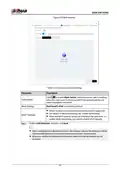
Figure 2-8 Mesh settings
Table 2-2 Descriptions of mesh settings
Parameter
Description
Click
to enable Mesh Switch, and then you can switch meshing
Switch Mesh
Mesh Settings
when the main router is disconnected to the network and the sub
router is properly connected.
Dual-band 2.4/5G is enabled by default.
●
Wired, wireless and combined Mesh networking are supported.
●
For details on Mesh networking, see “3 Mesh Networking”.
Mesh Topology
●
Mesh and Wi-Fi repeater cannot be enabled at the same time. To
enable Mesh networking, you need to disable Wi-Fi repeater.
Step 5 Enable Link Detection , and then click Next.
●
After enabling the link detection function, the network status of the WAN port will be
automatically detected to ensure the network connection remains stable.
●
When you enable the link detection function, make sure that the address can be
accessed.
10

| General | Details |
|---|---|
| Name | dahua DH-MAX18-3 MAX18 Mesh Wireless Router User Guide |
| Make | Dahua |
| Language | English |
| Filetype | PDF (Download) |
| File size | 0.3 MB |
 (1 votes, average: 5.00 out of 5)
 Loading...
If you have any questions regarding dahua DH-MAX18-3 MAX18 Mesh Wireless Router User Guide, please ask here and describe the problem in detail.

dahua AX1500 Wi-Fi6 Wireless Router Instruction Manual

dahua N300 Wireless Router User Guide

dahua DH-AX30 Wireless Router User Manual


PROCEND M331 Cellular Router Installation Guide

deco X50 Modem Unboxing Router User Guide

VIRTUAL ACCESS GW1000M Series Router User Manual

NETGEAR RAXE500 WiFi 6E Router User Guide

HERCULES HE042 Compact Trim Router Owner’s Manual

TP-Link RJ45 Modem Router Owner’s Manual

POOLEX WIFI-LINK Outdoor Wifi Antenna and 4G Router Instruction Manual

REYEE RG-R4 Mesh Router User Manual

YINUO-LINK Y6 300Mbps WiFi LTE Router Installation Guide
cradlepoint R920 Series Ruggedized Router User Guide