
digicom 8E4631 Boxed Defective 4G Router User Guide




8E4631 4G Router 300
Quick Guide
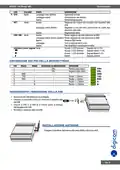
POWER SUPPLY INSTALLATION
VIN+ RED
VIN- YELLOW
•
•
Remove the pluggable connector from the unit, then
loosen the screws for the locking flanges as needed.
Connect the wires of the power supply to the terminals.
GND
TXD
RXD
A
B
POWER ON THE ROUTER
•
Connect one end of the Ethernet cable to the
LAN port on the unit and the other end to a
LAN port on a PC.
•
•
Connect the AC power to a power source.
Router is ready when SYS LED is blinking.
eng.4

| General | Details |
|---|---|
| Name | digicom 8E4631 Boxed Defective 4G Router User Guide |
| Make | digicom |
| Language | English |
| Filetype | PDF (Download) |
| File size | 0.31 MB |
 (1 votes, average: 5.00 out of 5)
 Loading...
If you have any questions regarding digicom 8E4631 Boxed Defective 4G Router User Guide, please ask here and describe the problem in detail.


robustel R2011 Cellular Router Instruction Manual

SKYWORTH R6215 Wi-Fi 6 Mesh Router Installation Guide

ASUS ZenWiFi XT9 AX7800 Tri Band WiFi Router User Guide

TP-Link AC1900 Wi-Fi Router Installation Guide

YINUO-LINK Y6 300Mbps WiFi LTE Router Installation Guide

MikroTik RB750r2 hEX Lite Router User Guide

Newland NL-81 Router User Manual

STRONG 4G LTE Wi-Fi Router Installation Guide

TP-Link Archer AX3000 Gigabit Wi-Fi Router Installation Guide

LINOVISION IOT-R32 Wholesale Rugged and Versatile Cellular Router User Guide