
digicom 8E4631 Boxed Defective 4G Router User Guide




8E4631 4G Router 300
Guida Rapida
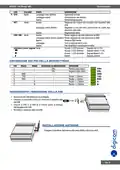
INSTALLAZIONE DEL SUPPORTO DI ALIMENTAZIONE
•
•
Rimuovere la morsettiera e allentare le viti dei morsetti
di bloccaggio.
VIN+ ROSSO
VIN- GIALLO
GND
TXD
RXD
A
Collegare i fili di alimentazione alla morsettiera e
serrare le viti.
B
ACCENSIONE DEL ROUTER
•
•
•
Collegare il Router al PC utilizzando il cavo
di rete Ethernet in dotazione.
Collegare l’alimentatore a una presa di
corrente.
Il Router è pronto quando il LED SYS Inizia
a lampeggiare.
ita.4

| General | Details |
|---|---|
| Name | digicom 8E4631 Boxed Defective 4G Router User Guide |
| Make | digicom |
| Language | English |
| Filetype | PDF (Download) |
| File size | 0.31 MB |
 (1 votes, average: 5.00 out of 5)
 Loading...
If you have any questions regarding digicom 8E4631 Boxed Defective 4G Router User Guide, please ask here and describe the problem in detail.


APRISM MI12 Wi-Fi 6 Dual Radio Router User Guide

Doonink FW40-WIFI Wi-Fi Router User Manual

HUAWEI WS7100 V2 WiFi 6 Plus WiFi Router User Guide

ASUS GT-BE98 Quad Band Gaming Router User Guide

TP-Link Qmada Gigabit VPN Router Installation Guide

LANCOM SYSTEMS LANCOM OAP-830 Wireless Router User Guide

WATER WORLD AC1200M Wireless Dual Frequency Router User Guide

Tenda 4G180 4G LTE Advanced Pocket Mobile Wi-Fi Router User Manual

TP-Link Deco X50-PoE Router User Guide

TP-Link Archer AX53 Dual Band Wi-Fi 6 Router Installation Guide