
Doonink FW40-WIFI Wi-Fi Router User Manual


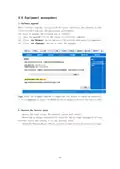


3. Password management (username and password).
The default username/password of the wireless router isadmin, the username
cannot be modified, and the password can be modified.For security reasons, it is
recommended to change this password and keep the password information safe.
The steps are as follows:
(1)Enter the original password in the"Original Password"text box; Enter a new
password in the"New Password"text box and re-enter a new password in the"Confirm
Password"text box to confirm.
(2)Clickthe <OK>button to complete the password change.
13

| General | Details |
|---|---|
| Name | Doonink FW40-WIFI Wi-Fi Router User Manual |
| Make | Doonink |
| Language | English |
| Filetype | PDF (Download) |
| File size | 0.62 MB |
 (1 votes, average: 5.00 out of 5)
 Loading...
If you have any questions regarding Doonink FW40-WIFI Wi-Fi Router User Manual, please ask here and describe the problem in detail.

Doonink FW70 WIFI Router User Manual


Iconnect 7621 WiFi 6 Router User Manual

Taiko Audio TAP011 Extreme Router User Manual

ASUS GT-AX11000 Pro ROG Rapture Pro Tri-band Gaming Router User Guide

ADVANTECH ICR-2041 LTE Router User Manual

inseego 5G FG2000 Router User Guide

ASUS DSL-N66U Dual Band Wi-Fi ADSL VDSL Modem Router User Manual

Cudy WR1200 Dual Band Wi-Fi Router Installation Guide

ASUS GT-AX11000 Pro ROG Rapture Tri-band Gaming Router User Guide

TP-Link TL-MR3420 3G-4G Wireless Router Installation Guide

ASUS RT-AX1800U Dual Band WiFi Router User Guide