
Home > LINOVISION > LINOVISION IoT-R32L Router User Guide
LINOVISION IoT-R32L Router User Guide

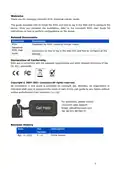


3. Hardware Installation
3.1 SIM Card Installation
A. Unscrew the cover of the SIM card then
it up.
B. Put SIM card into the slot and screw
take it off.
3.2 Antenna Installation
Rotate the antenna into the antenna connector accordingly.The external antenna should be
installed vertically always on a site with a good signal.
3.3 Router Installation
The router can be placed on a desktop or mounted to a wall or a DIN rail.
3.3.1 Wall Mounting (Measured in mm)
Use 4 pcs of M3 × 6 flat head Phillips screws to fix the router on the wall.
Recommended torque for mounting is 1.0 N·m, and the maximum allowed is
1.2 N·m.
6

| General | Details |
|---|---|
| Name | LINOVISION IoT-R32L Router User Guide |
| Make | LINOVISION |
| Language | English |
| Filetype | PDF (Download) |
| File size | 0.37 MB |
 (1 votes, average: 5.00 out of 5)
 Loading...
If you have any questions regarding LINOVISION IoT-R32L Router User Guide, please ask here and describe the problem in detail.

LINOVISION IOT-R32W 4G LTE Cat4 Cellular Router Owner’s Manual

LINOVISION IOT-R32W Versatile Cellular Router User Guide

LINOVISION IOT-R32 Wholesale Rugged and Versatile Cellular Router User Guide

LINOVISION IOT-R41 Mini 4G LTE Router User Manual

LINOVISION IOT-R32W Unlocked 4G LTE Router User Manual

LINOVISION IOT-R32W Rugged and Versatile Cellular Router Instructions

LINOVISION IOT-R32W Cellular Router User Manual

Cradlepoint E102 Series Enterprise Router User Guide

Thumbnail TN1000 Master Router Instruction Manual

LANCOM 1781-4G VPN Router User Guide

TP-Link Archer VR600 Wireless DSL Modem Router Installation Guide

Digital Alert Systems R232 Multi Port RF Router Installation Guide

Helmholz LTE11 Router Owner’s Manual

TP-Link AX6000 8-Stream Wi-Fi 6 Router Installation Guide

GRANDSTREAM GWN7052F Dual Band Wi-Fi Router Installation Guide

ASUS RT-AX88U Pro AX6000 Dual Band Wi-Fi Router User Guide
evolution DIGITAL SG0006D2VA GPON WiFi6 Mesh Router Installation Guide