
NEXXT Nyx1200-AC Plus Dual Band AC Wireless Router User Guide


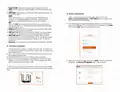





6. The next time you access the web interface through
screen will be displayed. The default username and password is
admin.
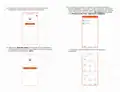
4. You can now set up the SSID and Password. Once you finished
configuring these settings, click on Ok to continue.
5. Once done, the message stating that the setup is complete will be
displayed.
5. Connecting to Wi-Fi using Windows 10
1. To connect to the router wirelessly, click on the wireless icon on
your taskbar.
08/16/2021
2. Proceed to select the Wireless network followed by Connect. By
default, the wireless SSID is Nexxt_XXXXXX (whereby “x“ represents
the last digits of the MAC address).

| General | Details |
|---|---|
| Name | NEXXT Nyx1200-AC Plus Dual Band AC Wireless Router User Guide |
| Make | NEXXT |
| Language | English |
| Filetype | PDF (Download) |
| File size | 1.18 MB |
 (1 votes, average: 5.00 out of 5)
 Loading...
If you have any questions regarding NEXXT Nyx1200-AC Plus Dual Band AC Wireless Router User Guide, please ask here and describe the problem in detail.

NEXXT AX18DO Dual Band Mesh Router Instruction Manual

NEXXT NCM-C1200 Bolt AC 1200 Router User Guide

NEXXT NCM-X3000 Bolt AX3000 Router User Guide


FRITZ!Box 6860 5G Outdoor Router User Guide

Falcon FN-4G-300P 4G LTE Portable 300MBPS Router User Manual

TELTONIKA RUTX09 Cellular IoT Router User Guide

OzSpy HAIX1RT2MP Hidden Camera Router User Manual

MAGNADYNE RV2458 Router User Guide

Woodpeckers REV033122 Multi Router Instructions

TP-Link TL-WR802N 300Mbps Wireless N Nano Router User Manual

FiberHome SR1021Y Wireless Router User Manual

Tenda AXE5700 Wi-Fi 6E Router User Manual

MERCUSYS MR47BE BE9300 Tri Band WiFi 7 Router User Guide